Have you ever read the first sentence of a platform rejection and started acting on it?
I did, and it made me convert an entire account type. The rejection didn't move. This post is about what I read next.
This closes a trilogy that started with one checkbox demanding a company and continued with the name changing while the verdict did not.
The situation
Three health-related apps were rejected under the same reason. The first line said: "Some types of apps may only be distributed by organisations."
Read literally, there's one action. I converted the account from personal to organisation — paperwork, verification, completion. The developer account policy status went clean.
The rejection stayed.
What would you do here?
You have roughly three options at this point: contact support, wait for propagation, or reread the notice.
I did the third. I read it past the first line.
The answer was lower on the same screen
The full text said the app "must be submitted from an organisation account because of the category you selected or the features you declared it provides."
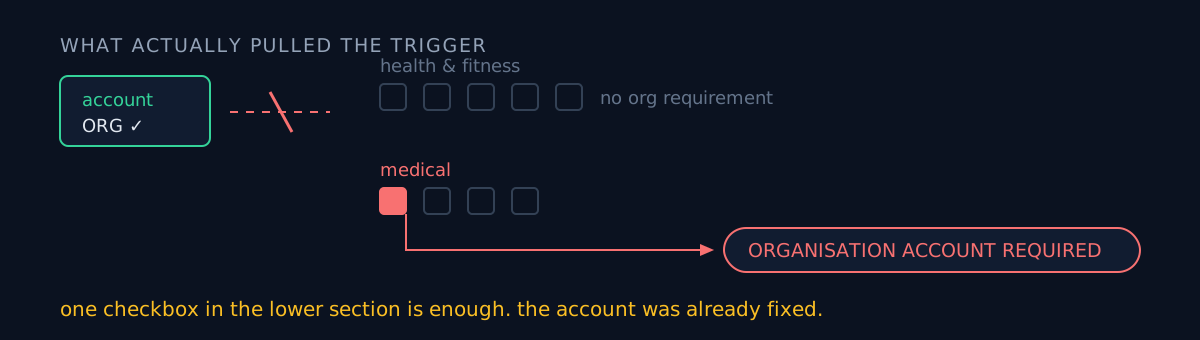
The account was not the trigger. The declaration was. And the how-to-fix section had already said it: "verify that your app content declaration accurately reflects the app's actual functionality."
The list view's one-line summary only ever shows you as far as "account type." You have to go policy status → issue detail → how to fix before anything tells you where to look.
Opening the declaration screen, it splits into two sections:
| Section | Items | Requires org |
|---|---|---|
| Health & fitness | activity, nutrition, cycle, sleep, stress | No |
| Medical | condition management, clinical decisions, medical devices, mental health | Yes — one box is enough |
All three apps had exactly one box ticked in the lower section.
One of them was arguable
Two were legitimate — they genuinely deal with medical conditions.
One was arguable. It's a counter: pick something you want to quit and it counts the days you didn't. Its own store description says "this is not medical advice" while its declaration ticked mental health. The description and the declaration disagreed with each other.
I could have unticked it. I didn't, for two reasons.
First, the account is already an organisation, so that declaration no longer blocks anything. Weakening a compliance declaration to dodge a requirement you already satisfy is pure downside.
Second, another app on the same account was once rejected in exactly the opposite direction — it logs food and mood, its health declaration was empty, and it was rejected for an "inaccurate health app declaration." Under-declaring is also a rejection reason.
I resubmitted with the declaration untouched and the violation cleared. The rejection had been issued before the organisation conversion propagated; once propagation finished, the same declaration passed.
The console-reading trap
The same day I misread one app's declaration state. The console draws every checkbox unticked immediately after load and fills them in a moment later. I looked at that transitional frame and wrote down "both ticked." It was one.
So I hardened the procedure:
- Wait for the load to finish. Checkboxes render late.
- Scroll away and back, and read the same value twice.
- Opening the form and leaving via "discard changes" saves nothing. Looking is safe.
I misread a date column the same day too, and wrote that one up separately. Both were the same mistake: asserting what a value on screen means without checking what it represents.
One more. The list view's "not submitted for review" badge is stale. One app showed exactly that in the list while its publishing overview had all 14 locales in review. The per-app publishing overview is the source of truth.
Three-line self-check
- Did you read the rejection through the "how to fix" section? The first line is the symptom; the cause is usually below it.
- Can you tell whether the requirement comes from account settings or from the app declaration? Changing an account is large and hard to undo. Reading a declaration takes thirty seconds.
- Is your declaration over- or under-stated? Both get rejected. The answer is "matches the actual functionality" — not "tick everything to be safe" and not "tick nothing to be safe."
The honest part
Whether the arguable app's declaration is genuinely accurate, I still don't know. My decision was "we already meet the requirement, so don't touch it" — not "this declaration is correct." At some point that app's declaration needs a review against its actual functionality.
I also never observed the propagation delay. Support quoted up to 72 hours, and that's all I have. So I cannot fully separate "it passed because I resubmitted" from "it passed because time passed." The outcome is three apps with zero policy issues; the causation I only partly know.
The same declaration screen can also block a launch outright — the same week, two permission lines stretched the form to three steps and killed the save button.
If you're holding a rejection notice, scroll to the bottom of that page before you act. The thing the first line tells you to do is often the most expensive thing on the list.