Start with the question. How does your monitoring bot decide what to monitor? A list you typed into the code, a set of candidates derived from a naming rule, or an actual query to the source?
I have already been burned by this once. In August I wrote about a review monitor watching 21 of my 44 apps. Twenty-one hand-typed lines had stalled at half the account. I fixed that one by querying the source.
Yesterday I stepped on the same spot in a different monitor. This time it wasn't the hand-written list — that part was already half fixed. The naming rule was the broken half.
I thought there were 12. There were 25.
I wired up the Android release surfaces on September 4th. Twelve apps were public on the store then, and I matched the web surfaces to that number. Yesterday I counted again out of idle curiosity: 25. Every app that had passed review since then had reached the web in exactly zero places.
To pin the number down I probed all 46 app slugs. The test was not the console track state but whether the public listing returns 200. A track can say completed while the listing is still invisible, and linking to that gives you a dead link.
But probing them all needed package names, and my 46 apps use two:
com.<brand>.<slug>     # the early apps
com.<slug>.android     # the later ones
So I probed both patterns per slug. That detail matters in a minute.
The monitor was the bigger problem
Fixing web numbers is just labour. The real question was why I was counting by hand at all. There is a job that checks Play status every morning. It was running. So why was it stuck at 12?
I opened it.
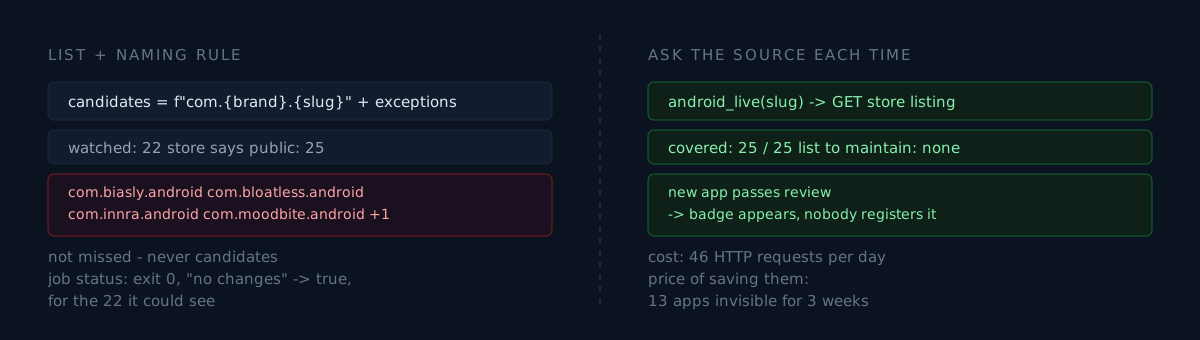
CANDIDATES = [f"com.{BRAND}.{s}" for s in SLUGS] + [...a few hand-typed exceptions...]Candidates are generated from a naming rule, with a short hand-written list for the ones the rule leaks. I remembered adding one line to that list on September 4th when an app wasn't showing up. One line, verified it worked, closed the file.
What I fixed that day was that one app. I did not fix the rule.
Diffing yesterday's full probe against the candidate set, five apps were not even candidates:
com.biasly.android      store 200
com.bloatless.android   store 200
com.innra.android       store 200
com.moodbite.android    store 200
com.<brand>.stelo       store 200   (matches the rule, missing from the slug list)
The first four are on the com.<slug>.android branch, which the com.<brand>.<slug> rule can never produce. The last one matches the rule but was missing from the slug list feeding it. Two different holes, one identical symptom: silence.
Silence is the whole point
That job reported healthy every day. Exit 0, and "no changes" was true every time. It watched 22 things and told me those 22 hadn't changed. It never lied.
When your watch list comes from a list or a pattern, a missing target can never surface as an error. There is no failure mode in not looking at something that isn't there. That is the structural blind spot of monitoring: the monitor does not monitor its own scope.
So there were two options. Which one would you take?
- Add the five to the hand-written list. Today's hole closes today. Five minutes.
- Fix how candidates are produced, so the next app that breaks the convention doesn't vanish either.
Honestly? I did about half of option 1. I split the second branch into _ALT_PACKAGES and took the union of both patterns. Re-running took the watch set from 22 to 27, with 26 public. As a bonus it caught one app flipping from unlisted to public, which nothing had noticed until then.
That is one more rule, not one less guess. If a third naming branch ever appears, it disappears just as quietly.
Meanwhile, one surface I never touched was already correct
Here is the interesting part. While fixing five web surfaces I checked a sixth and walked away, because nobody had touched it and it already had all 25.
It is the store badge on the end of the short-form videos:
def android_live(slug) -> bool:
    # No list, no guessed name. It hits the real store on every render.
There is no list. Every render asks the store and decides whether to draw the badge. So when an app passes review, the badge appears on the next render without anyone registering it anywhere. All five of yesterday's problem apps came back True, and the one app with no Android build came back False. Correct, both ways.
Three ways of answering the same question — "is this app on the store?":
| Method | When a new app appears | When one is missed |
|---|---|---|
| Hand-written list | A human must add it | Silence |
| Generated from a naming rule | Only if it follows the convention | Silence |
| Query the source each time | It shows up by itself | Structurally impossible |
The third looks expensive. Its actual cost is 46 HTTP requests once a day. I saved 46 requests and paid for it with three weeks of 13 apps being invisible.
Three checks for your own setup
- Count what your monitor watches, and count what actually exists at the source. Right now, both numbers. Do they match?
- If that list is generated from a naming rule, is anything violating the rule today? If you've ever hand-typed an exception, that's proof the rule already leaked once.
- When a target goes missing, what signal does the bot emit? If the answer is none, its green light doesn't mean "all clear" — it means "all clear within what I look at".
The takeaway
Fixing five web surfaces was a day of labour and not much of a story. What's left is why nothing told me for three weeks.
Because my monitor asked its own naming convention instead of asking the store. And because on September 4th I watched the rule leak and then mopped the floor instead of fixing the leak. Adding one app to a hand-written list wasn't a fix, it was symptom handling — the same mistake I made in the previous post, where I took the status code from an incident and left the cause behind.
The honest part: the monitor still guesses. It is a union of two patterns, not a query to the source. The real fix is pulling the app list from the console API, and that API has no endpoint that lists your apps, so today there is no way to do it. Which makes the accurate summary not "fixed" but "covered one more branch, still guessing".
Do one thing right now. Open your monitoring script and find the line where the target list comes from. If it's a literal or an f-string, that bot's green light has a hidden parenthesis in it.