Have you ever seen a console screen once and assumed it looks the same for every app?
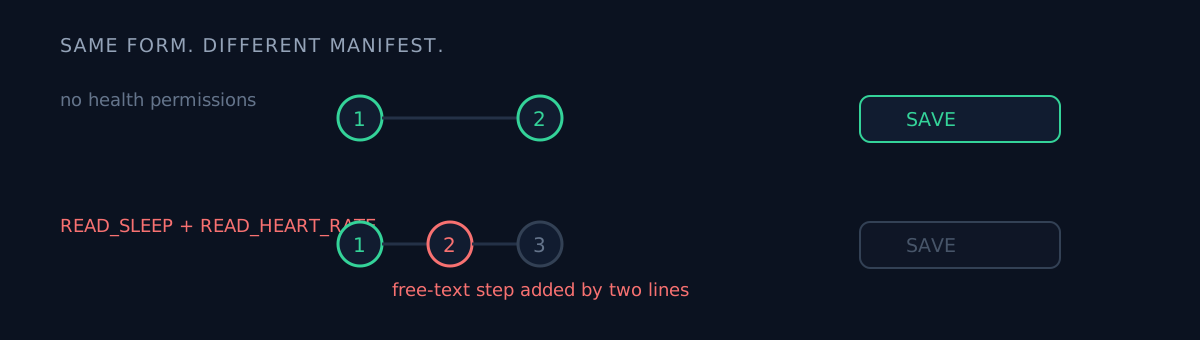
That morning I'd seen a two-step declaration form. That afternoon I walked another app straight at it. That app's form had three steps, and the save button was dead.
The situation
I was pushing an app that had never shipped to production. The bundle was uploaded, the listing was ready in 14 languages. All that remained was the rollout button.
The save button was dead in the preview step. One error: "you must complete the health declaration."
I had already opened that declaration screen earlier that day while tracking down why three other apps were rejected. It was a two-step form. So I went in expecting a quick fill.
This one had three steps
The difference was in the manifest.
<uses-permission android:name="android.permission.health.READ_SLEEP" />
<uses-permission android:name="android.permission.health.READ_HEART_RATE" />
If those two lines are declared, a "health data permissions" step appears in the middle of the form. Without them the form ends at step two.
And that step isn't checkboxes. It's free text. For each permission you must state why you need it and how you use the data, with up to 10,000 characters per box. If it's empty, the release will not save at all.
Generalising "this form has two steps" from a single sighting was the mistake. I didn't know the form's shape depends on the manifest.
Two more things I learned
One: an app that has never shipped cannot be released via the API.
# Rejected — "draft apps may only create draft releases"
releases = [{"status": "completed", ...}]

# Accepted — upload it, roll it out by hand in the console
releases = [{"status": "draft", ...}]
The first launch specifically needs a human in the console. Not knowing this burns time on "why is the API refusing me."
Two: the console showed a stale release name. I'd pushed a new bundle via the API, the screen still displayed the previous release name, and it looked like nothing had uploaded. The release name was frozen as a constant in my script. The track query API is the source of truth for actual state.
That's the same family as the stale review badge in the app list. The console view is not the source of truth.
What would you write in the free-text box?
This is where the real judgment was. Nobody tells you what a passing description looks like.
I wrote seven things per permission:
- Why this permission is needed
- How the data is used
- That access is read-only
- That the data is never sold
- That it is never used for training
- That the user can delete it
- That the app still works if the permission is denied
Choosing which categories to tick was also judgment. I used the classification a reviewer had pointed at when another app on the same account was rejected for under-declaring. It was the only ground-truth signal a reviewer had actually handed me.
One warning you can ignore
You'll be left with "native code present but no debug symbols uploaded." That is not a blocker. You can lose a day trying to clear every warning on a first launch; this one doesn't need clearing.
Three-line self-check
- Is the console form you saw the same for every app? Steps appear based on manifest, category and declarations. Generalising from one sighting stalls you right before a deadline.
- Did you verify the first launch is API-capable? Draft apps need one human action. Put that in an automation schedule and the automation fails that day.
- When the console and the query API disagree, which do you believe? Display values like names and statuses go stale.
The honest part
I still don't know what the free-text box needs to say to pass review. This app's first review will answer that. Whether the seven points are enough is a result I haven't seen. This post is not "write it this way and you pass" — it's a record of being blocked by a step I didn't know existed.
The category choice isn't confidence either. I carried over the classification a reviewer named in a different app's rejection, and whether it fits this app is not certain. Over-declaring triggers the organisation requirement; under-declaring gets rejected as an "inaccurate declaration." I picked a value with a wall on both sides, and the review will grade that judgment.
If you're preparing a first launch, open the app content declaration before you enter the rollout screen. Better than discovering a grey save button on your ship date.