I submitted three health-related apps to the store. All three were rejected. The reason had nothing to do with the content.
"Some types of apps can only be distributed by organizations. You have selected an app category or declared your app offers certain features that require you to submit your app using an organization account."
The apps' contents weren't the problem. Who submits them was.
Do you have an app where one line you casually picked on a store form could get you told "you can't distribute this on a personal account"? I had never once thought about whether I did.
Other health apps on the same account went through
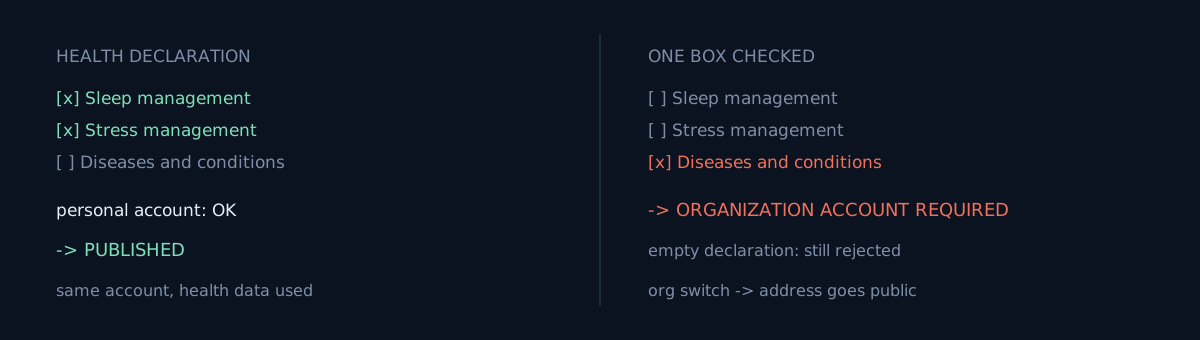
That's where this starts. From the same developer account, around the same time, health apps split like this:
| App | Health declaration | Outcome |
|---|---|---|
| A fitness app using heart-rate data | Health & fitness family | Published |
| A sleep and stress app | Sleep management + Stress management | Published |
| App A | Diseases and conditions management | Rejected |
| App B | Diseases and conditions management | Rejected |
| App C | Mental and behavioral health | Rejected |
The dividing line wasn't the category or a permission. It was one thing: did step 1 of the Health apps declaration select the Medical section.
The heart-rate app actually uses health-data permissions and I wrote per-permission justifications — and it still passed. So "touches health data" isn't the trigger. "Self-declared that it manages a disease" is the trigger.
Here comes the temptation
The declaration is a form I fill in. So don't check the box, right? — that thought arrives immediately.
Leaving the declaration empty does not get you through. I proved it.
The rejection had rolled the health declaration back to empty. I confirmed that and resubmitted exactly as-is, with no declaration. Same reason, rejected again. Submission activity now had two entries side by side on the same day — original rejection, and the empty-declaration resubmission rejection.
The reason text says "app category or declared features." The declaration was empty, so what's left is the category. But there's an app that passed a few days earlier under the same category. The category alone doesn't explain it either. Once the verdict attached to the account, it stopped mattering what I wrote.
What would you do here?
Reopen the form, downgrade the declaration from "disease management" to "general wellness," and resubmit? The word "or" is in there — go looking for interpretive wiggle room one more time?
I took a strategy that was already disproven on the second attempt and ran it once more, clinging to that "or." All I got was one more rejection on the policy record.
There is no way out by adjusting the declaration. And even if there were, it's not a road you should take. The accuracy of the declaration is itself a policy requirement, so writing it down softer to dodge a rejection is the violation.
One road was left — an organization account.
The road to an organization account, and its cost
Three requirements:
- An organization D-U-N-S number (up to 30 days to issue — this is the real gate)
- A phone and email for the public developer profile
- A phone and email for Google to contact you (private)
A few things I'd have felt better knowing in advance:
- A Korean sole proprietor qualifies for an organization account. The verification documents are per-country, and for Korea it's a single business-registration certificate — no corporate registry extract required. You don't have to be an incorporated company.
- The official doc title is the scope: "App testing requirements for new personal developer accounts." Organization accounts are outside the 12-tester / 14-day testing requirement.
- A rejection doesn't delete your app. It ends with "Changes to your app weren't published," the draft stays, and the unsubmitted changes go back to Publishing overview. You fix and resend, and after the switch it's one submission.
And there is one cost you cannot undo.
⚠️ An organization account publishes your address. If you registered your business address as your home, that address shows up verbatim in the store's developer info — down to the unit. There's no way to hide it, and once it's public it can't be pulled back.
This post is not a recommendation to switch. I had apps to ship and no other path, so I switched — but putting your home address permanently on the store is not a light decision. If you don't have a separate business address, I'd re-examine whether this app has to ship right now at all.
Three self-checks
- Have you actually checked whether your app's store declarations (health, finance, government, kids…) contain an item that demands an account type? Most of them don't warn you before review.
- Does "a similar app on the same account passed" count as evidence that this one will? The axis that splits them can be one line in a declaration.
- If you need to switch to an organization account, can you accept the address disclosure? It's the one part no code can undo.
The honest part
I stacked up four rejections before scrapping the "downgrade the declaration and resubmit" strategy. It was already wrong on the second attempt, and I kept finding interpretive room because the text has an "or." I didn't appeal — because the reason is true. It really is a disease-management app and the account really was personal. An appeal is a tool for when the verdict is wrong, not for when it's inconvenient.
The conclusion that an organization switch was the only fix was itself correct. But there was one missing condition, and that's the subject of the store showed the company name while review was still looking at the old account. This post is also a follow-up to The Greyed-Out Button Wanted a Website — that one goes as far as "the gate was D-U-N-S"; this one is "why I had to pass that gate."
Do one thing now: pick one of your apps and re-read its store declaration form from top to bottom. Check whether a box you ticked without thinking is demanding an account type.