How does your automation identify its target? By the name on screen, or by a real key?
I used a substring search for convenience. So a fix meant for one app was applied wholesale to a different one.
The situation
I ran a pipeline that applies the same kind of store copy fix across several apps. You pass an app name, it finds the matching patch file, it applies it.
One app failed submission three times in a row.
The lookup was searching by substring
There's a coincidence buried in why this became a problem.
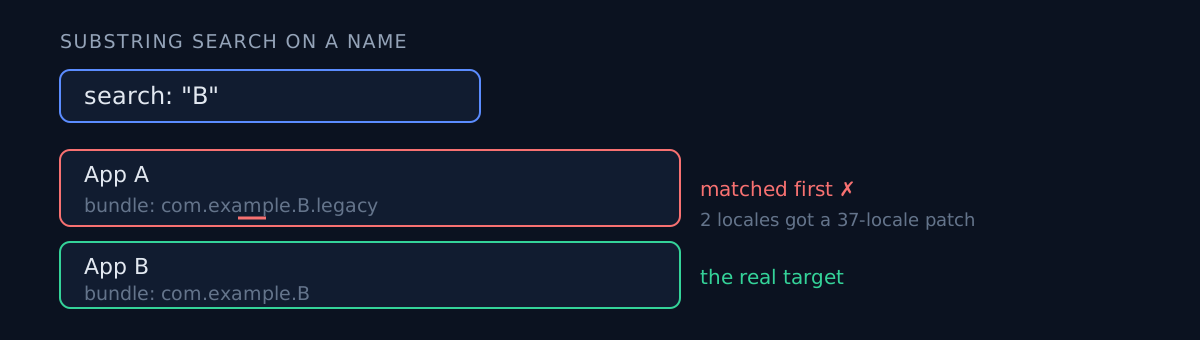
One of two apps had traces of an old name left in its bundle identifier. Its real name is A, and its bundle still contains the earlier name B. And another app's real name is exactly B.
Search for app B, and the code looks for "apps whose name contains B." App A's bundle contains B, so A matched first.
A small app with two locales received a thirty-seven-locale patch in its entirety.
Why it never reached production
It died on the spot, fortunately. The next stage was a check that halts if any locale isn't present on this version, and thirty-five of them weren't.
That's the point of this post. If the locale counts had happened to line up, another app's copy would have gone live silently.
What stopped it was not a target-identification check — it was a check with a completely different purpose. No safety mechanism did its job; a neighbouring check happened to catch it.
The other failure in the same batch
Another app in the batch died for the opposite reason: its submission script didn't exist at all.
The name in the automation list and the actual script filename differed by one letter. That one failed loudly instead of going quietly wrong, which makes it the better failure.
The fix
# Wrong — substring matching never misses an accidental overlap
if needle in bundle_name or needle in display_name:
    return this_app

# Right — exact bundle ID, and refuse to guess on duplicates
candidates = [a for a in all_apps if a.bundle == exact_bundle]
if len(candidates) != 1:
    raise Error(f"matches multiple apps: {[a.name for a in candidates]}")
Dying on duplicates rather than taking the first is the essential part. The real problem with substring search isn't the overlap — it's that on an overlap it silently picked one.
The same batch produced a deploy script about to overwrite live listings with stale repo values, and the root is the same: identify a target by a display value and it goes quietly wrong the day that value changes or collides.
A pre-flight sweep
Before running the batch, I added a check that sweeps every target for three things:
- Can the patch file be found?
- Does the submission script exist?
- Can the app ID be resolved?
This time it surfaced 11 wiring defects before anything ran. Eleven out of 46 targets is close to a quarter. Meeting those one at a time mid-run would have stalled the batch repeatedly.
The core lesson
The manifest key, the bundle ID, the display name and the file name can all be four different things.
Infer one from another and this happens. And the more apps you have, the higher the collision probability — at 46, you already collide.
Three-line self-check
- Does your automation find its target with a substring? It's one
in. Go grep for it. - What happens when there's more than one candidate? If it takes the first, that automation will eventually be quietly wrong. Dying is correct.
- Do you sweep every target before running a batch? A defect met mid-run is a defect met with half the batch already applied.
The honest part
My own automation created this defect. I added substring matching for convenience and didn't anticipate collisions across a wide name list. Not somebody else's code — mine.
This time it was safe by luck. The locale counts didn't line up, so it stopped; a different check ordering wouldn't have caught it. "Safe by luck" is not "safe by design." That's why the conclusion here is only "I added one more guard."
And how did I find this combination among all 46 targets? By running a full sweep after the incident. The pre-flight check is new as of this incident. It's a product of the accident, not of the design.
If you have automation that fans one fix out over many targets, grep the target-identification code for in once. If it's there, the collision day is coming.