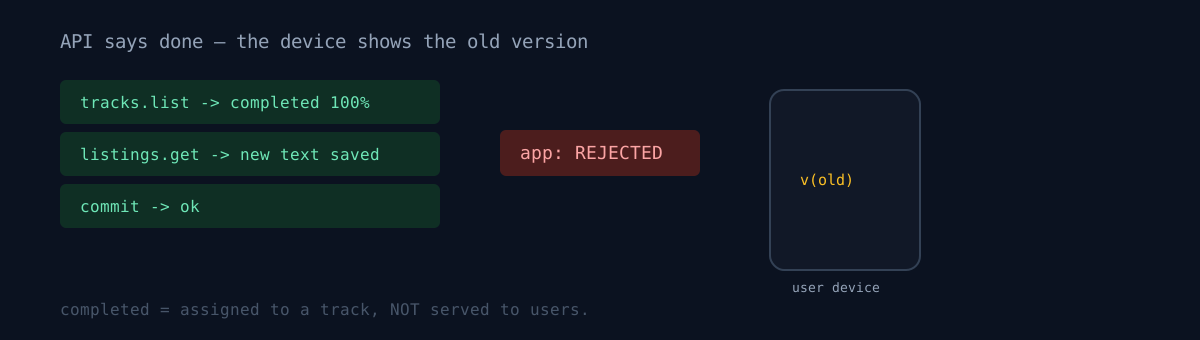
I automate Android app releases via API — upload the build, assign it to a track, update store listings in 17 locales, commit. When the API returns success, I log it as deployed.
One day a rejection email arrived: the data safety form was missing an email address. Yet querying the track state showed status=completed, rollout 100%.
completed is not evidence of serving
Even when the track query returns completed, if the app status is "rejected," that release isn't served. Users keep getting the previous version. The API only says "it was assigned to a track as instructed," not "people are receiving it."
Listing text is the same. In a rejected state, a --listing-only commit succeeds and the query API returns the new text, but that's just a value stored on the console side — it isn't reflected on the public page. So you have to scrape the store page directly to confirm public reflection.
curl -A "Mozilla/5.0" "https://play.google.com/store/apps/details?id=<pkg>&hl=<locale>"
# ⚠️ false positive if the old text partially contains the new → match a token unique to the new text
And I got caught here again. A false positive if the old text partially contains the new. In the Korean listing, the old text carried some of the new text's phrases verbatim, so a simple substring check wrongly flagged it as "reflected." You have to match on a token that only exists in the new text.
| signal | what it means | what it doesn't |
|---|---|---|
tracks().list → completed 100% |
assigned to a track | served to users |
listings().get → new text |
saved on console | reflected on public page |
| commit success | edit committed | passed review |
The data safety form can't be touched via API
The data safety form that caused the rejection can't be read or written. There's no such resource in androidpublisher v3. It's console-UI-only, and all 6 app-content-related forms are the same.
So this rejection can't be solved by automation — a human has to open a browser. The best automation can do is produce a list of "what the code actually sends off-device" to ground the form answers. I did exactly that — confirmed email and user-ID transmission from the auth code, and location permission from the manifest, to organize the answer items.
The rejection email names the missing data type precisely. If the callout matches the code, it's not something to appeal. Fixing the form is the answer. Here, OAuth was actually transmitting email, so the callout was correct.
Resubmission procedure:
1. Answer every data type down to its sub-questions (collect/share, purpose, required/optional)
2. Save through the final step
3. Publishing overview → "Send for review"
→ On approval, the pending release and listing changes publish together. No re-push.
Measured: resubmitting this way passed within an hour the same day, and the pending release and 17-locale listings auto-published together. Much faster than the advertised "up to 7 days" — a data-safety-only correction seems to carry a light review burden.
Apps in this story: Plotta (Android) · iOS.
Honestly
- For months I logged "track completed = deployed." I haven't retroactively verified whether any release in that window actually failed to publish. My records are now of reduced trust.
- The resubmission has a trap too. Just checking data-type boxes and saving doesn't take. You have to answer all sub-questions, save through the final step, then click "Send for review" in the publishing overview. There was one attempt where I saved midway and thought I was done.
- The privacy policy and the form must agree, but the policy page is behind a CDN challenge and can't be fetched via CLI — browser-only. So this verification is also outside automation.
- I judged passing by the store page's meta tags and version block. That's an observation, not an API-guaranteed state. I couldn't find a better method.
The same family of trap exists on iOS — even when the submission API returns success, the actual review state and store reflection are separate. Pair it with the subject of version not editable wasn't the version and you get a matched pair on "what a deploy API's success does and doesn't guarantee."
Two more entries in the same "a status display doesn't speak for the reality" family follow this one — where the console list and Publishing overview said different things and I nearly overwrote a release in review, and the 72 hours where the store display had changed but enforcement was still looking at the old account.
That completed your deploy automation logs at the end — does it mean the version actually appeared on user devices, or just that it was assigned to a track? One scrape of the store page tells them apart.