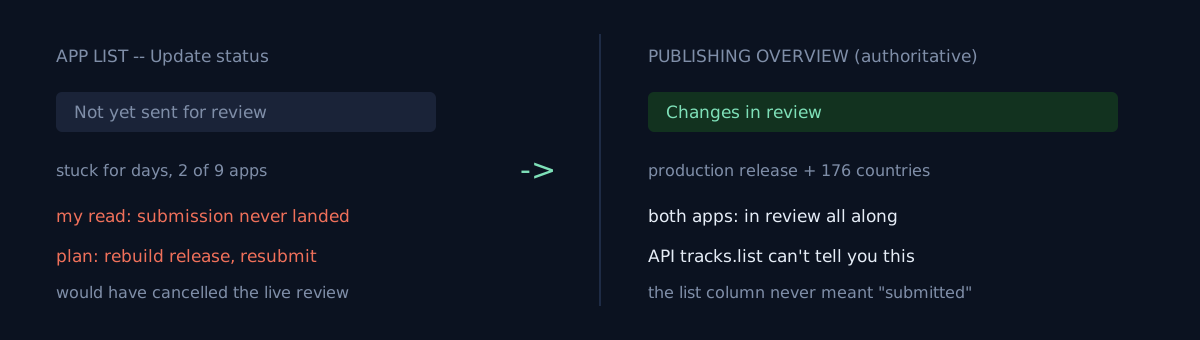
Two apps had been stuck at Not yet sent for review (info icon, not a clock) in the store console's app list for days.
The other seven apps I uploaded the same day the same way had all flipped to In review — just not these two. So I concluded "the submission didn't actually go through," and wrote down a plan to rebuild the release and submit it directly from the console.
When you classify some state as "blocked," do you check that the screen you're basing that on is the one that answers the question?
Two screens were saying different things, and the one I believed was the wrong one
I opened Publishing overview. Both apps read:
Changes in review — Your changes are now in review.
One had its production release and 176-country targeting wholly in review; so did the other. That column in the list was never the place that says whether you've submitted.
The reversal is two layers deep.
- The display wasn't wrong — I assigned the column a meaning it doesn't carry. Update status is where the app's update state lives; "is it in the review queue" is answered by Publishing overview. I looked at one convenient screen and inferred the other screen's answer.
- Executing the plan would have overwritten a release that was in review. Rebuilding a release cancels the in-progress review and starts over from scratch. The list display would have stayed the same — so the same misread would keep calling the same action in a loop.
What would you do here?
Seven are fine and two have shown a different status for days. Do you make a conditional plan — "if it's still like this tomorrow, rebuild the release"? Or do you open one more screen for those two before deciding?
I wrote the conditional plan. The condition was wrong — because the condition itself was a bad observation.
Code, commands, numbers
- The 7 apps were submitted for production full rollout the same day with the same script, all
status=completed. Only 2 of them showed a different list status. - Authoritative check: app → Publishing overview. Two wordings split it:
Changes in review — Your changes are now in review.→ in review- if not submitted, it shows a state with a
Submit N changes for reviewbutton
- The API can't make this distinction.
edits.tracks.listtells you the release assigned to a track and its status (draft/completed), not whether it's in the review queue. - I asserted "cache lag" twice about this state and was wrong twice. On the third pass I wrote it down as cause-unknown and left the conditional plan.
- Why only these two apps keep that display, I still don't know. This post isn't an explanation of the cause — it's about where to put your criterion.
Three self-checks
- Before classifying a state as "blocked / failed," have you opened the screen that directly answers that question? Is the screen you're looking at the right place for it?
- In your conditional plan ("if X then redo Y"), is condition X a value you can observe with certainty, or something inferred from another value?
- Does that "redo Y" actually include an irreversible action (canceling review, restarting a rollout)? If so, the cost of a wrong condition is high.
The honest part
For days I had both apps filed as "blocked." They were fine from the start. No loss, but for as long as the bad status report stood, other judgments stacked on top of it. Reaching for the easy "cache lag" explanation twice is an extension of the same mistake — I chose a guess over a check.
One lesson. When several screens say different things about the same thing, first find which screen is authoritative for that question. The convenient screen rarely is.
The earlier case in this family is completed 100% is not published — that one is about API status not meaning published; this one is about two console UI screens saying different things.
Do one thing now: pick a state you recently wrote down as "blocked," and reopen the screen that answers that question directly.