I was adding a share feature to a GPS territory-walking app. You walk, you claim ground, and the app turns your claimed area into a short vertical video you can post. The video needs one thing in the background: a map of the neighbourhood you actually walked.
I decided to fetch that map from Apple's Maps Web Snapshots — one URL with coordinates and a size, one PNG back. Grab it server-side, paint it onto the canvas, done.
And I already had a token endpoint. The same project renders a MapKit JS map on the web, so /api/mapkit-token had been running happily for months.
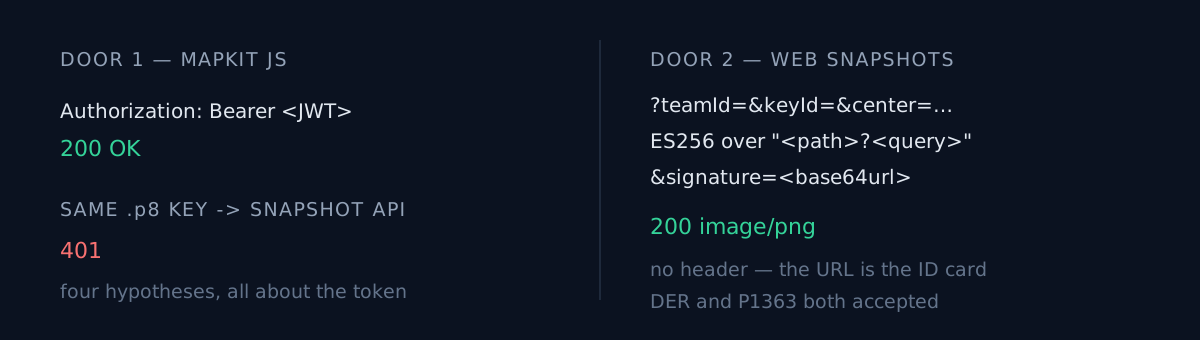
So I put that token in an Authorization: Bearer header and sent it.
401What I suspected
What would you suspect here?
Everything I looked at was on the token side. Expired? Lifetime too short? An origin restriction? Does this key need a separate snapshot capability? I regenerated with different issuing parameters, sent it again, and got another 401.
Four hypotheses, one premise: the ID card is wrong. That is how a 401 reads. It says "I don't know who you are," and that pushes you straight into fixing your ID.
The web map was working the whole time, on a token minted from the very same key. That was the clue. I read it as "the key is fine, so the issuing options must be wrong." What it actually meant was that there were two doors.
What was really going on
Maps Web Snapshots does not accept a Bearer token at all. It is a different authentication scheme.
- You put
teamIdandkeyIdin the query string. - You sign the whole
"<path>?<query>"string with the same.p8private key, ES256. - You base64url the signature and append it to the URL as
&signature=.
There is no header. The request URL is the ID card.
export function signedSnapshotUrl(params, { teamId, keyId, privateKeyPem }) {
  const q = new URLSearchParams(params);
  q.set("teamId", teamId);
  q.set("keyId", keyId);

  // The signature covers the request line as Apple will receive it, so the
  // query string must be serialised once and reused verbatim.
  const pathAndQuery = `${SNAPSHOT_PATH}?${q.toString()}`;
  const signer = crypto.createSign("SHA256");
  signer.update(pathAndQuery);
  signer.end();
  const signature = base64url(signer.sign(crypto.createPrivateKey(privateKeyPem)));

  return `${SNAPSHOT_HOST}${pathAndQuery}&signature=${signature}`;
}
200 image/png. Same key, same team, same company. Just a different door.
Where I nearly lost another hour
ES256 signatures come in two encodings: DER and IEEE P1363. The JWT spec mandates P1363, while Node's createSign(...).sign(key) emits DER by default. Anyone who has hand-rolled a JWT has written the conversion once.
So I built both and threw both at it. Both returned 200.
The snapshot API accepts either encoding. Node's default works as-is, and the conversion code was never needed. Throwing one request before writing the guard against a problem I expected saved twenty lines. Defensive code is inventory too — and unused inventory confuses whoever reads it next.
Two things I only learned after the image came back
The default map type fights the video. t=standard comes back in a saturated teal. Layered over a dark composition it reads as a sticker pasted on top. t=mutedStandard steps back and behaves like a background.
The Apple Maps attribution is baked into the bottom-left corner. You cannot remove it, and you must not cover it. That means the video layout has to leave that corner empty from the start. Put a caption or a logo there and discover the rule later, and you are redoing the layout.
Three things to check in your own project
- Is there an API you assumed would work because you "already have that vendor's token"? Two APIs from one vendor using two different auth schemes is common. Thirty seconds in the authentication section of the docs settles it.
- When you get a 401, have you ever suspected anything other than the credential? A 401 can mean "your ID is wrong" — or "that is not how you present ID here."
- Did you run it once before writing the code that guards the trap you predicted? I nearly shipped an encoding converter I did not need. Whether a constraint you read about applies to this endpoint is something only a request can tell you.
The honest part
This was my mistake, and it was not a coding mistake. It was a reading-order mistake.
I looked at my own codebase before I looked at the documentation. Seeing /api/mapkit-token sitting there, I decided authentication was a solved problem in this project — and that decision set the direction of every attempt that followed. Reading the auth section first would have made this work on the first try.
I hit the same shape of failure a few days earlier: 200 Tests Passed and the Button Did Nothing. There too, "this part is already verified" hid the part that was not. The Console Was Silent and the Screen Was Blank is the same story from another angle: the evidence was somewhere I was not looking.
Is there a stretch of your project you are skipping right now because "that part already works"? Are you sure it is the same door?