I was building a feature that turns a territory you walked into an eight-second video you can share. The choreography lives on the web as a single implementation; the apps load that page in an offscreen WebView and collect the encoded video.
I thought I had verified it thoroughly.
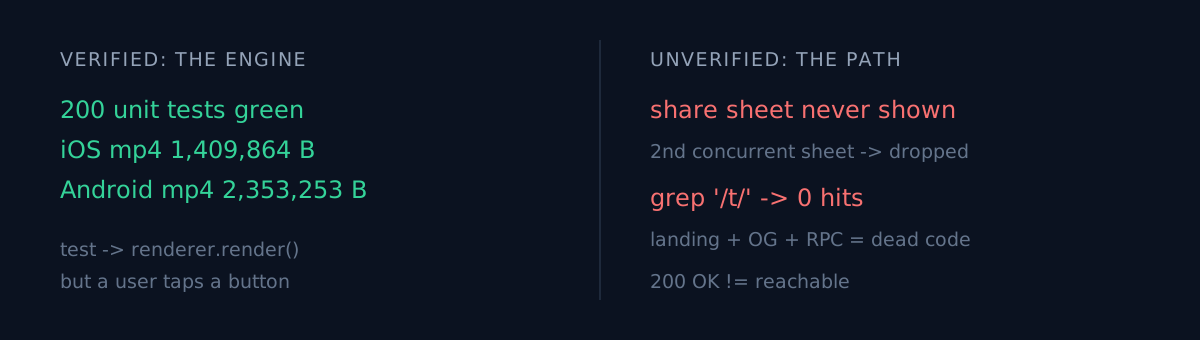
web unit tests       200 passing
iOS unit tests       326 passing
iOS device render    1,409,864-byte mp4, progress 1.0, ftyp confirmed
Android render       2,353,253-byte mp4, progress 1.0, ftyp confirmed
Both platforms produced actual mp4 files. I counted the bytes and checked the ftyp box in the header. The web build went to production.
Then the code review I ran just before shipping said this:
On iOS the mp4 is produced and the share sheet never appears.
What had I actually verified?
My end-to-end test looked like this:
let renderer = TerritoryReelRenderer()
let url = try await renderer.render(payload: payload) { ... }
XCTAssertGreaterThan(data.count, 200_000)
It called the renderer directly. The engine was proven perfectly. But users don't call renderers. Users tap buttons.
Tapping the button goes like this: the claim result sheet is already up → you tap Share → seconds later the render finishes → the app presents the share sheet. Except SwiftUI silently drops a second concurrent sheet on the same view. The claim sheet is still up, so the share sheet never appears. No error, no log, no crash.
The worse part: line 84 of that same file held a comment I had written months earlier.
// A sheet may already be up. SwiftUI silently drops a
// second concurrent sheet, so dismiss any open one first…
I knew. I had written it down. I did it again anyway.
Second finding: a page nobody could reach
The same review caught something else.
I had built the landing page a shared link would arrive at: a /t/<territoryId> route, an OG card with map imagery, a database function to fetch that one territory, a migration for it. Real work.
And the link attached to the share message was this:
https://plotta.ootssu.comThe root domain. Searching the whole codebase for anything that constructs /t/ returned zero hits. The landing page, the OG card, the RPC, the migration — all of it was dead code nobody could reach. In a feature whose whole point is distribution, the link half simply did not exist.
Building something and connecting to it are different things.
Where would you look first?
Worth pausing here. Two hundred tests pass, you're holding the actual output artefact, and you've already deployed. Someone tells you the feature doesn't work. Where do you look?
I would have looked at the renderer. That's what I verified, so that's where my confidence lives. The actual problem was in four lines of screen-transition code I had never tested.
Why it passed
Three things lined up.
Unit tests know nothing about presentation. I tested that the coordinator fills shareItems. The code that actually puts it on screen is outside the tests.
My end-to-end started at the engine. Because it began at the renderer rather than at the entry button, everything between the button and the renderer fell outside the verified range.
I never treated "a link to it" as part of shipping a new route. I confirmed the page returned 200. I never confirmed that any code produces that URL.
Three things to check
Apply these to whatever you're building now:
- Where does your end-to-end test start? At the button a user presses, or at the function you feel confident about?
- Does a link to your new route exist in the code? One
grepanswers it. Returning 200 is not the same as being reachable. - Are you stepping on a trap you already documented in that same file? In my case the answer was written on line 84.
The honest part
The pre-ship code review was the only thing standing between me and submitting a non-working feature to the App Store.
This isn't the first time green meant nothing — every job was green for two weeks, and the site was stale for two weeks. I've also been wrong in the other direction: I made the tests pass and production gained users.
And I got it wrong again, immediately after learning it. While widening the entry points to the profile and the map, I left the same sheet guard out of the map path. A second review caught that one. Twice in one session, same class of failure.
Manual confirmation does not survive the next refactor. So the real fix isn't "be more careful next time" — it's building verification that starts at the entry button in the first place.
When was your feature last verified starting from the button?