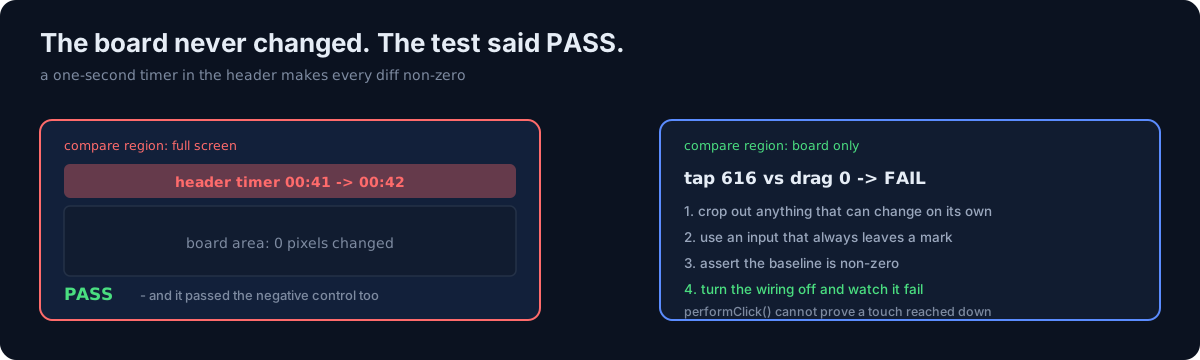
In a puzzle app where you paint cells by dragging, I needed to verify the gesture wiring.
Gesture wiring can't be extracted into a pure function. The order you attach modifiers is the rule, and getting it wrong kills the core interaction. So I decided to count how many pixels changed inside the board area from a UI test.
let cg = XCUIScreen.main.screenshot().image.cgImage!
let rect = CGRect(x: w*0.20, y: h*0.38, width: w*0.60, height: h*0.24)
cropped → CGContext(premultipliedLast) → compare RGBA bytes
One question first. When your test passes, can you prove what that test is actually watching?
1. Three things silently make this measurement meaningless
I walked into all three.
① Never compare the full screen
There is a one-second timer in the header. So anything you do produces "it changed".
That makes it a test that passes with no wiring at all. You have to crop to the board.
② Measuring with an input that only responds to correct answers flips day to day
One mode of that app leaves nothing behind on a wrong cell — the mistake indicator flashes and disappears.
The same coordinate produced 616 pixels in the middle of the board and 0 on another cell. Switch to a mode that always leaves a mark and it becomes deterministic.
③ "A is greater than B" is vacuous when A = B = 0
Before comparing, separately assert that the baseline itself isn't zero (tapChanged > 50).
This isn't unique to pixel testing. Every ratio, improvement, and difference check becomes silently true when the denominator is zero.
2. And passing wasn't the end of it
I turned off one wiring flag and ran again. It failed with "tap 616 vs drag 0".
Until that negative control, there was no evidence the test was watching the wiring at all.
The first version (full-screen comparison) passed the negative control too. That is the moment I discovered ①. Without a negative control I would never have seen it.
In the same batch, the test run that executed nothing and one build setting that killed 61 tests are the sibling posts, and the tests that passed while the button did nothing is the earlier one in the family.
3. How would you verify gesture wiring?
- (a) Mock and check the callback fired
- (b) Click via an accessibility action and inspect the resulting state
- (c) Count pixel change on screen
(a) watches the callback, not the wiring. Break the wiring and calling the callback directly still passes.
(b) has a trap. ⚠️ Compose's performClick() is indistinguishable from the semantic action
path. Both paths invoke the same callback, so it is no evidence that a touch reached down.
Measure with a drag — you cannot paint multiple cells through a semantic action. Measured:
.clickable { } on the overlay  → cells painted by drag: 0 (tap, long-press, drag all dead)
semantics { onClick { } }      → 2 or more             (touch reaches the canvas)
So the answer is (c). Expensive, and there is no alternative.
4. Accessibility wiring is the same family, and stranger
On iOS, a view declared as an accessibility child receives no layout. The label and value enter the tree, but the frame is infinite/zero, so it is readable and untappable. The symptom only appears in UI tests.
kAXErrorCannotComplete performing kAXScrollToVisibleAction→ Switch to an overlay with hit testing disabled. It gets a frame and touches pass through.
⚠️ The simulator's screen reader cannot be enabled from the system command line — you set it and it reads back off. So wrapping accessibility code in "if the screen reader is on" makes it unverifiable. If the node count is tolerable (225 cells), dropping the gate and staying verifiable is the better trade.
5. The pixel-testing checklist
1. crop out chrome that can change (timers, clocks, battery) — board area only
2. choose an input that always leaves a mark regardless of state
3. assert the baseline is non-zero first
4. turn the wiring off and confirm it fails (negative control)
6. Three odds and ends
- This machine's simulator runs in Korean, so finding elements by label fails. Pin the language with a launch argument, and dump the hierarchy when lookup fails.
- The device list includes older devices, so selecting by name dies on a deployment target mismatch. Select by UDID and wait for boot first.
- Result tallying has to read both kinds of counter.
Limits
Pixel testing is expensive: a screenshot, a crop, a byte comparison, and it's bound to a device and a resolution. But for gesture wiring there was no alternative. This post isn't "use pixel testing" — it's "if you do, honor these four".
Three things to check in your own tests
- Does the region your UI test compares include a clock, timer, or battery? If so, that test always says "changed".
- In your "A > B" assertions, can A and B both be zero? Assert the baseline separately.
- Have you ever reverted the fix and watched that test fail? If not, you don't yet know what the test watches.
The honest part
① is the scary one. That test passed — and passed the negative control. Green twice. With the wiring deleted.
"The test is green" and "the test is watching something" are different facts, but two greens in a row blur that line. I didn't find ① through insight; I found it through confusion — "wait, why does it still pass with it off?"
Do one thing today. Take a test you wrote recently, delete one line of the code it verifies, and run it. If it still passes, that test is currently protecting nothing.