Closing the Android themed icon (monochrome layer) warning. It's easy to defer as "asset work", and doing it carelessly breaks your brand. I built a procedure on one app and ran it across all 17.
One question first. Do you believe a <monochrome> tag means your themed icon renders correctly?
That tag only says where to look.
1. The monochrome layer uses alpha only
Color is discarded. The system paints it with its own color.
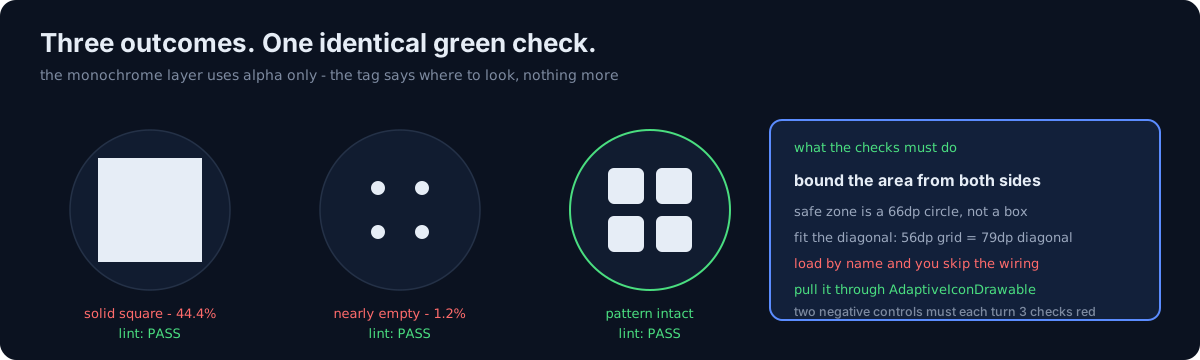
So if the foreground PNG has an opaque background square underneath — the common shape in this fleet — reusing it produces a solid block with the cells and pattern gone. Measured:
area 44.4% (solid square) · filled runs in the middle row: 1 (cells gone)
pixels outside the safe zone (66dp diameter circle): 28,251 — farthest at 50.9dp
Omitting <monochrome> entirely produces the same result — the system auto-converts the
foreground. Which means adding the tag, by itself, changes nothing.
2. The safe zone is a circle, not a square
66dp in diameter. Fitting the bbox between 21 and 87dp is not enough.
Square patterns get caught on the diagonal. A 56dp-wide grid has a 79dp diagonal, so the corners are clipped by the circular mask. My first attempt did exactly that, and a review render caught it. Fit the diagonal, not the width.
3. The sweep found two opposite failure directions
- Solid square (background square baked into the foreground): 5 apps. 44% area, pattern gone.
- Nearly empty circle: 1 app.
<monochrome>pointed at the foreground, and that foreground was four small elements on a transparent background — 1.2% area. The attribute was perfectly present, so lint passed. The fix here is not to scale the whole thing (the layout already fills the circle) but to grow each element in place (2.2× → 5.6%).
Reusing the foreground is sometimes fine: a transparent-background silhouette whose content sits inside the safe zone is fine. But that structure breaks silently the day someone adds a background to the foreground.
In the same batch, the 60-pixel drawing inside a 180-pixel canvas is the sibling post, and the purple that was not in my theme is the same family.
4. Two things I reported wrong
⚠️ I scanned one path and reported wrongly. Looking only at version-qualified directories, I wrote "two apps have no adaptive icon XML at all" — both had it in the unqualified directory (a safe layout given their higher minSdk). You have to look at both paths.
⚠️ Loading the drawable by name checks the asset, not the wiring. It passes no matter where
<monochrome> points. I found out because the negative control passed.
Pull it through the adaptive icon instead:
(ctx.getDrawable(R.mipmap.ic_launcher) as AdaptiveIconDrawable).monochromeThe round icon needs its own check too. Wire only one and behavior differs per device.
5. What would you do with a full-illustration icon?
Monochrome uses alpha only. If the original is a full illustration with a hundred thousand colors, there is no shape to extract.
- (a) Use the silhouette
- (b) Tune the threshold until something comes out
- (c) Redraw it from the icon's own motif
(a) gives you a solid square. (b) never recovers the pattern at any threshold. The answer was (c). Admitting that some shapes cannot be extracted is part of the procedure.
6. Extraction differs per icon
| Original shape | Method | Trap |
|---|---|---|
| Solid background + pattern | Color distance from the background | Textured paper needs the threshold up at 250 |
| Gradient background | Extract the bright, low-saturation side (white) | Flat subtraction reads the far end of the gradient as "a different color" and fills the whole square |
| Geometric shapes | Measure coordinates as connected components → rebuild as vectors | You must recover pitch, size, corner radius and rotation or the pattern dies |
| Full illustration | ❌ Not extractable → draw it | 100k colors. Redrawn from the icon's own motif |
| Transparent background + small elements | Grow each element in place | Scaling the whole thing overflows the safe zone |
⚠️ Separate the floor from the ramp. Keep them as one and mid-valued elements stay semi-transparent, giving you two tones. One app's interior floated at 62% alpha, so the marker looked like a ring with a grey center.
7. Defects in the source asset get magnified
One app's crescent at the top was clipped vertically on its left side (10×26 vs 17×26 · 19×26). It was live in the shipping icon too, invisible at that size.
Monochrome scales it 2.2×, so it stands out. I removed the element rather than inventing one. Drawing something that isn't in the original isn't restoration, it's invention.
8. Four instrumentation tests and two negative controls
- Area upper and lower bounds (blocking the solid square and the empty circle from both sides)
- Everything inside the 66dp circle
- Number of filled runs in the middle row (are the cells separated?)
- Does the round icon carry the same layer?
The two negative controls (swap in the foreground PNG; delete the <monochrome> line) must each
turn 3 checks red.
The sweep itself parses <monochrome android:drawable="…">, resolves the actual asset, and
measures area and the 66dp circle. If the reference is a vector, it has to be rendered.
The presence of <monochrome> guarantees nothing.
Three things to check in your own app
- Have you actually rendered your themed icon? A tag-existence check passes a solid square.
- Do you check both bounds? A lower bound alone passes the solid square; an upper bound alone passes the empty circle.
- Does your check watch the wiring or the asset? Loading a drawable by name never sees the wiring.
The honest part
I was wrong twice in this audit, and both times it was scope of inspection. Once I looked at only one directory; once I looked at the asset and never the wiring. I never failed to find the defect itself.
So the lesson here isn't "monochrome uses alpha only" — it's closer to "write down what your check does not look at, first." The negative control tells you that for free. Both times, it's what caught me.
Do one thing today. Extract your app's themed icon and lay it on a black circle. One image tells you whether the pattern survived, whether it's a solid block, or whether it's nearly empty.