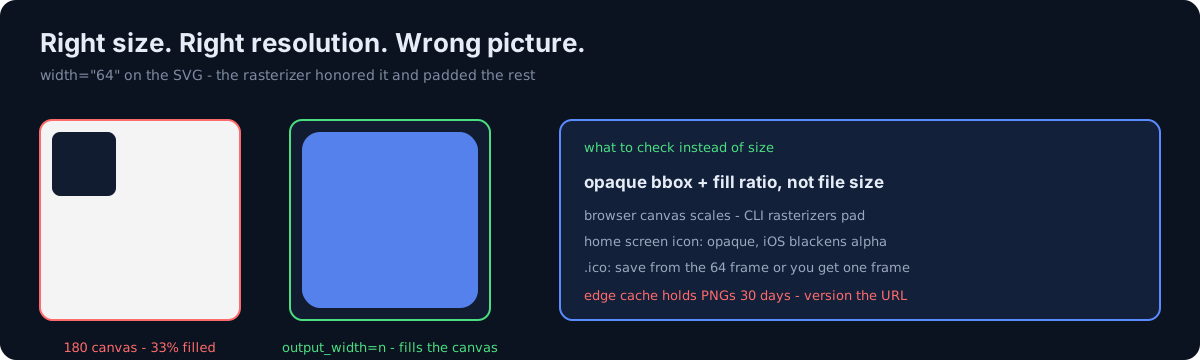
While tidying site icon assets, I opened the home screen icon (apple-touch-icon.png). The file
was 180×180. The drawing occupied only the top-left 60×60.
opaque bbox (2,2,62,62) · 33% filledThat file serves as both the iOS home screen icon and the organization logo in structured data. It was live in that state.
One question first. Does your asset check ask "does the file exist and is it the right size", or "what is actually drawn in it"?
1. The cause was one line in the source SVG
<svg width="64" height="64" viewBox="0 0 64 64">Even with a viewBox, rasterizers honor the intrinsic size and pad out the remaining canvas.
I reproduced it with the macOS thumbnail CLI: request a 360 canvas and you get a 64-sized drawing on a white background. The live file appears to have been produced through that path.
2. Browser canvas does not do this
drawImage(img, 0, 0, n, n) scales to the target size.
So icons made in a browser are fine and only CLI-produced ones break. The same SVG yields two different results.
Both file size and resolution look correct, so nothing catches it unless you look. I was checking size, resolution, and existence — nothing else.
3. How would you catch this?
- (a) Check file size and resolution
- (b) Pin the file hash to prevent regressions
- (c) Measure the opaque pixel bbox and fill ratio
(a) is what I was doing, and it passed. (b) freezes the current broken state as the expected one. The answer is (c). This belongs to the "a constant exists ≠ it was applied" family — for assets it's "the file exists ≠ the drawing exists".
4. The fix: tell the converter the target size
cairosvg.svg2png(url=src, write_to=dst, output_width=n, output_height=n,
                 background_color=None)            # tab icon: keep rounded corners transparent
cairosvg.svg2png(..., background_color="#050403") # home screen icon: opaque to the corners- Home screen icons must not be transparent. iOS composites transparent areas to black. Take
the background color straight from the SVG's full-bleed rectangle
fill. - Save
.icofrom the largest frame. Hand the imaging library a 16×16 and passsizes=[(16,16),(32,32),(48,48),(64,64)]and only the 16 goes in. Build at 64 and save, and you get 4 frames. Confirm withfilereporting "4 icons", then re-read the frame list from the library. - Judge it with a single render. Upscale each size's frame with NEAREST, stitch them into one sheet, and look.
5. Even after fixing it, the old icon ships for up to 30 days
⚠️ The edge rule holds PNGs for 30 days, so swapping the file alone leaves the cache in front of it.
Add ?v=YYYYMMDD to the reference and ship it with the HTML, and change the structured data's
logo URL too. This is an extension of
the edge cache that hid a deployment, and the same family as
the time only my browser looked fine.
In the same batch, the themed icon that was a solid square is the sibling post — two ways icon assets go quietly wrong.
6. One side trap — git add is all or nothing
git add a b c stages nothing if one path is missing.
In a loop over 9 apps, the one app without a manifest file silently produced an empty commit. The
first line of output was On branch main, which reads like success.
Loop commits need a git status --porcelain check afterwards. Here too the verdict is the
resulting state, not whether the command succeeded.
What I still don't know
- I don't know how long the file was in that state. Asset generation happened through several paths and there's no record.
- Which means I also can't say how many people saw the cropped icon.
Three things to check in your own site
- When did you last open your icon PNG? A size check passes on a file with no drawing in it.
- Do your SVGs carry hard-coded
width/height? Even with a viewBox, CLI rasterizers honor them. - Did you version the reference URL when you replaced an icon? If not, the old art ships for 30 days.
The honest part
This isn't debugging. I opened a file. And I hadn't opened that file in months, because the check script was green.
Assets are more vulnerable to this than code. Broken code usually dies; a broken image stays a perfectly sized, perfectly valid file.
Do one thing today. Open your site's apple-touch-icon.png directly in a browser and check
whether the drawing fills the canvas. Ten seconds.