Start with a question. Does your app theme define every color slot your screens actually read?
I believed mine did. FreshSave's Android color scheme was organized around a brand blue, and when I opened the app I saw blue. Theming was a finished task.
Then, in the screenshots already live on the store, the selected category chip was lavender.
I had never used purple anywhere
I went through every color constant. Not one purple value. The chip's drawing code had no hardcoded color either. I hadn't used the wrong color.
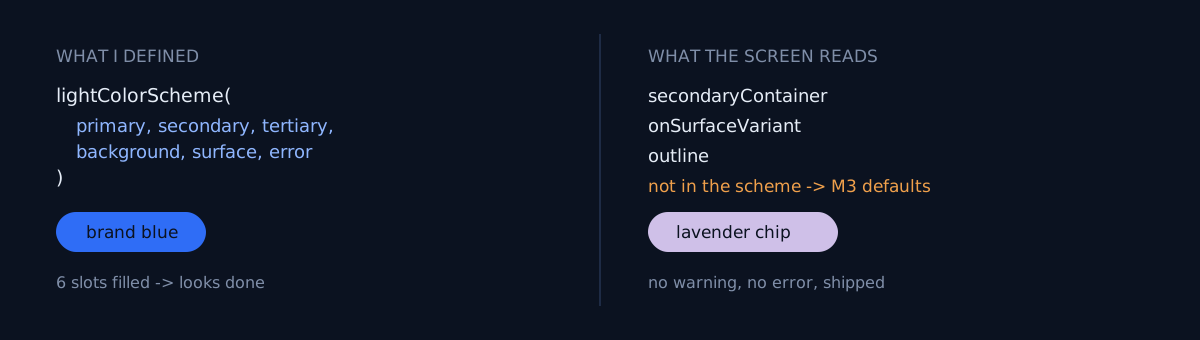
The lightColorScheme(...) call explained it. Six arguments were filled in:
primary, secondary, tertiary, background, surface, errorAnd the slots the screens actually read were not those six:
secondaryContainer   <- FilterChip selected-state background
onSurfaceVariant     <- secondary text
outline              <- card and input borders
None of those three are in the scheme. So what happens? Not an error. lightColorScheme() quietly fills omitted arguments with Material defaults. No warning, no compile error, no lint complaint. And the M3 default neutral palette has purple mixed into it.
So a blue app with a lavender chip wasn't a bug. It was the specified behavior. I said nothing, so the defaults spoke.
Why this one hides so well
The slots you do define come out in exactly your brand color. Open the app and you get a firm sense that "the theme is applied." That sense removes the need to distinguish slots you don't use from slots you didn't define. In code they look identical — neither appears in the scheme. They only diverge on screen.
The mismatch is also subtle. Fluorescent green would have been caught instantly. The M3 default neutrals lean grey-purple, so next to a blue accent they read as "slightly muddy blue." You swipe past them in a screenshot review.
What would you do here?
Two options at this point:
- Find each screen showing lavender and set a color at that spot.
- Extract every slot the screens read and diff it against the scheme.
Option 1 comes back on the next screen. It fixes only what you noticed, so any screen you didn't capture stays broken. I went with option 2.
Grep the slots you read, then diff
The method is simple. Pull every slot name the code references:
grep -rho 'MaterialTheme\.colorScheme\.[A-Za-z]*' app/src | sort -uDiff that list against the arguments passed to lightColorScheme(...) and darkColorScheme(...). The difference is exactly the set of slots leaking defaults.
The gaps are predictable:
- Container family:
secondaryContainer,onSecondaryContainer,primaryContainer,tertiaryContainer - Neutral family:
onSurfaceVariant,outline,surfaceVariant,outlineVariant
Derive the values from the accent you already have. Inventing a new color here just creates a second palette, and the next person asks the same question again.
Three things to check
- Is the difference between your grepped
MaterialTheme.colorScheme.references and your actual scheme arguments empty? - Did you run the same check on both light and dark schemes? Filling only one is common.
- Do the screenshots currently live on your store show any color that isn't in your palette?
The honest part
The worst part is that this was found after it shipped. Fixing the app makes the next build blue. But screenshots already uploaded to the store do not fix themselves. Re-capturing and re-uploading is separate work, on top of the code change. I did the same cleanup in A paywall got captured in the screenshots.
And automated checks don't catch this. Lavender passes contrast too — the same family of failure as Every Contrast Check Passed — The Screen Was Dead. Deciding a color is "wrong" only comes out of a diff against the palette.
Do one thing right now: run that grep line and put the resulting slot list next to your theme file. Has your difference ever been empty? Mine returned three on the first run.