Think of one control in your console that sits greyed out. Do you know why it is locked?
I didn't. And I walked past a condition I could already satisfy for months.
It started small. My store listings showed my personal legal name as the developer, and I wanted my business name there instead. My estimate was "edit one display string." What I actually hit was an account type problem. One store took thirty minutes. The other is still waiting on a support reply as I write this.
The field I wanted was editable all along
I began from the assumption that showing a business name requires converting the account to an organization. That assumption was wrong.
The Developer name in Play Console is an editable text field on a personal account, and the field's own help text says it does not have to match your legal name. The limit is 50 characters.
There is one catch: the change is not immediate. Saving raises a review banner, and until approval users keep seeing the old name.
Your new developer name is being reviewed
Users will see <old name> until your new name <new name> is approved.
Nothing notifies you when it clears. You learn it only because the banner is gone. The completion signal for this task is something disappearing, not something appearing — so if you never go back and look, you never find out.
The reason it was locked was not on the page
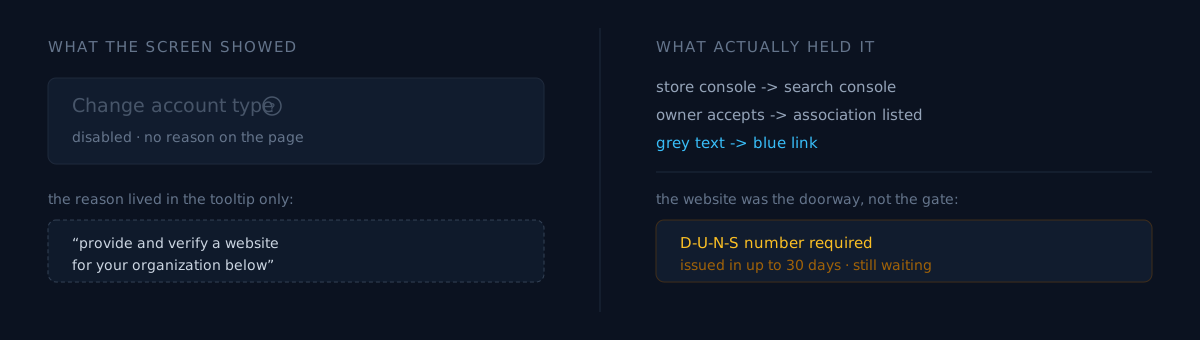
My goal was already met, but Change account type next to it stayed greyed out. Nothing in the page body said why. The reason existed only in a tooltip, behind a question-mark icon you have to hover.
To change your account type, provide and verify a website for your organization below.The condition was to provide and verify an organization website. I had owned that domain for years. My account had the "I don't have a website" box ticked.
This is the part worth generalizing. When the unlock condition lives in a single hover tooltip, people who could already satisfy it walk past it for months. A greyed-out control reads as "not applicable to you." It does not introduce itself.
What would you do here
You meet a greyed-out control. Two paths.
Do you read the account type policy documentation from the top and reverse-engineer the eligibility rules? Or do you hover the question mark on every disabled control on the screen?
I spent twenty minutes on the first, and the answer was in the second. Policy docs explain what is required. The tooltip is the only thing that knows what is missing from your account right now.
Website verification was not proof of ownership — it was a request
I expected to upload a file or drop in a meta tag. Neither.
The verification request goes to the registered owner in Search Console. When that owner accepts, a Play Developer Account entry appears in the Associations list in Search Console, and at that moment the grey text becomes a blue link.
Ownership of your website has been verified by the registered owner in Google Search ConsoleSo a lock in the store console was hanging on state in the search console. If you do not run both under the same account, you stall here — and nothing in the store console tells you that is why.
I have been burned by this coupling before. One redirect once erased my proof of ownership to Google. Back then only search rankings were on the line; now a store account setting hangs off the same state. Search Console ownership is not an SEO asset. It is closer to an infrastructure credential.
Unlocking the button is not the same as being able to convert
Clicking the now-blue link showed three requirements:
- A D-U-N-S number for the organization — issued by D&B and cross-checked against official business documents
- A phone number and email for the developer profile — shown publicly on the store, verified by code
- A phone number and email for Google to contact you — private, also verified by code
The website was the doorway. The real gate was the D-U-N-S number, which the documentation says takes up to 30 days to issue. This was never a same-day task.
The conditions to unlock a control and the conditions to finish the work are different sets. The moment the button turned blue felt like progress, but all I had earned was permission to read the requirements list.
I spent twenty minutes in the wrong account
This is the embarrassing part.
There were two developer accounts under the same person, and the one I opened first had missed its account verification deadline — developer profile and all apps removed. A banner at the top said changes would not be published. I read that banner and kept working for another twenty minutes anyway.
An empty app list was a signal I should have read far sooner. I have written before about being blocked for months by one wrong constant in my own notes, and the shape is identical: the tooling was working correctly and I was pointing it at the wrong target. Accounts need to be confirmed by account ID, not by the name displayed on them.
Three things to check yourself
You can do all three in your console in about three minutes.
- Have you hovered the question mark on every disabled control? More screens than you'd expect omit the reason from the page body. The condition may be one you can already meet.
- Is a website registered on your store account, and is that verification still valid? Verification is not a one-time pass — it keeps hanging on state in a different console.
- Do you have exactly one developer account? If you have more, confirm which account ID you are looking at. Removed and suspended accounts still render a perfectly normal UI.
The honest part
This work is not finished.
- The organization conversion is waiting on D-U-N-S issuance. I have only filed the application.
- I have done nothing on the Apple side. My developer account entity type is set to individual, and there is no UI in the console at all to change it. Support is the only path, and I could not confirm whether a sole proprietorship that is not an incorporated entity qualifies as an organization. That reply hasn't come, so this post has no conclusion there.
- I could not verify the D-U-N-S application form. I tried browser automation and got stopped by domain permissions and login session; I never saw the form. The official application page (
dnb.com/duns/get-a-duns.html) redirects to the US SMB page (en-us/smb/) and lists a US phone number. I could not establish the correct route for a non-US business, and I am not going to guess in writing. Existing-number lookup is atservice.dnb.com. - There is one decision I backed out of. The documentation states that organization accounts display the legal name and address on the store. For a one-person business whose registered address is a home address, the business name and the home address arrive as a single bundle. The display name had already achieved its purpose, so I concluded the conversion is not urgent. That was a decision, not a technical blocker, and it is why I stopped.
Of a task I expected to take thirty minutes, the only part that took thirty minutes was the first field. Everything else was the same problem: the screen would not tell me why something was locked.
The rest of the story continues in why one health-declaration checkbox blocked a personal account and the 72 hours where review was still looking at the old account after the switch was done.
Open one console right now and hover the question mark on something that is greyed out. It may be asking for something you already have. If you have hit one of these, I'd like to hear which screen it was.