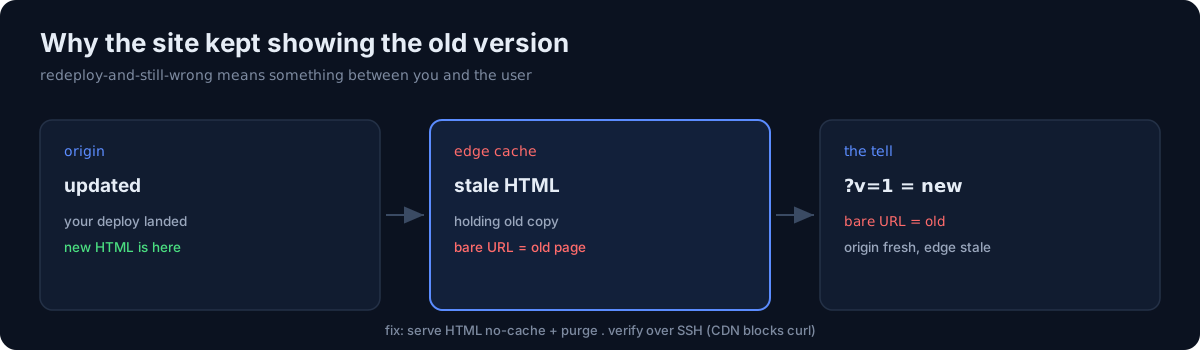
I deployed, checked the site, and saw the old version. Redeployed. Still old. The deploy was fine — the edge was lying to me.
What was happening
The bare URL was being served from Cloudflare's edge cache — cached HTML from a previous version. My deploy updated the origin, but visitors hitting the cached edge copy kept getting the old page until the cache expired.
The confusing part: adding a cache-buster query (?v=1) returned the new page immediately, while the bare URL stayed stale. That split behavior is the tell — origin is updated, edge is holding an old copy of the canonical URL.
The fix
Serve HTML with no-cache so the edge doesn't hold stale documents:
# .htaccess (static host)
<FilesMatch "\.html$">
  Header set Cache-Control "no-cache, must-revalidate"
</FilesMatch>
For content already cached, purge it (Cloudflare dashboard). The edge cache expires on its own within about an hour, but a purge or the no-cache rule makes it immediate.
The debugging trap
Cloudflare's bot protection blocks curl and headless Chrome, so my usual "just curl it" verification returned challenge pages, not the site. I had to verify over SSH (grep the file on the origin) or with a real browser. If a CDN sits in front of your origin, remember your CLI checks may be talking to the CDN's challenge, not your content.
The honest part
"Redeploy and it's still wrong" almost always means the artifact isn't the problem — something between you and the user is. Caches, CDNs, and challenge pages all fail by showing you a confident, wrong answer. Add a cache-buster to separate origin from edge, and verify through a path the CDN doesn't intercept before you touch the code again.