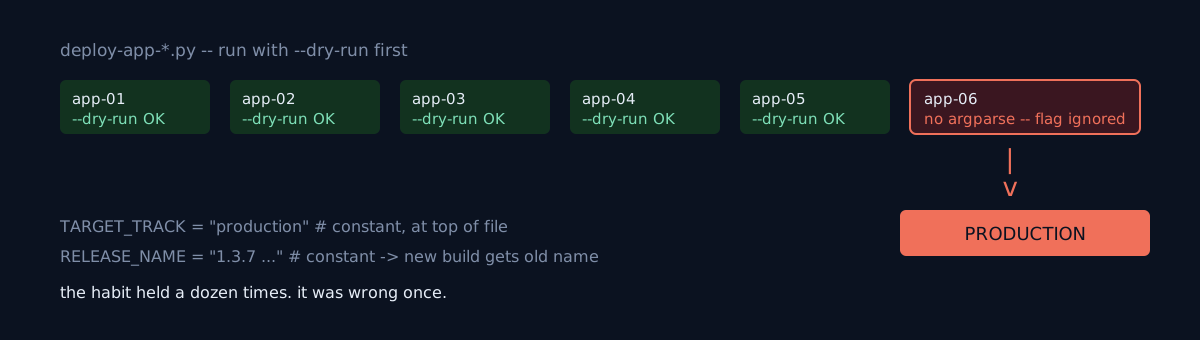
I ship a dozen-odd apps to the store the same way. Each app has its own deploy script, and they're nearly identical, so my hands remember it — run with --dry-run first, and if the output matches what I intended, drop the flag and run it again.
That day I ran it with --dry-run attached. The version shipped straight to production.
Your "dry-run first" habit is a safeguard only on top of a script that actually implements the flag. Do all of your scripts implement it?
That script had no argparse
--dry-run, --track, --version-name, --release-notes — all silently ignored. There's a constant at the top of the file,
TARGET_TRACK = "production"and running it commits to production immediately. It doesn't inspect the arguments or warn. It never reads sys.argv at all.
The reversal is that only this script is different. Every other app deploy script in the same repo supports argparse and --dry-run. That built an expectation that the habit would carry over, and the expectation held a dozen times. It was wrong once.
This is what separates it from a tool mistake. It wasn't the wrong tool — one different thing was mixed in among the right ones. And you can only see that it's different by opening the file.
A second trap came along with it. The release name is also a constant, so the new version shipped with the old release name. The release notes went out with old content too. Because the publish itself matched my intent, even that didn't catch my eye until later.
What would you do here?
You have a dozen-odd scripts that do the same thing and look identical. When you make a new one, do you check every time that its interface matches the rest? Or do you shrug — "I copied and edited one, so it must be the same"?
This script was most likely written before the others got argparse. Interfaces drift apart over time, and the fact that they've drifted is quiet.
Code, commands, numbers
- The shape of the problem (gist):
TARGET_TRACK = "production"      # constant
RELEASE_NAME = "1.3.7 — ..."     # constant; unchanged, the new version gets the old name
# no argparse -> sys.argv unused -> every flag is ignored- As a post-fix I added a guard at the very top that dies if you pass a flag:
if len(sys.argv) > 1:
    sys.exit("This script takes no arguments. It commits to production immediately.")
Dying is better than silently ignoring an unsupported flag. But this fixes one file — whether the other copies in the repo are in the same state has to be checked separately.
- Side finding: this app is the only one in the repo with versionCode/versionName hardcoded as constants in the build file, so gradle property injection doesn't take. That needed an extra bundle verification, and that verification is what confirmed the published versionCode.
- The release name and notes could be corrected later with a track PUT + commit. The publish itself can't be undone.
Three self-checks
- Do you have several scripts that do the same job? Have you ever verified that their argument interfaces are actually the same, or is it "they look alike, so they must be"?
- Are your safety flags (
--dry-run,--check,-n) being parsed? When you pass an unsupported flag, does the script die, or ignore it and run? - Does a script that does something irreversible — deploy, delete, bill — have a guard that signals it's dangerous to run with no arguments?
The honest part
No harm done. What went out was what I was going to ship anyway, and I confirmed by live comparison that the store listing matched the previous version. That was luck, not judgment — a half-baked version would have gone out just the same. "Dry-run first" is a good habit, but I mistook a habit for a safeguard. A habit is a safeguard only when the tool actually implements the flag.
The earlier case in the family of automation drifting quietly while the lights stay green is Every job was green for two weeks. The site was stale for two weeks.
Do one thing now: pick one script that does something irreversible and run it with an unsupported flag attached. Does it die, or does it just run?