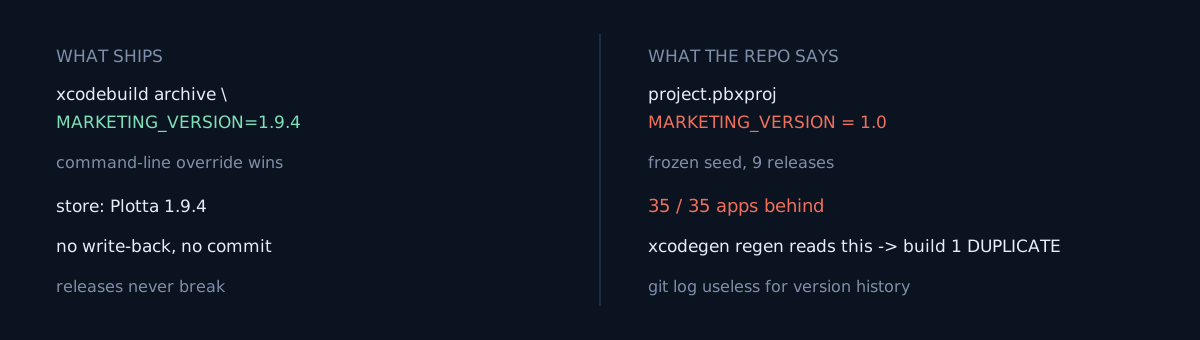
There are 46 apps in my App Store Connect account. I took the 41 that have a live (or in-review) version and lined each one up against its repo's MARKETING_VERSION.
Every one of the 35 I could match to a repo had a committed version behind the live one. Matches: 0. Ahead: 0.
Is the version number in your repo the same as what's in production right now? I had never once checked.
The gap wasn't "one release behind"
If it were one or two notches off, I'd shrug and think "forgot to commit after a release." Instead it looked like this:
Plotta          repo 1.0     live 1.9.4
Paxio           repo 1.0.0   live 1.4.12
Nomori          repo 1.0     live 1.4.3
Cyra            repo 1.1.8   live 1.3.0
Aftershift      repo 1.0     live 1.3.1
...
Unse repo 1.0 live 1.0.1Plotta's repo says 1.0; the store says 1.9.4. Across nine minor releases the committed value moved zero times. That's not "forgot." It means there is no path by which that value ever updates.
Reading the release tool
# ios_release.py
if version:
    cmd.append(f"MARKETING_VERSION={version}")
if build_number:
    cmd.append(f"CURRENT_PROJECT_VERSION={build_number}")
It appends MARKETING_VERSION=1.9.4 to the xcodebuild archive command as a command-line argument. xcodebuild treats that override as higher priority than the value in the project file. So the archive is built as 1.9.4 and uploaded as 1.9.4.
And that's it. There is no code that writes 1.9.4 back to the repo's project.pbxproj, and no code that commits a version bump. The next release, the driver script passes --version again, overrides again, and the repo learns nothing again.
The version number lives in two places — the build argument and the project file — and only one is real. This is if the same value appears twice, one is already wrong, the release-tooling edition.
Why it never broke
Because the build-time override wins every time. MARKETING_VERSION is just a display string for the store; what Apple checks for duplicates is the build number (CURRENT_PROJECT_VERSION), and the driver passes a fresh one (timestamp-ish) on every release, so it never collides.
So the gap doesn't block releases. What it quietly breaks instead:
git logcan't tell you when an app went to 1.2. They all say1.0.- Anyone wiring CI off the repo reads the wrong value.
- A guard that reads the version from the project file compares against a stale seed.
The one place it did bite
The third one actually happened. Digging through release notes I found this line:
⚠️
xcodegen generatereverted the Info.plist version macros, giving build "1" DUPLICATE → fixed by addingCFBundleShortVersionString/$(MARKETING_VERSION)+CFBundleVersion/$(CURRENT_PROJECT_VERSION)toproject.yml'sinfo.properties
Apps that use xcodegen regenerate the Xcode project from project.yml. When that happened, the Info.plist reverted to the value written in project.yml — the stale seed 1 — and archiving in that state got rejected by Apple with "build 1 already exists."
The override only wins while it's being applied. Slip a project-regenerating tool in between, and that tool treats the stale seed as the truth.
What would you do here?
Two branches:
- Hand-bump
MARKETING_VERSIONand commit it on every release. - Have the release tool write the version back to the project file and commit it after a successful upload.
Option 1 is 40 chances to forget across 40 apps. Any structure where the repo tracks truth via a human hand will drift.
Option 2 is right. Take the value xcodebuild received as an override, and the moment the upload returns 200, write it into project.pbxproj (or project.yml) and commit chore: bump <app> to X.Y.Z. Then the repo mirrors the store, and xcodegen regeneration reads the truth.
(I'm writing this before making that fix — the 40 apps use two project-file formats, so the write-back itself needs testing, and right now the point is to nail down what is stale first.)
Three self-checks
- Is the version number in your repo (
MARKETING_VERSION,package.json,Cargo.toml…) the same as what's in production? If the release tool doesn't write it back, the answer is usually no. - Is there a value in your repo that gets overridden at build time? If so, that repo value is a seed — and something somewhere reads the seed as truth.
- Do you use a tool that regenerates the project file (xcodegen, codegen, templating)? Then it reads the pre-override value — is that value right?
The honest part
I missed this for months because releases kept succeeding. The gap never blocked me, so I had no reason to look for it. It was odd that git log said 1.0 everywhere, but that didn't read as a "bug."
One lesson. A build-time override splits the repo from the truth. The overridden value is wrong on every path that has no override — regeneration tools, CI scripts, the moment a human reads the repo. If you're going to use an override, write the value back so the two places rejoin.
Do one thing now: pick one app and line up its repo version against its store (or deployed) version.