Play Console has a section for providing sign-in credentials — formerly App access. It is where you declare whether a reviewer can actually reach your app's paid content.
There are two answers: yes or no. Reading the form's own wording, both applied to my app.
Do you decide console form answers by reading the documentation first? I did.
Both were true
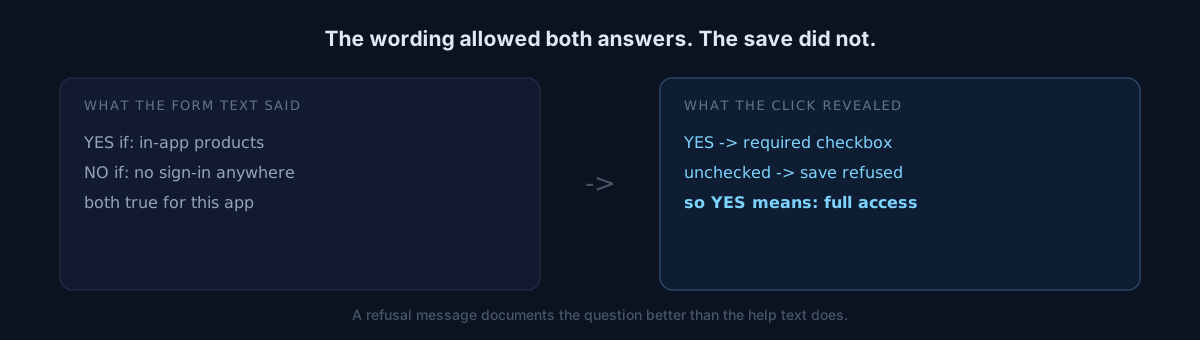
The "yes" condition: "if your app includes any of the following… payments (including one-time products), memberships, subscriptions, access tiers." My app has in-app products. Applies.
The "no" condition: "if any of the following apply… sign-in is not required in any country or region." My app has no sign-in at all. Also applies.
No amount of rereading breaks the tie, because the two statements are not mutually exclusive.
The fork appears after the click
Choosing "yes" reveals a required checkbox.
The sign-in credentials in this declaration provide full access to all app functionality and content, including premium or paid content
Leave it unchecked and the save is refused outright.
1. select "Yes"
2. attempt save with the checkbox unchecked
3. "Your changes couldn't be saved" returned immediately (measured)
4. check the box -> save succeeds
That checkbox is what tells you what the question actually means. "Yes" does not mean "my app has in-app products." It means "I have written down a way for a reviewer to reach the paid content."
For an app with no accounts, that way is a promo code — and promo codes require agreeing to a separate set of terms before you can issue them.
Here is where it splits
Would you accept the promo-code terms now and answer "yes," or answer "no" and switch if review asks?
The correct answer was "no." "Sign-in is not required" is true, so it is not a false statement. If review later demands access to paid content, that is the moment to generate a promo code and switch to yes.
Choosing "yes" and ticking the box is what would have been false — the credentials I listed would not have provided that access.
Research alone cannot catch this
Going into that session I had pre-decided two answers: this one and the target age group. Opening the actual forms flipped both.
The required checkbox appears nowhere in the guidance text. It only exists after you click "yes." Reading documentation first cannot tell you that step 3 exists.
This is not the first Play Console form that blocks quietly — there was a checkbox that demanded a company and a rejection that survived changing the account type. Different incidents, same shape.
Self-check
- Do you have console answers locked in before opening the form?
- Are the two options' conditions mutually exclusive? If not, wording cannot choose for you.
- Have you ever pressed save on purpose to fail? The rejection message is better documentation than the help text.
The honest part
There is no code in this post and nothing was fixed. All I did was abandon a pre-decided answer in front of the form.
But two pre-decided answers, both wrong in one session, is enough for me to treat "settle console answers by research" as a method that does not work here.
Next time you fill in a console form, deliberately fail one save. The refusal is more precise than the guidance.