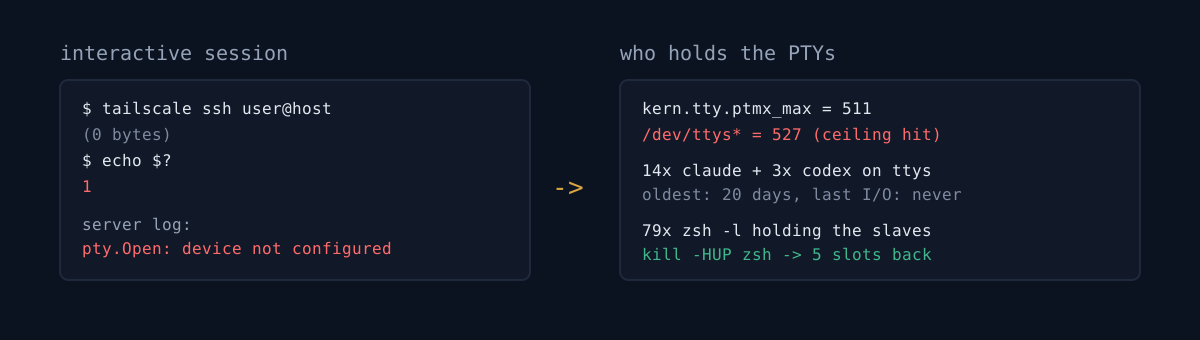
Right now, how many CLI sessions are alive on your dev machine? And the oldest one — when did you last touch it?
I run several coding agents on an always-on Mac. One day I tried to SSH in with tailscale ssh and no prompt appeared. The connection just dropped, without a single line of output.
$ tailscale ssh user@100.x.x.x
$ echo $?
1
Zero bytes, exit status 1. No error message. A silent failure.
The network was innocent
I crossed suspects off one at a time.
- tailnet / ACL: command mode to the same host worked fine.
tailscale ssh user@host -- 'whoami'→ instant reply. - MagicDNS / host key: command mode works by hostname too.
- Version warning: the recurring
client 1.98.5 != tailscaled 1.98.9was unrelated background noise.
So the only thing broken was the interactive (PTY) session. Under ssh -vv, the server accepts the PTY request and the shell request, and then the session dies at zero bytes. By that point the network and auth layers have all passed. The problem is above them.
In my post on remote-controlling an always-on Mac over Tailscale I covered an "orphan port" trap. This time the orphan wasn't a port — it was a session.
The real cause was only in the server-side log
The client told me nothing. The cause was in the tailscaled log on the machine being connected to.
ssh-session(...): start failed: pty.Open: device not configuredpty.Open failed. The server could not open a pseudo-terminal (PTY) for this session. I reproduced it directly.
$ python3 -c "import os; os.open('/dev/ptmx', os.O_RDWR)"
OSError: [Errno 6] Device not configured: '/dev/ptmx'
/dev/ptmx allocates a new PTY, and it's returning errno 6 (ENXIO) — no slot left to allocate.
$ sysctl kern.tty.ptmx_max
kern.tty.ptmx_max: 511          # macOS default limit

$ ls /dev/ttys* | wc -l
527                             # already over

$ uptime
up 20 days, 26 users
Pinned against the ceiling. So who is holding all 511 — that's the real question.
Not terminal tabs
I walked every process holding a PTY (ttysNNN) with ps. Not terminal-app tabs. Long-lived CLI agent sessions.
- 14
claude+ 3codex, each on its ownttysNNN. - Oldest: 20 days. Some were sessions resurrected with
--resume. - Each session ran inside a
zsh -lspawned by a remote-control relay (~/.orca-remote/relay-*, the same relay from my cmux/Orca setup). - There were 4+ different relay versions alive at once. Nobody had cleaned up the old ones.
- One relay was holding 14–19
zsheach, so 79zshwere sitting on PTYs.
Sessions I'd connected to from a phone or the web and walked away from were never reaped on the server side. For 20 days.
What would you do?
There are 14 claude processes, 20 days old. Do you just pkill -f claude?
That list includes the session doing this cleanup right now. It also mixes in the relay daemons and other live work underneath them. A broad pkill kills someone else's work. You have to pick PIDs one at a time, oldest first — and for that you need a way to prove "this session is dead."
Telling a dead session from a live one
Age is weak. CPU time is weak. A 20-day session could still be in use, and CPU time accrues from background keepalive alone.
The decisive signal is the tty's last access time (atime).
$ ls -lu /dev/ttys003
crw--w----  1 user  tty  ... Aug 11 09:24 /dev/ttys003      # 20 days ago, zero I/O since
atime is when that terminal was last read from or written to. No I/O for 18–20 days is confirmation that the session is abandoned. All five targets looked like this.
Then it's procedure. Leave the relay daemons alone; clean up the leaves (claude/codex) first with SIGTERM, to give them a chance to flush session state.
zsh -l ignores SIGTERM
I killed the leaves and the PTY count dropped by one (from ~528 to ~528). The thing holding the PTY slave wasn't claude — it was its parent, the zsh -l session leader.
So I tried to kill the zsh, and it just ignores SIGTERM. A login shell traps it.
The right signal is SIGHUP — the one that actually fires when a terminal window closes. On SIGHUP, zsh runs zshexit and terminates cleanly.
kill -HUP <zsh_pid> # all five exited here. SIGKILL was a no-op.Result: PTY count 528 → 523, five slots reclaimed. /dev/ptmx opens again.
A 3-line self-check
- Put
sysctl -n kern.tty.ptmx_maxnext tols /dev/ttys* | wc -l. If the two numbers are close, your next interactive login fails silently. ps -Ao pid,etime,tty,command | grep -E 'claude|codex' | grep ttys— how many multi-day sessions show up? Each one is holding a PTY.ls -lu /dev/ttysNNNon a suspect tty — if the last I/O was days ago, that session isn't waiting for you, it's just holding a seat.
The honest part
Raising the ceiling (sudo sysctl -w kern.tty.ptmx_max=999) is first aid. It reverts to 511 on reboot, and persisting it needs a LaunchDaemon. And it isn't the root cause.
The root cause is that the remote-control relay doesn't reclaim disconnected sessions, and that stale relay versions keep piling up with no cleanup. Hand-picking PIDs to kill isn't a fix, it's triage. In killing failed bots cleanly I wrote that killing the process alone lets launchd revive it; same shape here — kill the leaf and the relay can re-attach, and if you don't get the parent shell the PTY stays taken. It's also a sequel to the macOS launchd gotchas.
Run ls /dev/ttys* | wc -l right now. Compare it to sysctl -n kern.tty.ptmx_max. If they're close, today is the day to clean up.