Running one coding agent is easy. Running four without losing track of which one is stuck is the actual problem — and it's what pushed me through three environments.
Stage 1: a plain terminal
I started the obvious way — Claude Code in one tab, Codex in another, a shell for git and builds. It works for one or two agents. Past that, it falls apart: an agent finishes or asks a question and just sits there silently while I'm looking at a different tab. The bottleneck wasn't the agents, it was my attention — I had no signal for "this one needs you."
Stage 2: cmux
cmux is a native macOS terminal (Swift, built on Ghostty's rendering engine) aimed specifically at people running terminal-based AI agents. What it fixed for me:
- Notification rings — a process that needs attention signals it, so I stop babysitting idle tabs.
- Vertical tabs and split panels — several agents visible as native panels at once.
- An automation API (CLI + Unix socket) for creating workspaces and taking screenshots.
This is the moment running 3–4 agents stopped feeling like plate-spinning.
Stage 3: Orca
Orca reframes the whole thing as an Agent Development Environment. The pieces that mattered to me:
- Isolated git worktrees per agent — several agents (Claude Code, Codex, and others — 25+ supported) working side by side without stepping on each other.
- Built-in Chromium preview + design mode — review UI, annotate a diff, send that feedback back to the agent.
- Remote worktrees over SSH + phone monitoring — check agent status while I'm out, on the same always-on Mac.
MIT-licensed and cross-platform. This is where "many agents in parallel" became the default mode instead of a stunt.
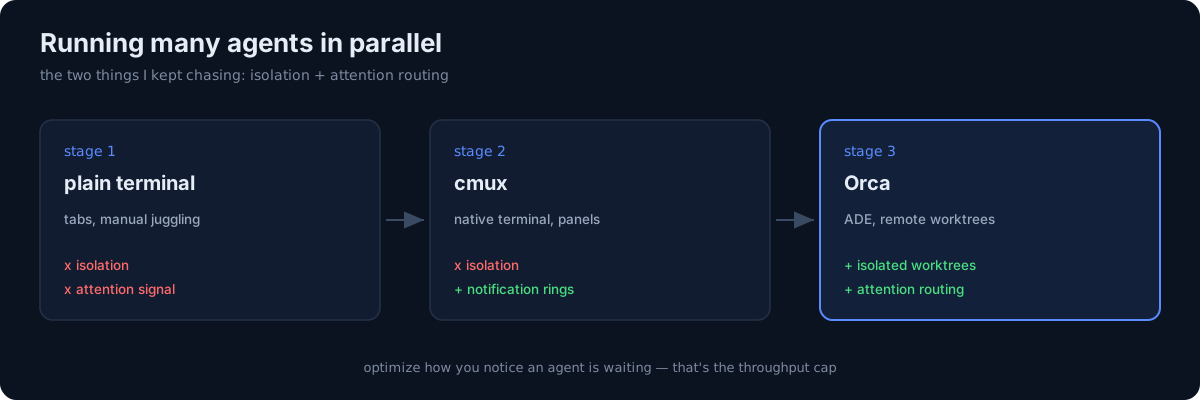 The same work across three environments — isolation and attention routing.
The honest part
The tool matters less than the two properties I kept chasing: isolation (agents that can't corrupt each other's working tree) and attention routing (a clear signal for which agent needs a human right now). A plain terminal has neither, cmux gave me the second, Orca gave me both.
If you're scaling past one agent, don't optimize the prompts first — optimize how you notice that an agent is waiting. That's the thing that actually caps your throughput.