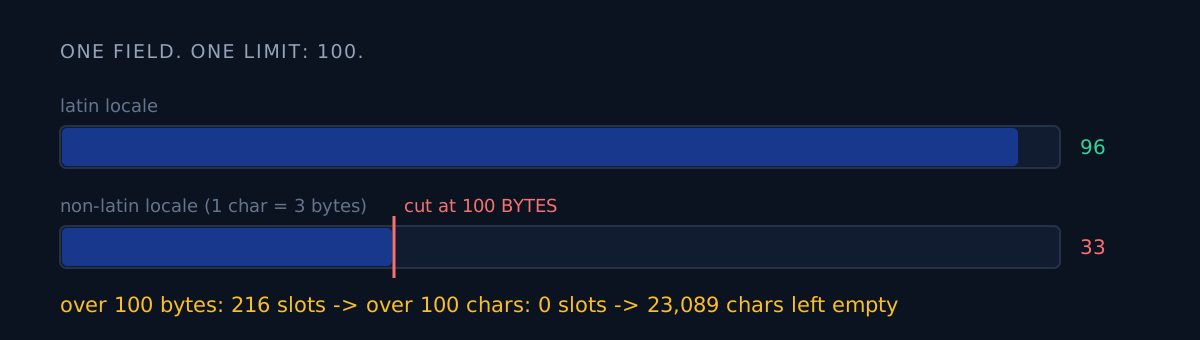
Does your validator only block going over the limit, or does it also count how far under you are?
Mine only did the first. It was green for months, and that green light was capping the search surface of 46 apps at one third.
What I was trying to do
The store has one field where you type search terms directly. The limit is 100. To improve search exposure across 46 apps, I started by counting how much of that field I was actually using.
Across 678 locale slots the average fill was 72. The distribution was strange.
en-*    96
ko      53
ja      52
zh-Hans 44
Only English sat near the limit; everything else stopped around halfway. I read it the natural way at first — the translators wrote shorter copy, those languages pack more meaning per word.
How would you read that distribution?
There's a fork here. If you read it as "the translators wrote less," the next task is stuffing more words in — more hand translation across 46 apps and many locales.
I asked a different question first: why only non-Latin? If it were a language property, Korean and Japanese and Chinese being similarly short is explainable — but all three landing at almost exactly one third is not something a language does.
The actual cause
The limit is 100 characters. My validator was measuring 100 bytes.
In UTF-8 a Latin character is one byte, so English was never affected. Korean, Japanese and Chinese characters are three bytes. A validator that truncates at "over 100 bytes" cuts non-Latin locales at one third of the real limit. You can't type past roughly 33 characters, so it looks like a human stopped there.
The evidence was clean:
- Of 678 live slots, over 100 bytes: 216
- Over 100 characters: 0
Nobody had ever exceeded the real limit. 216 slots were blocked by a limit that didn't exist.
The empty surface totalled 23,089 characters. This is not surface that costs translation money. These apps already ship in those languages; there was simply an empty box where the searchable words for that market belong.
The fix
# Wrong — this silently changes the unit of the limit
if len(keywords.encode("utf-8")) > 100:
    keywords = truncate(keywords)

# Right
if len(keywords) > 100:
    raise ValueError("keyword limit exceeded")
And one more line, which is the real lesson:
remaining = max(0, 100 - len(keywords))A checker that only blocks overflow can never see emptiness. A pass signal tells you "the limit was respected." It never tells you "we stopped at one third of it."
Audit results
| Metric | Value |
|---|---|
| Locale slots | 678 |
| Average fill (before) | 72 chars |
| Average fill (after) | 90 chars |
| Over 100 bytes | 216 |
| Over 100 characters | 0 |
| Empty surface | 23,089 chars |
The same audit caught four more defects: slots using a full-width comma as the separator so the whole string indexed as a single term, slots containing third-party trademarks (a policy violation), slots where the positioning had changed but stale words were still crowding out the new ones, and slots carrying another app's keywords.
The audit went three layers deep. After keywords came the body copy (the store copy was stripped to ASCII), and after that the subtitle (36 subtitle slots were still in English). All three fields had the same kind of hole.
Three-line self-check
- What unit does your length check count in? Open it and look for
len(s)versuslen(s.encode()). If you ship multilingual copy and it's the latter, only your non-Latin users are quietly losing. - Does your checker count the shortfall? A checker that only looks at the ceiling is a checker whose floor is zero. One line printing fill rate exposes this class of bug.
- How many months have you not questioned a passing check? Passing checks stop questions. That is the real reason this bug lived so long.
The honest part
Whether more fill actually produces more exposure, I don't know yet. Store search doesn't reflect changes immediately, and I need at least two weeks after this batch clears review before any comparison is meaningful. All I can claim right now is that the surface got bigger.
Whether the words I added are good words is a separate problem. Filling a slot and picking the right search term are different jobs, and this post only covers the first. I also learned in the same week how easy it is to be fooled by an aggregate — I wrote down "516,000 characters unused" and after changing the yardstick it was 19,000.
If you have code touching multilingual fields, grep for encode once. Anything it finds is not a validator — it's a ceiling.