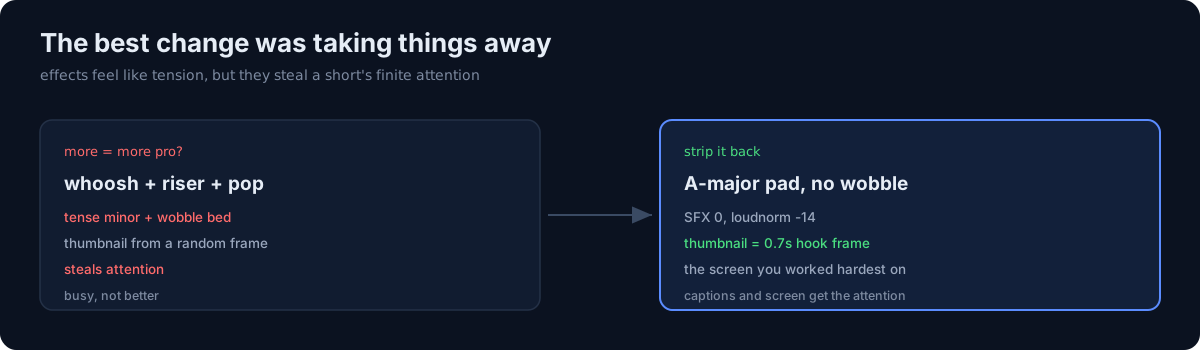
Improving a content pipeline isn't always a big move. These two were pure taste, and both were about taking away.
Removing the sound effects
A whoosh at every cut boundary, a riser at the start, a pop every time a caption appeared. I added them for tension, but after a few videos back to back they were just annoying. I removed all of them.
The background bed was a tense minor triad with a double-tremolo wobble; I swapped it for an A-major sustained pad plus a gentle low end (lowpass 1600, no wobble). It's narration-free, music-only, so the final loudnorm=-14 handles the level. Verification: the zone2 render came out at -14.1 LUFS with zero SFX.
Thumbnails from the hook frame
I made the YouTube custom thumbnail come not from a random frame but from the 0.7s hook frame that render_hook extracts (the clean first frame, before any xfade overlap). The hook frame is the screen you worked hardest on to grab the viewer — so it's the right thumbnail too.
While I was at it, I re-rendered the 404-baked mbti/ja short from clean shots, swapped the public version, and set the old one to private.
The honest part
The illusion that "more makes it look more pro" lasted a long time. The sound effects, the wobble bed — they feel like they add tension, but they actually steal attention. In a short video, attention is a finite resource, and the captions and the screen need all of it. Improvement isn't always adding a feature — often, the best change is to take something away.