I batch-rendered promo videos for a couple dozen apps, then watched them back. Half were quietly broken.
The contamination
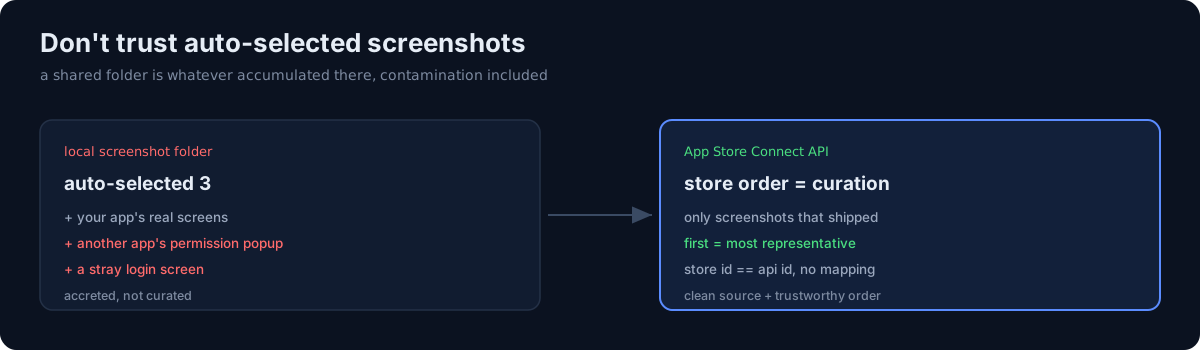
My pipeline auto-selected three screenshots per app from each app's local screenshot folder. The problem: those folders weren't clean. Several apps' folders had picked up another app's permission-dialog screenshots (a photo-access popup from a completely different app), and one had a login screen from yet another app mixed in.
Rendered straight, those videos would have shown one app promoting another app's UI — leaking the wrong product on screen. Auto-selection also loved grabbing splash/onboarding/settings frames and missing the actual value screen.
Lesson one: auto-selecting from a local folder is not curation. The folder is whatever accumulated there, contamination included.
The fix: pull from the store, in store order
Instead of trusting local folders, I pulled screenshots straight from the App Store Connect API — the images the developer actually published to the store, in the order they appear there.
That solved two problems at once:
- Clean source. Only the screenshots that shipped to the store, nothing that leaked in locally.
- Trustworthy order. Store display order is the curation — the first screenshot is the one chosen as most representative — so "take the first three" becomes meaningful instead of random.
The store's app id doubles as the API's app id, so no mapping was needed. I fetched the latest version's localized screenshot set per app and wrote them to a clean per-app folder.
The honest part
The bug that scared me wasn't the ugly splash frames — it was the silent leak of another product's UI into a video I was about to publish. Auto-pipelines fail quietly: nothing errored, the videos rendered fine, they were just wrong. When your inputs come from a shared or accreted location, add a trusted-source step (here, the store API) and a human spot-check of the final frames. "It rendered" is not "it's correct."