Where does your CLI tool keep its credentials? Are you sure it's one place?
I didn't ask that question for three weeks. I read the error message instead.
Failed to authenticate: OAuth session expired and could not be refreshedAn unattended scheduled job died with that line. Not once — seven times across seventeen days. The sentence said expired, so I logged in again. It died again the next day.
Three hypotheses, three rejections
First: plain expiry. A fresh login should last days. It died the same evening I logged in. Rejected.
Second: the unattended environment. If it only fails when nobody's watching, maybe it's the missing TTY. I called it with env -i, every variable stripped, no TTY. It worked. Rejected.
Third: something writing stale values back. I added a probe that snapshots the credential file at the moment of failure, and found the job failing auth with eight hours left on the token. Definitely not expiry. I concluded that a long-lived interactive session was writing its own stale in-memory value back to the file.
That was also not quite right. It was circumstantial. Stale writes were happening, but the theory never explained why only the unattended jobs died.
What settled it was one comparison
This morning my ledger caught the moment an empty token got written. I opened the credential file:
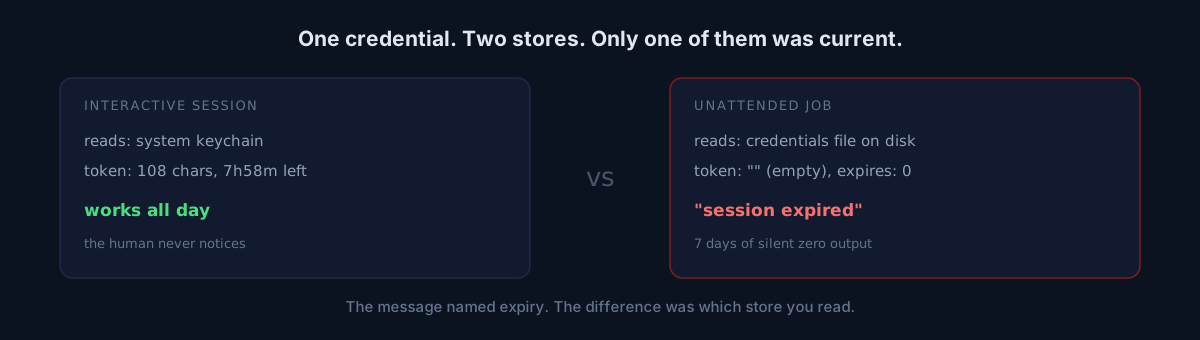
accessToken: "" refreshToken: "" expiresAt: 0Then I did the one thing I had never done. I opened the system keychain at the same moment.
accessToken: 108 chars expiresAt: 7h58m from nowOne empty, one healthy. Same account, same tool, same second.
Pause here — what would you do next? I saw two paths: copy the keychain value into the file and see, or go read more docs. Copying took thirty seconds and settled the question, so I copied.
Unattended call with the empty file:
$ env -i HOME=... PATH=... claude -p 'reply OK'
Failed to authenticate: OAuth session expired and could not be refreshed
rc=1
The production failure, reproduced exactly. Then I wrote the keychain value into the file and ran the same command:
OK
rc=0
So there were two doors
- Interactive sessions read the keychain. Always current.
- Unattended one-shot calls read the credentials file on disk. That file is a copy of the keychain, and it goes empty or stale.
Which is why a human can never see this. My terminal was fine all day. The only things dying were jobs that run alone at dawn and dinnertime. "It only fails when unattended" wasn't about the environment or the hour at all — it was about which store gets read.
Counting the damage: seven days in the ledger, plus one full weekly long-form video run lost. The exit codes were honestly 1 the whole time. I was reading an honest signal through a misleading sentence.
The fix is boring
One job, every 120 seconds: read the keychain, compare to the file, reconcile if they differ. With three rules.
- If the keychain is empty or expired, write nothing. Overwriting with a blank is me causing the outage.
- If the file's expiry is further in the future, leave it alone. A reconcile must not become a stale write.
- Never log token values — only the first 8 hex of a SHA-1, enough to see rotation.
The generator job got one branch too. On an auth message, it calls the reconcile once before giving up, then retries. A "usage limit" message does the opposite: stop the run immediately, no reconcile, no more candidates thrown at a wall. I first classified both messages the same way and had to correct it. Wrong label, wrong remedy: a rate limit heals by waiting, a stale copy never does.
Three things to check in your own setup
- How many places does your CLI store credentials? Have you confirmed that the interactive path and the non-interactive path read the same one?
- When you reproduce an unattended failure, are you reproducing it in your own shell? Your own shell is usually fine — that's the trap.
- Do you verify the cause the error names (expired, forbidden, unreachable) against the actual state at that instant, or do you trust the sentence?
The honest part
This is a three-week misdiagnosis log, not a victory lap. What I missed wasn't subtle. I assumed there was one store and never tested the assumption. There's even a note from two weeks ago where I queried the keychain, got nothing, and crossed the hypothesis off. I still don't know why that lookup came back empty. Today the same command returned a value.
If an unattended job of yours is dying on auth, do one thing before you log in again: at the moment it fails, check whether the store your tool reads is the store you're looking at. If they differ, you're done.