I kicked off a long release job and added a loop to wait for it. The reflex form:
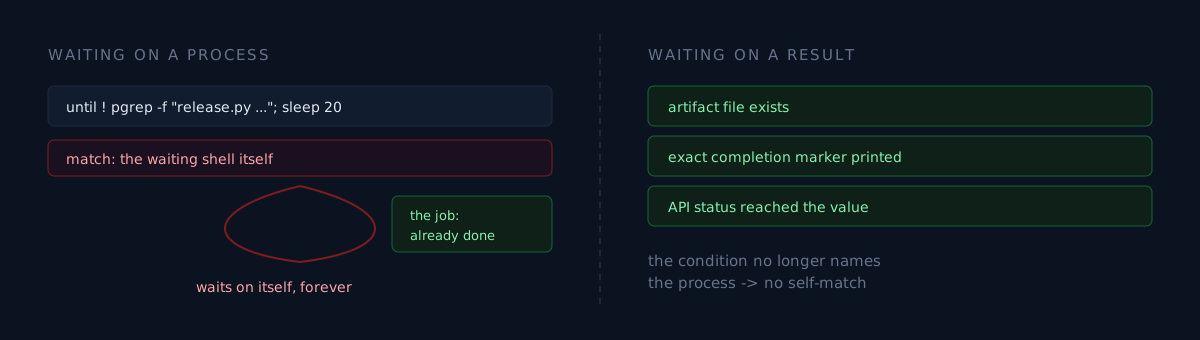
until ! pgrep -f "release.py release <app>" >/dev/null; do sleep 20; doneThat loop never ends.
Is your wait condition watching "the job finished," or "that string exists somewhere"?
Why it hangs
pgrep -f matches the full command line, not the process name.
And the shell running this until loop has release.py release <app> in its own command line — because I typed that string into the condition.
So:
- The loop calls
pgrep -f "release.py release <app>" pgrepfinds the shell running the loop- The condition holds, so it sleeps 20 seconds and goes back to step 1
It waits on itself for as long as it is alive.
The symptom is plausible in the worst way
If this crashed, I'd have caught it in thirty seconds. Instead the bug presents as "the job isn't done yet." Which looks perfectly healthy.
So I reported the wrong state. The build had already passed and I said we needed twenty more minutes. By the end of the session there were five of these ghost shells stacked up, each waiting on itself.
Narrowing it, and doing better
You can narrow the pattern to get past this instance — include the interpreter, since the waiting shell is zsh and not python:
pgrep -f "python.*release\.py"But that mostly books the next round of the same trap. I had already fixed this form once and then used it again on a different job. It's a reflex form; that's why.
What would you do?
You need to wait for a job. What do you make the condition?
- The process is gone — what I was doing. Besides the self-match, a vanished process doesn't mean success. Something that died is also gone.
- The log has no errors —
grep -iE "error|fail"matches linker flag names (-no_warn_duplicate_libraries) and deprecation warnings. Not grounds to report failure. - The result you wanted exists — an artifact file, an exact completion marker, or a status value from an API.
The third. And choosing the third means you stop typing the searched-for process name into the condition, so the self-match problem disappears with it.
The real answer here: I didn't care whether the build tool had exited. I cared whether the store had judged that build valid. The local process was never the right thing to ask.
Three checks
- Does your
pgrep -fpattern also appear in the command line of the shell running it? If so, that wait will not end. - Are you deciding completion by process existence? A vanished process is neither success nor failure. It carries no verdict.
- Is your log watch a word search?
errorandfailshow up in healthy build logs all the time. Print an exact completion marker and watch only that.
The honest part
Shells hanging quietly has happened before — why moving files hung. The same false positive existed in my log watching, and it also produced a wrong "it failed" report. Both share a cause: mistaking the signal that's easy to observe for the signal you want.
Process lists and log strings are easy to observe. "Did the store accept this build" costs one more API call. Trying to save that one call cost twenty minutes and five ghost shells.