How does your static-site deploy script know that its source is current?
I thought mine did. The files were in the repo. Git was tracking them. The deploy script itself lived in the same repo. All three were true, and calling that script would still have broken the site.
It was a one-line fix
I had to correct a single factually wrong sentence in an app's privacy policy. Genuinely one line. I opened the HTML in the repo, changed the wording, then fixed the same wording in the other apps that had it, and while I was in there I unified a contact address and a copyright line — so I ended up touching 175 files. Ordinary so far.
One habit saved me right before deploying: pull live and compare before pushing.
Honestly it wasn't a habit so much as a scar. This site bit me once before, when a deploy script was pointing at the wrong project entirely (that story), and ever since I've treated "download before upload" as a rule for this domain.
That time the destination was wrong. This time the source was.
Zero out of 178 matched
I tarred up the live copies of every file I was about to change — 178 of them — pulled them in one shot, and diffed each against the repo's HEAD version byte for byte.
live == repo HEAD : 0 files
live != repo HEAD : 178 files
Not a single match. And the differences all leaned the same way.
flara/privacy.html      HEAD   8365   LIVE  58287  (+49922)
cyra/privacy.html       HEAD   7826   LIVE  57521  (+49695)
zone2/privacy.html      HEAD   4301   LIVE  55156  (+50855)
peritrack/support.html  HEAD   1991   LIVE  52720  (+50729)
Live was 48,000–52,000 bytes larger per page. Push the repo files and every page loses about 50KB. Across 170-odd pages.
What the 50KB was
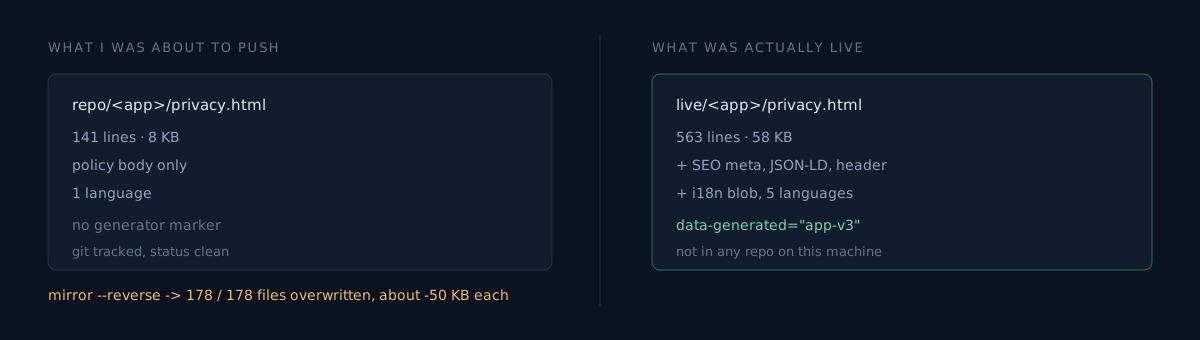
Opening a live file made it obvious: this was a completely different generation of the site.
| Repo | Live | |
|---|---|---|
| Lines | 141 | 563 |
| Marker | none | <main data-generated="ootssu-app-v3"> |
| Contents | policy body only | SEO meta · JSON-LD · site header · language switcher · translation blob |
| Languages | English | five |
data-generated="ootssu-app-v3". At some point a generator was introduced, it lifted the site a level, and the repo still held the generation before it. There is no "switched to the generator" commit on the repo side, because the generator publishes straight to live without passing through it.
Most of the 50KB was an inline translation blob called window.OOTSSU_I18N — roughly 12KB, 62 keys per language.
And there was a second twist
The moment I saw the translation blob I assumed the worst: if the bad sentence is duplicated across five languages, this is a five-times-bigger job.
So I parsed the blob and scanned every language for the problem words. The result wasn't what I expected. Exactly one Korean value matched, and here is what that key said:
The detailed section below preserves the official source text for this app's data handling and support information. The page chrome and summaries are localized.
The blob localizes navigation and summaries only. The policy body stays in the original English. Which meant correcting the wording was one edit in English, full stop.
This matters because the error was survivable in only one direction. Had the blob localized the body too, I would have fixed English, declared victory, and left a false statement standing in four other languages. A fix applied without checking the structure is a performance of a fix.
I almost called the deploy script without reading it
Here is the upload script that lives in the repo:
lftp -u "${USER},${PASS}" -p "${PORT}" "${PROTOCOL}://${HOST}" <<EOF
mirror --reverse --verbose \
  --exclude-glob upload.sh \
  --exclude-glob .DS_Store \
  "${LOCAL_DIR}" "${REMOTE_PATH}";
EOF
mirror --reverse. Not a script that uploads one file — a script that mirrors the entire tree. There is no --delete, so nothing on the remote gets removed. That makes it look safe. It is not safe: every file that differs from local gets overwritten. With the older generation.
Calling that to fix one line would have reverted the whole site to pre-v3. And the one line I set out to fix would have been fixed perfectly.
What would you do at that point? Go hunt for the generator's source and fix it there, or treat live as the canonical copy?
I treated live as canonical
The generator's source isn't on this machine. It's probably on another one, but I couldn't confirm that. So:
- Pull the live copy of each file I need to change.
- Apply the substitutions to those copies — not to the repo's.
- Push them back.
- Verify by grepping on the server, plus one real browser check.
Step 3 bit me again. Calling scp per file in a loop died at about the eighth with Connection closed, and SSH itself refused connections for a little while — the host throttles rapid consecutive sessions. Switching to a single-session tar pipe did all of them at once.
tar czf - -C <local> a.html b.html c.html \
  | ssh <remote> 'tar xzf - -C ~/public_html'
The "real browser" in step 4 wasn't optional. This domain sits behind a CDN that serves a challenge 403 to non-browser clients, so curl cannot tell you whether a deploy landed. I needed both halves: grep the files on the server to confirm the content, and open one page in a browser to confirm the CDN wasn't still handing out a stale copy.
The honest part
This deploy can be overwritten by the next generator run. I edited the live output directly and never touched the generator's input. When the source turns up, the same wording has to be corrected there too. Until then this fix is provisional.
The repo is also still stale. What I committed was the string substitution that brings the repo in line with live conventions; the generation gap is untouched. Which means the next person can walk into the same trap — and the script in the repo still mirrors the whole tree. That's an open item, not a finished one.
A three-minute self-check
Try these three on your own static site right now.
- Download any one page from live and compare its byte count with the repo copy. Same?
- Open your deploy script and read the arguments after
mirrororrsync. Does it push one file, or the whole tree? - Open the live HTML and look for a generator marker like
data-generated. If there is one, is that generator's input in your repo?
A file being under version control doesn't mean it's the current one. Neither does a clean git status. If any of those three catches you, pull live before your next deploy.
If question three turned something up, I'd like to hear what the marker was — I want to know whether generators bypassing the repo is just my problem.