When did you last look at your app's store privacy label? And does it agree with your database schema?
I filled mine in at launch and never opened it again. For four months.
Someone else raised it; the schema settled it
An anonymous tip listed EU regulatory concerns about my apps (that story). One of the eleven points read:
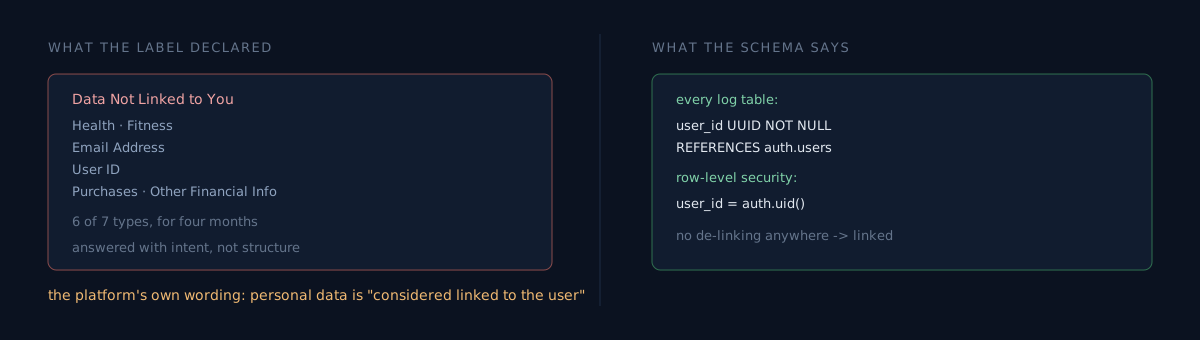
The store privacy label states that health data, email address and user ID are collected but not linked to the user. Your privacy policy, however, states that all logs are stored and synchronised through an authenticated account.
That is an easy kind of claim to check. Open the migration.
user_id UUID NOT NULL REFERENCES auth.users ON DELETE CASCADEEvery log table. And one row-level security policy for all of them:
CREATE POLICY "users_own_data" ON %s FOR ALL TO authenticated
  USING (user_id = auth.uid()) WITH CHECK (user_id = auth.uid())
There is no de-linking anywhere. The linkage is the feature — you sign in to see your own records.
So the label was wrong.
What was actually declared
I opened the console. It was worse than I expected.
App A (skin diary): Health, Fitness, Email Address, User ID, Purchases, Other Financial Info — all under "Data Not Linked to You." Of seven types, only Crash Data was Linked.
App B (PCOS tracker): all seven categories Not Linked. The Linked column was empty.
App C (menopause tracker): all six Not Linked. And for an app that tracks symptoms, the Health data type wasn't declared at all — only User Content.
App D (perimenopause tracker): nine types, all Not Linked.
I can guess how it happened. The wizard asks "is this data linked to the user's identity?", and when you read that question the night before shipping, it reads as "do you use this to track users?" There's no ad SDK and no intent to track, so "No" comes naturally. The question isn't about intent. I answered it with intent.
Apple wrote the decisive evidence
Opening the dialog to fix it, the second step's body text said this:
Data collected from an app is usually linked to the user's identity via these means, unless specific privacy protections are put in place before collection to de-identify or anonymize it (...)
Note: "Personal Information" and "Personal Data", as defined under relevant privacy laws, are considered linked to the user.
That is the same claim the tip made. And it isn't a third party's interpretation — it's the platform's own definition. If you didn't break the linkage before collection, it counts as linked. I never did.
There was nothing left to argue.
It isn't in the API
I went looking for an API first. Forty-four apps.
GET /v1/apps/{id}/appDataUsages            -> 404
GET /v1/apps/{id}/appDataUsagesPublishState -> 404
I dumped the app resource's full relationships list. accessibilityDeclarations, appTags, webhooks, searchKeywords are all there — and not one privacy or data-usage entry. There is no way to script it. Console UI only.
What would you do? Click through forty-four apps, leave it until review catches it, or fix only the most sensitive ones?
There is one piece of good news
Label changes publish immediately, independent of version submission. It works even while an app is waiting for review. No binary, no review queue. The moment you hit Publish, the store page changes.
That matters because a wrong label is not the kind of debt you "carry along in the next release." You can fix it today. Which removes the excuse for postponing it.
Five steps per data type:
- Purposes (leave App Functionality)
- "Linked to the user's identity?" → Yes
- Tracking definitions (read only)
- Tracking examples (read only)
- "Used for tracking?" → No (no ad SDK) → Publish
I fixed three apps this way. When you're done, the "Data Not Linked to You" column disappears entirely and everything moves to Linked.
Two things that bit me in automation
I drove it with browser automation, and got bitten twice.
One. Chaining two data types in one batch fails. Hitting Publish re-renders the page, and the element reference you captured beforehand points at something else. I hit this on the fourth app — the dialog never opened, and fortunately nothing had been applied, so there was no half-written state. You have to re-resolve the reference after each type.
Two. The Publish button's x coordinate moves. The dialog width follows the title length. "Health" is at 1006, "Purchase History" at 1045, "User ID" at 995. Hardcode the coordinate and you quietly click empty space.
The second one is scarier, because failure produces no signal.
The honest part
I fixed three of roughly sixteen health-data apps. At 20–30 clicks each I couldn't finish in a day. The rest are still shipping a wrong label.
And you must not flip everything in bulk. Games with no account, on-device-only tools — for those, "not linked" is genuinely correct. The label needs a per-app judgement, which is another reason a script wouldn't have been enough even if the API existed.
I also left the menopause tracker's undeclared Health type alone. Adding a data type is a judgement about what the app actually collects, and that's a different kind of decision from flipping a linkage answer.
A three-minute self-check
- Open your privacy label and read the "Data Not Linked to You" list. Is anything on it stored in a table with a user foreign key?
- Actually read the wizard's step-two body text. Did you ever put protections in place before collection to break the linkage? If not, the answer is decided.
- Do the label, the web policy, the in-app copy and the store description all say the same thing? That's four places.
Number one takes one look at a schema. I only did it after a stranger pointed at it.
If you check right now, tell me how many items disagreed with your schema. Mine was six out of seven.