Screens that require a signed-in session can't simply be launched in a simulator. So I extract the screen as a value-only view and render it to PNG from a unit test. The point is to look at pixels and check the design. Splitting the view out is better structure anyway.
Then I hit the strangest one. I rendered a fully transparent screen and the previous test's drawing came back.
Is your render check watching "something was drawn," or "it was drawn this time"?
The renderer returns the previous result
When the content is entirely transparent, the renderer doesn't produce a new image — it returns the previous render.
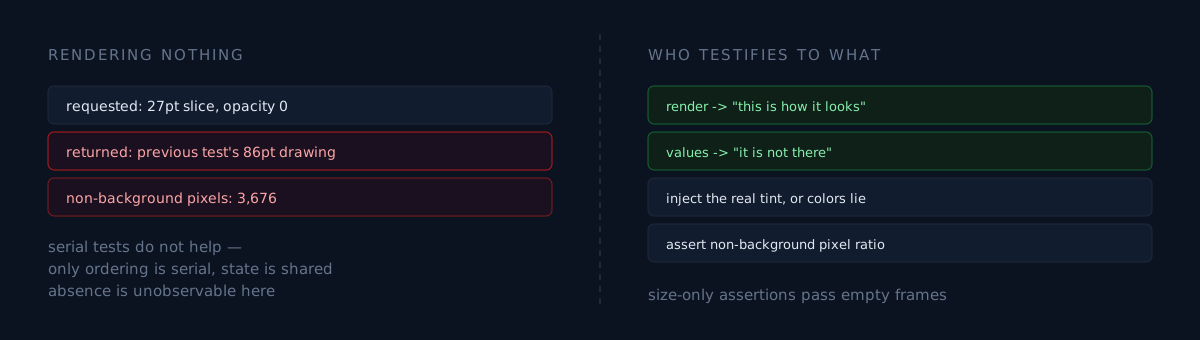
I baked a 27pt slice at zero opacity and got the prior test's 86pt drawing, 3,676 pixels of it. Same coordinates, same size, so I spent a long while on "why won't this disappear."
Another case of a lying render check: screenshots contaminated by another app. Running tests serially doesn't prevent it either. Only the ordering is serial; renderer state is shared.
The conclusion: "empty screen" and "fully gone" must be checked with value tests, and render captures should only be trusted for what is visible.
Three more traps from the same pipeline
Environment variables don't reach the test process. Passing an output path from the shell didn't work; neither did a dedicated prefix. I switched to writing into a temp directory and printing the path, then opening that path from the host.
Without the tint, colors lie. In the real app, a sheet inherits the parent tab view's tint through the environment. An isolated render has none, so you get system blue — perfectly shaped to be misread as a color bug.
Assertions that only check dimensions pass an empty screen. "A 1200×340 PNG came out" says the canvas is that size and nothing about its content. Take the top-left pixel as the background color and also assert the ratio of pixels that differ from it.
What would you do?
You need to confirm an element is gone. How do you look?
- Render it and look — a transparent render returns the previous picture. Absence is unobservable this way.
- Assert dimensions — an empty screen passes.
- Check values — assert through state or the view tree that the element isn't built.
Only the third. And that isn't a workaround, it's a division of labour: renders testify to "this is how it looks," value tests testify to "it isn't there."
Three checks
- Are you verifying transparent or empty screens by rendering? The renderer may hand back the previous result. Prove absence with values.
- Does your isolated render receive the real app's environment (tint, fonts, dynamic type)? Without it, colors and sizes differ from production.
- Does your PNG assertion only check size? Add the ratio of pixels differing from the background.
The honest part
For the transparent-screen case I concluded "this can't be verified by rendering." That isn't a workaround — it's giving up a verification method.
And this pipeline cannot tap anything. The simulator CLI has no tap subcommand, and unit-test renders have no interaction. So the furthest question this pipeline answers is "how does this state look." "Does this button work" still needs a different tool.