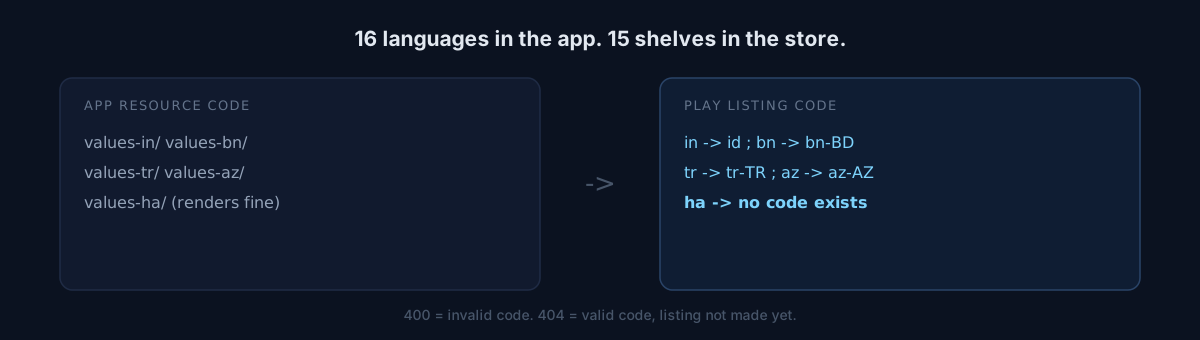
One Android app supports 16 languages. After uploading store listings, 15 existed.
Are you passing your app's resource folder names straight into store listings?
The two systems are not the same
| Code the app uses | Code Play wants |
|---|---|
in (Indonesian) |
id |
bn |
bn-BD (bare bn is rejected) |
tr |
tr-TR (bare tr is rejected) |
az |
az-AZ (bare az is rejected) |
en |
en-US |
| Hausa | none — rejected under every code |
Indonesian is the cruel one. Android resources use in for historical reasons; Play wants id. Pass the folder name through and you get a silent failure or an outright rejected upload.
A language with no shelf
The last row is the surprise. The app renders correctly in Hausa, but the Play store page does not support that language at all.
A user in that market lands on the English page automatically. The product is ready and the shelf does not exist.
You can pay for translation, ship the app in that language, and its speakers will still decide whether to install based on English copy. No code change fixes that.
Here is where it splits
You need to know which codes are valid. Dig through the official documentation, or ask the API?
The API was faster and more accurate. Documentation and behaviour can differ in small ways.
service.edits().listings().get(
    packageName=pkg, editId=edit_id, language=code
).execute()
# 400 -> invalid code
# 404 -> valid code, listing not created yet
That distinction is the whole trick.
- 400 means "no such code."
- 404 means "the code is fine, you just have not made this one yet" — a normal state.
Confuse them and you either abandon a language you could serve or keep hammering one you cannot.
A successful upload is not a persisted value
An upload answering "success" is not the end. After every upload I read the listing back and compared sent values to returned values field by field.
A successful commit response does not guarantee the value landed. A field that gets dropped silently never shows up in a status code.
Self-check
- Do your app resource codes and store listing codes come from the same value? Is there a mapping table?
- Does your listing count exactly match your supported-language count? One short is the signal.
- Do you read back and compare after upload, or stop at a 200?
The honest part
I kept the Hausa store screenshots instead of deleting them, in case Play adds the language later.
Honestly, I have no evidence that day is coming. I kept them because keeping them is cheaper than throwing them away.
Count your store listings right now. If the number differs from your supported languages, every missing one is somewhere in that table.