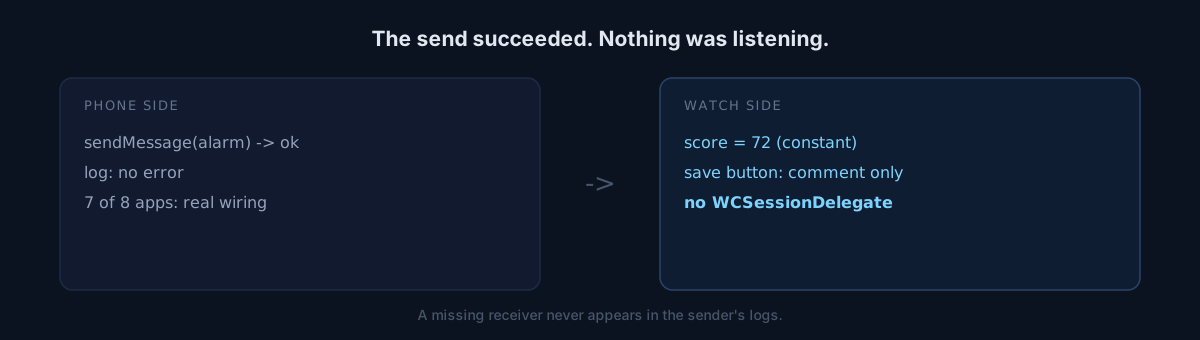
Before writing "watch app included" into a store listing, I decided to verify it. Eight apps ship a watch app.
Seven were really wired. One was not.
When did you last confirm that values actually move between your app and its companion surface — watch, widget, extension?
The screen looked fine
The app in question shows a sleep recovery score. The watch screen had a number on it, a "Save" button, a sane layout. From a screenshot it looks finished.
Then I opened the code.
@State private var score: Int = 72   // same number for every user
Button("common.save") { /* WCSession message to phone */ }   // body is a comment
The recovery score was a constant. Every user saw 72. New users with no baseline data — users for whom a score cannot exist — also saw 72.
The real scorer, RecoveryScorer.score, returns nil when the baseline is under seven nights. So this screen was showing a number to people whose correct answer was "no score yet."
The "Save" button's body was a single comment. Read quickly and you take that line for code.
The sending side logs success
The decisive finding was elsewhere. The watch target had no WCSessionDelegate at all.
The phone was sending a "schedule smart alarm" message every time. Nothing was listening. And the sender has no way to learn that — the send is recorded as successful and the logs are clean.
The absence of a receiver never shows up in the sender's logs.
Here is where it splits
Eight apps share the same pattern: phone-watch sync. One turned out to be a shell.
Would you reopen the other seven, or close this as an exception?
I reopened them. All seven were really wired — one shell is no basis for suspecting the rest. The risk ran the other way: "there's a watch app, so of course it works" nearly made me skip this one. The only reason I opened all eight was that I was about to write a claim about them.
Fixing it surfaced two more
Harder to find than "no watch app" is "watch app exists but the updates stop," because the screen is sometimes right.
WatchSessionRelay.sendchecked reachability and usedsendMessageonly. That path lands only while the watch app is in the foreground. In the background the message evaporates.updateApplicationContexthas to be refreshed alongside it so the value is at least readable on next launch.- The alarm settings push sat after a "is the feature enabled" check. When a user turns the alarm off, the watch never hears about it and keeps showing a disabled alarm as enabled.
One more lesson. Exposing a paid phone setting as writable on the watch is a paywall bypass in itself — purchase state lives on the phone, so if the watch can change the value, a watch-only user effectively gets it free. The watch alarm screen is read-only now.
Self-check
- Is any value on your companion screen a constant? A screenshot cannot tell you.
- Forget the sending target: does the receiving target actually have a delegate?
- Check symbols in
.debug.dylib, not the top-level executable. The top-level binary reports zero symbols and you conclude "there is no code."
The honest part
I do not know how long this app was in that state. Commit history suggests the watch target shipped as a placeholder from the start, but I cannot confirm it, so I will not say "for months."
The fix is in review, and the same version dropped other false claims from the store listing — that became its own post.
Open one companion screen in your own app and trace, in one step, where the number on it comes from.