Does your app's failure screen state the cause, or guess at the most common one?
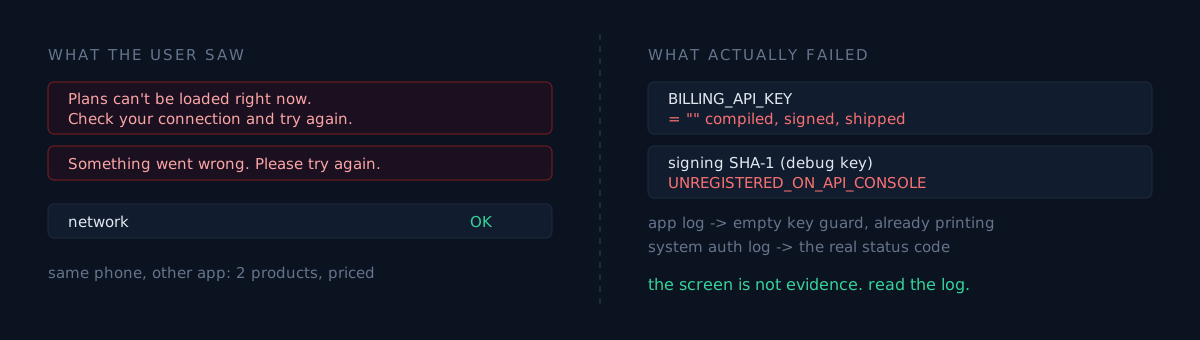
Yesterday two production apps reported failures. Both on-screen messages pointed at the network. The phone was fine in both cases. One real cause was in the build, the other in a console setting, and both times the answer sat in the device logs rather than on the screen.
First: "Plans can't be loaded right now. Check your connection"
That message appeared on the paywall. Wi-Fi was connected, and other apps on the same phone worked.
I split the possibilities three ways: the phone or account, the store's product setup, or the app's build. So I launched a different app on the same phone — one that uses the same billing SDK — and read its logs.
Requesting products from the store with identifiers: ...pro.yearly, ...pro.monthly
Retrieved productDetailsList: ... "formattedPrice":"₩2,500" ...
Building offerings response with 2 products
Billing connected with country code: KR
Two products came back with prices. The phone, the account and the network were cleared.
Then I launched the failing app and read its logs. One line was the whole answer:
E ...Paywall: REVENUECAT_API_KEY is empty — purchases will not workThe app already knew. Its own guard was printing the exact cause, and the screen was painting "check your connection" over it.
I opened the shipped APK to confirm
Rather than trusting the log alone, I checked the artifact that actually went to the store. I pulled the APK off the phone and grepped for the billing key format (goog_ prefix).
There was exactly one match: goog_1a2b3c4d5e6f7h. Not a real key — it's the example string the billing SDK uses inside its own error messages ("your key should look like this"). The working control app's APK contained the example string and a real key. The failing app had only the example.
So the release build compiled the key as an empty string, and that build went all the way to the store.
Why the build passed
The key is read at build time from a local properties file and baked in as a constant. It looks like this:
buildConfigField("String", "REVENUECAT_API_KEY",
    "\"${localProps.getProperty("REVENUECAT_API_KEY", "")}\"")
The second argument is a default of empty string. If the build machine doesn't have the value, it compiles to "" without a single warning, and compiling, signing, uploading and review all pass. The only place it fails is a real user opening the paywall.
This is where the fork is. Do you write "don't forget the key" into the build docs, or do you make the build fail when the value is blank?
The docs already said it. So I put it in code:
gradle.taskGraph.whenReady {
    if (allTasks.any { it.name.startsWith("bundleRelease") } && rcKey.isBlank())
        error("REVENUECAT_API_KEY missing — release blocked")
}
A rule a human has to remember will break at least once. If the rule is checkable, converting it into code that checks is the only version that survives. The same paywall once sold a feature that wasn't there because one locale went unfixed. Nobody opens the paywall every day.
Second: "Something went wrong. Please try again"
Different app, Google sign-in button. Tapping it produced that message. This time the account chooser appeared normally, then closed on failure. The app log held only this:
E AuthViewModel: Google sign-in failure
androidx.credentials.exceptions.GetCredentialCancellationException: [16] Account reauth failed.
Reading the first line of an error as the cause gets you fixing the wrong thing. It happened here too.
Cancellation, reauth failed. Read literally: the user cancelled, or the account needs re-authentication. Both read as not the app's fault. If you only look at the app process log, you stop here.
So I dropped the app filter and swept the system authentication service's logs for the same seconds. The cause was in lines written by Google Play services, not by the app.
W Auth.Api.Credentials: [AccountReauth_flowRunner] Flow failed.
W Auth.Api.Credentials: cpwk: [8] Unknown error [status=UNREGISTERED_ON_API_CONSOLE].
W Auth.Api.Credentials: cpwk: [16] Account reauth failed.
UNREGISTERED_ON_API_CONSOLE — this app's package name plus signing fingerprint is not registered in that cloud project. The [16] the app saw was that failure translated one layer up, and "something went wrong" flattened it once more.
I checked the signature on the installed build:
$ apksigner verify --print-certs base.apk
Signer #1 certificate DN: C=US, O=Android, CN=Android Debug
Signer #1 certificate SHA-1 digest: 92a3...7bb3
Debug-signed. Issuing a sign-in token needs more than the web client ID: the calling app's package name and signing fingerprint have to be registered in the console. Debug keys usually aren't. So this particular failure only hits locally installed test builds — and if the same message appears on a store build, the missing fingerprint is the Play app-signing key instead.
All three fingerprints need registering: the debug key, the upload key, and the app-signing key Play re-signs with. Miss one and sign-in dies only for builds installed through that path.
What the two failures share
The causes have nothing in common — one is a build artifact, one is an external console setting. What they share is that the message shown to the user pulled the diagnosis in the wrong direction.
- "Check your connection" → the real cause was a constant that went empty at compile time
- "Something went wrong" → the real cause was a fingerprint missing from a console
In both cases an accurate cause string existed at the point of failure: once in the app's own log, once in a system service's log. It just got erased on the way to the screen.
Three self-checks
- Does your release build pass with an empty secret? Blank the properties file and run a release build. If it succeeds, your app may already have shipped that way.
- Does the shipped artifact contain the real value? Grep the file you uploaded, not the source. Correct source is not evidence of a correct build.
- Does your failure screen separate causes? If a configuration error, a user cancellation and a genuine network error collapse into one string, the next report costs you the same hours.
The honest part
Both of these lived in that state for days. Because the failure screen pointed plausibly at the network, the reports got filed as "probably transient". For the app with the empty billing key, purchases were structurally impossible that entire time.
What actually saved time was the order of elimination: clear the network and account with a different app on the same phone, read the app log, then inspect the uploaded artifact and its signature directly. The on-screen message is not evidence.
Try just one thing: connect the phone, leave adb logcat running, and open the failing screen once. Both times the answer was within the first screen of scroll.