I added a feature, built, installed on a physical device, opened the app — and the entry point wasn't there.
What do you suspect first? I suspected the code. Conditional visibility, a flag left off, a different build configuration. I dug there for a while.
This was the iguana mini-game in Purro, and it showed up fine in the simulator. It was missing only on the iPhone 16 Pro.
A strange combination
To state it plainly:
- Simulator screenshot: matches the code. New entry point visible.
- Device: same commit, same command, installed. No entry point.
That combination is itself the clue. If the code were wrong, the simulator would be wrong too. The two diverging means they are looking at different artifacts.
What the install command picked up
The device install looked like this:
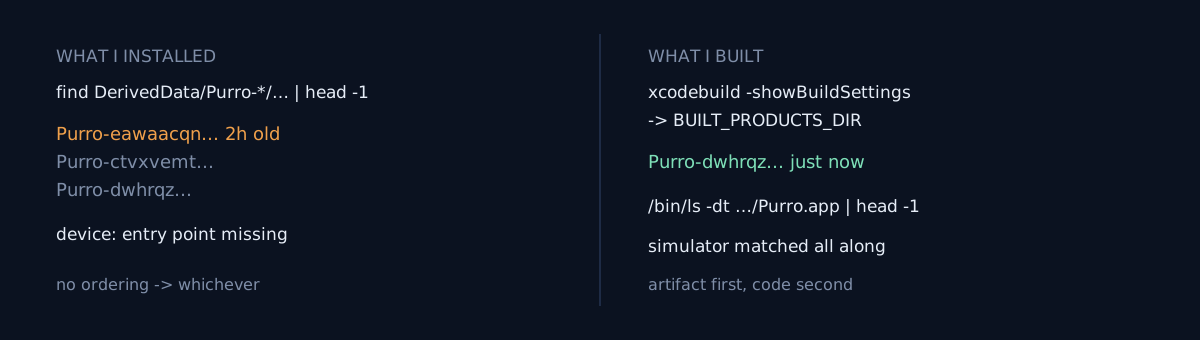
find ~/Library/Developer/Xcode/DerivedData/Purro-*/Build/Products/Debug-iphoneos/Purro.app | head -1And that app had three DerivedData folders:
Purro-ctvxvemt…
Purro-dwhrqz…
Purro-eawaacqn…
find does not return them newest-first. head -1 just takes one of them, and this time it took Purro-eawaacqn… — a build from two hours earlier, before the iguana work started. Install that and of course there is no entry point.
The code had been right the whole time. I had been reading correct code.
Why there are several folders
The hash after the app name in a DerivedData folder derives from the path of the project file. So the same app gets a new folder whenever:
- you move or copy the project to a different path,
- you build from a worktree or a second checkout,
- a symlink in the path makes it resolve differently.
Old folders are never cleaned up automatically. They sit there and quietly get matched by any script that locates things with a path pattern.
What would you do here?
Two branches:
- Delete all DerivedData and rebuild.
- Determine which folder the build you just ran wrote to, and install from that path.
Option 1 fixes today and recurs tomorrow. Folders multiply again, and head -1 picks arbitrarily again. I switched to option 2.
Getting exactly the artifact you just built
Three ways, most authoritative first.
1. Read it from the build log. The xcodebuild run you just did prints the path it actually used. This is the surest source.
2. Ask the build settings directly.
xcodebuild -showBuildSettings … | grep BUILT_PRODUCTS_DIR3. In a hurry, sort by mtime.
/bin/ls -dt ~/Library/Developer/Xcode/DerivedData/Purro-*/Build/Products/Debug-ipho*/Purro.app | head -1The difference from find | head -1 is one flag: -t. That one character separates "whichever" from "most recent."
Three things to check
- Do your install or upload scripts locate
.app/.ipa/.aabby path pattern? If so, is there any ordering? - How many DerivedData folders does that app have right now? (
ls -d …/DerivedData/<App>-*) - What is your evidence that the app on the device is the one you just built? Surfacing version and build number somewhere in the UI answers this in one second.
The honest part
The expensive part wasn't the lost time — it was the order of suspicion. Start from "is the code wrong" and you can dig forever, because code always looks a little suspicious.
So I made a rule: when the simulator matches the code and only the device disagrees, look at the install artifact before the code. If two environments diverge from one source, the divergence isn't in the source.
Same family as 200 Tests Passed and the Button Did Nothing. There I had to verify the path rather than the engine; here I had to verify the artifact rather than the code.
Do one thing right now: run ls -d ~/Library/Developer/Xcode/DerivedData/<YourApp>-*. Do you get exactly one line?