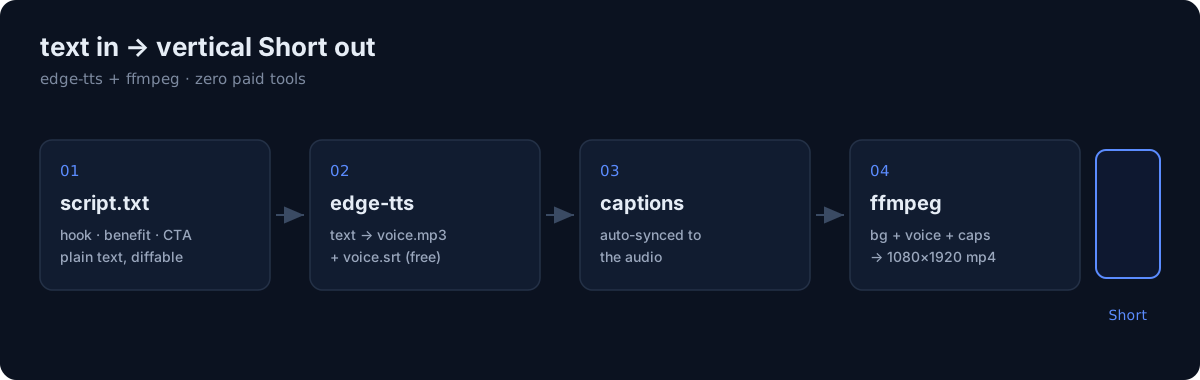
The video that introduces this pipeline was made by this pipeline. No human touched a timeline.
I run a bunch of small web apps, and I wanted short promo and content videos for them without paying for a stack of SaaS tools or spending an evening in a video editor per clip. So I built a pipeline: text in, a ready-to-upload vertical video out. Here's exactly how it works, and — the part most "automation" posts skip — what it actually did and didn't solve.
The stack (zero external accounts)
Three pieces, all free, no API keys, nothing that phones home:
- edge-tts — text-to-speech. Free, no key, dozens of voices.
- cairosvg — rasterizes SVG icons/marks to transparent PNG (ffmpeg can't take SVG directly).
- ffmpeg — composites everything into a 1080×1920 H.264 clip. Installed via the
imageio-ffmpegPython package so I get a known-good static binary instead of fighting the system one.
That last choice matters more than it looks — I'll come back to it.
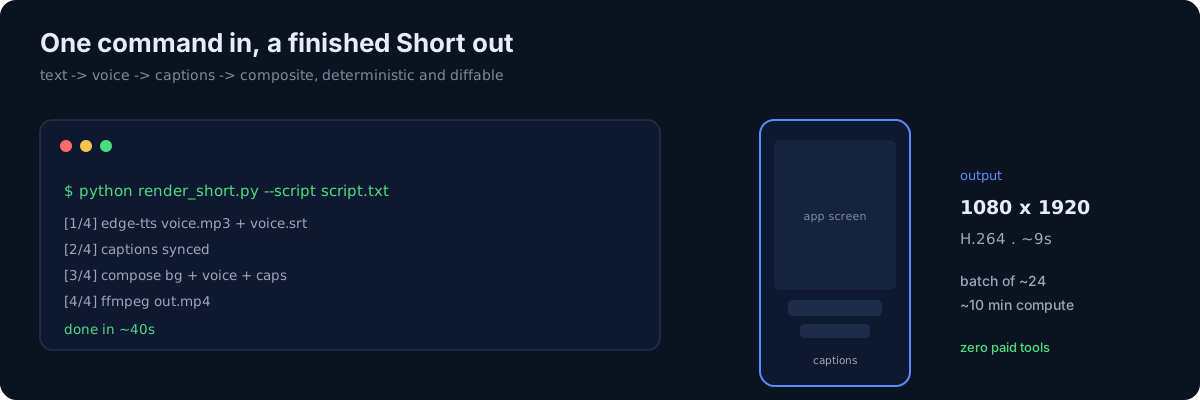 One command runs the four-step render — a 1080×1920 Short in about 40 seconds.
The four steps
1. Script → plain text
Each video starts as a tiny script file: a hook line, a benefit line, a call to action. Keeping it plain text means the rest of the pipeline is deterministic and diffable.
2. Text → voice with edge-tts
edge-tts \
  --voice ko-KR-SunHiNeural \
  --text "$(cat script.txt)" \
  --write-media voice.mp3 \
  --write-subtitles voice.srt
The nice part: edge-tts writes the SRT for me, so caption timing comes for free. For Korean I break lines with word-break: keep-all rules so captions never split a word mid-syllable.
3. Captions synced to the audio
Because the SRT is generated from the same synthesis pass, the caption segments already line up with the audio. No manual timing, no whisper step. I just restyle the segments (per-line, big, high-contrast) at composite time.
4. Composite with ffmpeg
The layout is a hook card → app screenshot cuts → a CTA, cross-faded together, with a phone mockup frame, a subtle zoom on each cut (zoompan), on-screen captions, and a music bed with sidechain ducking under the voice.
ffmpeg -i bg.mp4 -i voice.mp3 \
  -filter_complex "[0:v]scale=1080:1920,zoompan=z='min(zoom+0.0005,1.1)':d=125[v]" \
  -map "[v]" -map 1:a -c:v libx264 -preset veryfast -crf 22 -t 9 out.mp4
Output: 1080×1920, H.264, ~9 seconds, rendered in roughly real-time-and-a-half. A batch of a couple dozen clips is about ten minutes of compute on my machine.
Two gotchas that cost me real time
overlayhas noalpha=option. If you want a layer to fade in, you fade the source withfade=alpha=1, not the overlay. I burned an hour assuming symmetry that isn't there.- The system ffmpeg was quietly broken (a shared-library soname drift), and the usual download mirror was DNS-blocked on my network. Pulling a static binary through
imageio-ffmpegsidestepped both. On a recent Python, betting on a static ffmpeg beats betting on video wheels compiling.
Multilingual for near-free
The same script, re-voiced, gives me language variants. The trap is fonts: the CJK system fonts live at paths with spaces and non-ASCII characters, and ffmpeg's drawtext chokes on those. Fix: copy the font to an ASCII-named file and point drawtext at that. After that, Japanese renders cleanly — no tofu boxes.
The honest part: production was never the bottleneck
This is where I'd push back on the whole "money-printer" genre. Yes, I can now generate a finished Short in seconds instead of an evening. But making the video was never what stood between me and results. Reach was. A pipeline that outputs 50 clips doesn't get you 50 clips' worth of views — the algorithm, the niche, and platform authenticity rules decide that, and none of them care how fast you rendered.
I only learned that by actually publishing and reading the numbers, which is its own post. If you take one thing from this: automate production to lower the cost of trying, not because automation is the thing that pays.