Right after auto-listing 124 products, the next problem arrives: who handles an order when one comes in?
For a one-person store, everything after the order is riskier than listing. Miss an order and you get a late penalty; confirm without checking supplier stock and you get an out-of-stock cancellation; mark shipped without a tracking number and that's a false dispatch; cancellations, returns and exchanges are money leaving.
So I built an order monitor. The first version was not built to last.
v1: driving a logged-in browser
The fastest thing to build was reusing the seller-console session already logged in.
- Drive the browser via AppleScript
- Open or reuse the seller console's order page
- Call the internal GraphQL endpoint for the order list
- Push new orders to Telegram with inline approve/reject buttons
- Auto-approve after 5 minutes of no response
Half a day of work. And it was equally obvious why it wouldn't survive.
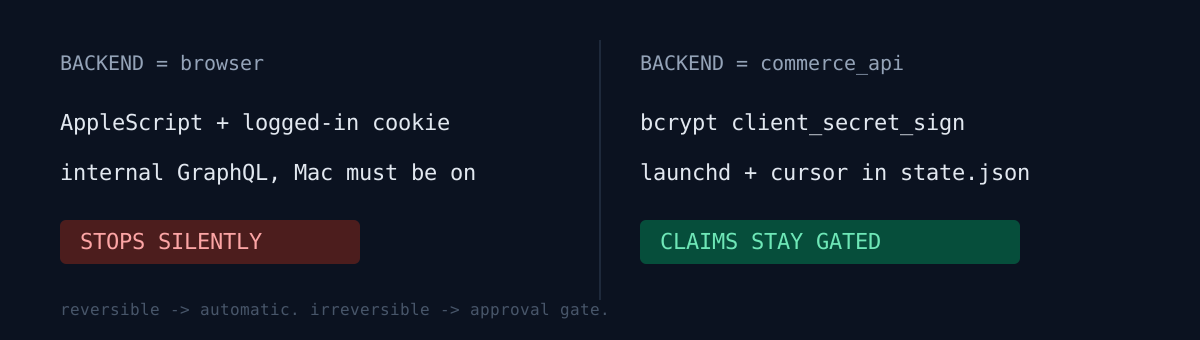
- The Mac must be on and logged in
- Expired cookies stop it silently
- AppleScript times out
- It's not a public interface — an internal UI change kills it
Would you have left it there? It did work, after all. But "works" and "runs unattended with money attached" are different bars. For a notification bot I'd have shipped it; this thing presses order-confirm on my behalf.
v2: the official commerce API
Naver's Commerce API exposes SmartStore over HTTP. The endpoints in use:
GET  /v1/pay-order/seller/product-orders/last-changed-statuses
POST /v1/pay-order/seller/product-orders/query
POST /v1/pay-order/seller/product-orders/confirm
POST /v1/pay-order/seller/product-orders/dispatch
POST /v1/pay-order/seller/product-orders/:id/claim/cancel/approve
POST /v1/pay-order/seller/product-orders/:id/claim/return/approve
I didn't delete the old path — I put a backend switch on it.
ORDER_OPS_BACKEND=commerce_api # or browserKeeping the old backend gives you somewhere to fall back to when the new one is blocked on auth or permissions. I needed it once mid-migration.
Auth gotcha — you never send client_secret
This is where the hours went. It's OAuth2 client credentials, but the raw client_secret is never sent.
Token flow:
- Join
client_idand the current timestamp with an underscore - bcrypt-hash that string using
client_secretas the salt - base64-encode the result
- Send it as
client_secret_sign - Use the returned access token as
Authorization: Bearer
The request shape is picky too:
POST /v1/oauth2/token,Content-Type: application/x-www-form-urlencoded- body:
client_id,timestamp,client_secret_sign,grant_type=client_credentials,type=SELF - With
type=SELFyou must not sendaccount_id; onlytype=SELLERneeds one.
The timestamp hashed into the signature must be the same value you put in the body, and required fields change with type. Those two are the classic failure points. Signature-based auth has to be followed literally, on any platform — I burned time on the same class of gotcha with a brokerage API.
The polling loop and the state file
One cycle in commerce-API mode:
last-changed-statusesfor changed product orders- Collect the changed product order IDs
product-orders/queryfor details- Classify: new order or claim
- Telegram notification
- Approval or timeout → confirm API
- Tracking number arrives → dispatch API
State lives in a single state.json: orders already seen, orders awaiting approval, the Telegram update offset, and the timestamp of the last change query. That last field is the important one. Without it, every restart shifts the query window and you either miss orders or reprocess them. A polling cursor belongs on disk, not in memory.
launchd and the venv
The monitor runs permanently under launchd. One snag: Homebrew Python on macOS is an externally-managed environment, so global pip install is blocked. The signature needs bcrypt, so the deps live in a project-local .venv and the plist points directly at that venv's interpreter.
launchctl unload ~/Documents/.../com.ootssu.smartstore-order-ops.plist
launchctl load   ~/Documents/.../com.ootssu.smartstore-order-ops.plist
launchctl list | rg 'smartstore-order-ops'
tail -n 80 ops.log
A launchd job inherits none of your shell — not PATH, not an activated venv, not the working directory. Everything must be explicit. The launchd gotchas I wrote up earlier applied verbatim here.
What I deliberately left manual
Order confirmation auto-approves after 5 minutes of silence. But cancellations, returns and exchanges never execute without an explicit command.
/approve  <productOrderNo>
/ship     <productOrderNo> <carrierCode> <trackingNumber>
/cancel_approve <productOrderNo>
/return_approve <productOrderNo>
/exchange_collect <productOrderNo>
The reason isn't technical, it's financial. Claims move money, feed seller penalties, and need a judgment call about whether the supplier or I am at fault. In API terms, confirming an order and approving a return are both one line. The line to draw isn't how hard the call is — it's how recoverable a wrong call is.
The rule keeps repeating itself in automation design: reversible actions run automatically, irreversible ones sit behind an approval gate.
Three self-checks
If you run unattended ops automation:
- Does auth depend on a session or cookie — and when it expires, does it fail loudly or stop silently?
- Does your polling cursor survive a restart? (What happens to the query window when the process dies?)
- Are any irreversible actions mixed into what runs without a human?
The honest part
The Naver side is wired, but this pipeline is so far verified only under zero load. The log reads monitor started backend=commerce_api, token issuance OK, change query OK, and last_changed_count=0 — because there are no orders yet.
More honestly: the biggest piece is still missing. The API handles order detection, confirmation, dispatch and claim approval — but placing and paying the actual purchase order with the supplier, and obtaining the tracking number, is not in there. If the supplier has no API, that lands back on browser automation. The exact thing I just removed.
To claim "order to delivery is automated," you need the whole chain, and this chain still has one human link. Automation percentage should be computed from the weakest link.
Anything you run unattended right now that's betting its life on a login session? Go check that one first.