What does your verification script do when it can't read the thing it's supposed to check?
I was pre-building the night before, so I could resubmit three rejected Android apps in one pass the next day. The goal was to produce bundles with a bumped version code and verify them before upload. Two checks: that the bundle's version code is the intended value, and that it's signed with the correct upload key. The second check has a reason — a wrong signature is only rejected at upload time, and by then that version code may already be spent.
What would you do?
Three targets throw the same error at the same time. Do you suspect the script, or the three targets? I went for the targets, and for a moment got as far as "is the signature even attached?" The common cause was my shell.
On the first run, all three apps "failed to read"
The script pulls a certificate fingerprint from the keystore, pulls another from the signing block inside the bundle, and compares them. Both came back empty. When three apps show the same symptom at once, you start suspecting the targets, not the script.
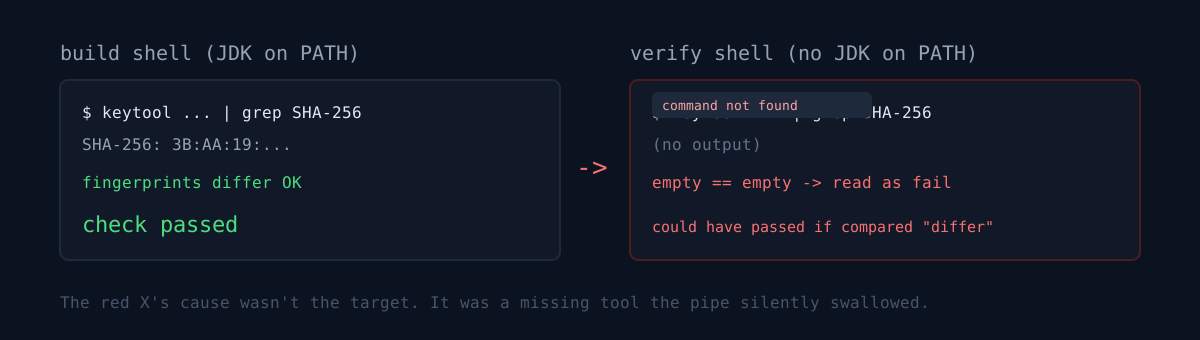
The cause wasn't the certificate — the command never ran. The build was run against a specific JDK, but verification ran in a different shell that didn't have that path. With no key tool available, it printed nothing, and since the output is piped into grep, an empty result looked like "couldn't read the fingerprint."
The dangerous part is the opposite direction. Here, empty read as a failure. But if the condition had been written if fingerprints differ, fail, two empty values are equal to each other and it would have passed. You end up in a state where verification claims success with no tool present.
I'd already hit the same trap on the version check. The standard package tool can't read the bundle format, and a guard that regexes the version out of the output silently passes when there's no match. I once had that guard in place and still uploaded an old bundle, and got rejected with "version already used."
A verifier has to be designed around what happens when it fails to check, not around what it checks.
Honestly
- I didn't see for several minutes that the build shell and the verify shell had different environments. I read "three apps, same symptom at once" as "common cause = a problem with the targets." The common cause was my shell.
- Having explicitly written "fail if it can't read" into the verify script was luck this time. It's there because of a prior incident, not as a habit, and my other scripts aren't shaped that way yet.
What makes the version check actually check
- Instead of the standard package tool, it reads the plain-text manifest the same build left behind.
- It fails if that manifest is newer than the bundle — the manifest lives outside the bundle and could belong to a different build.
- And it does not pass when it can't read the value.
The signature check pulls a fingerprint from two places and compares. Each app's fingerprint should differ from the others — if they match, keys got crossed.
The shell environment is handed to the verify side too:
export JAVA_HOME=$(...)
export PATH="$JAVA_HOME/bin:$PATH"
This build: all three apps match on version code and version name, and the three signing fingerprints all differ. Build time was 2–10 minutes per app.
Three checks
- If you have a guard that decides by grepping or regexing a value out of output, does it pass or fail on zero matches? If it passes silently, a dead tool still lights the check green.
- If you pin your build to a specific runtime path, does the verification step after it inherit the same environment, or does it run bare in a different shell?
- In a comparison check like "fail if A differs from B," what happens when A and B are both empty? They're equal, so it passes.
From the same resubmit prep, there's also the two hours I burned thinking a reviewer reply was enough. That one was a wrong written procedure; this one was an empty output I misread.
Pick one guard in your pipeline that decides by scraping a value, then run it with that tool deliberately removed from PATH. If the check goes green, that guard isn't checking anything.