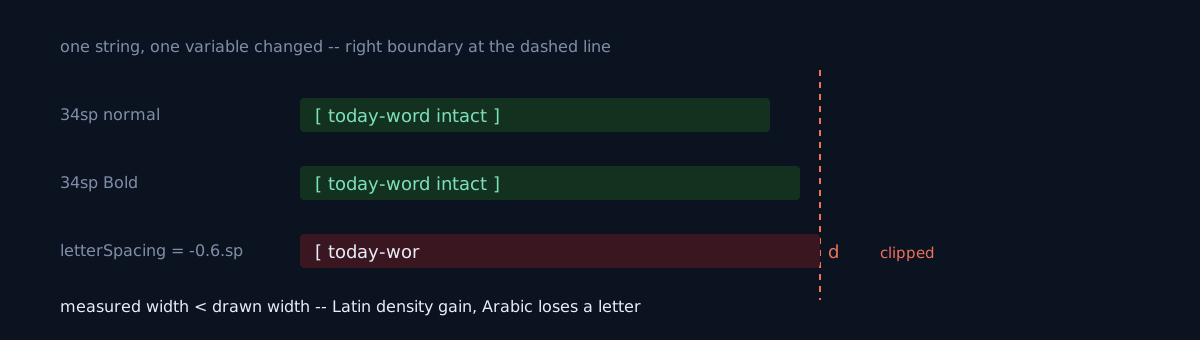
I was shooting an Android app's store screenshots per locale. The Korean, English, and Japanese cuts were fine, but only the Arabic cut had the screen title clipped. The word for "today" rendered with its last letter gone.
When you diagnose a bug as a "layout width problem," do you check whether the evidence backing that diagnosis is actually a symptom another cause produces just as well?
The first hypothesis was plausible, so I held it too long
At first it looked like a layout width problem. There was evidence — the title had wrapped to two lines, and setting maxLines = 1 made the last letter disappear. Classic overflow.
But widening it to the full card didn't change anything.
That's where I stopped guessing and built a diagnostic screen. I drew the same string three times, changing only one condition, and captured it in one image.
| Condition | Result |
|---|---|
| 34sp normal | intact |
| 34sp Bold | intact |
34sp + letterSpacing = (-0.6).sp |
clipped |
Not the font, not the weight, not the width — the tracking. A negative letter-spacing makes the measured width come out smaller than what's actually drawn, and Arabic uses wide glyphs at word ends, so the last letter gets pushed out of the layout.
Here's the reversal
That letter-spacing was a design improvement. It was a value added to tighten Latin titles a touch, and on the screens I was looking at it did look slightly better. The improvement was erasing letters in another script.
I folded it with one rule — no negative letterSpacing in typography. The tiny density gain in Latin is worth less than a letter not vanishing in one locale.
What would you do here?
The two-line wrap and the maxLines experiment keep looking like they support the width hypothesis. Do you try a few more width adjustments here? Or do you set the hypothesis down and render side by side, changing one variable at a time?
What killed the hypothesis wasn't new information — it was the negative result that widening changed nothing. The diagnostic screen was cheap, and doing it first would have been much faster.
Code, commands, numbers — same-nature problems that came out of the same capture job
- Truncating weekday abbreviations to the first two letters makes all seven Arabic weekdays the same two letters. Use
DayOfWeek.getDisplayName(TextStyle.NARROW, locale). DateFormatSymbols.getInstance()andLocale.getDefault()look at the JVM default locale. If the screen is being drawn in a different locale, that part stays English. Pull the locale out of the composition's configuration.- Layout direction comes from the activity configuration. Swapping only the locale in a capture harness doesn't engage RTL — you have to pass the layout direction along too.
- When compositing a caption into an image, forcing a single font makes Arabic and Hindi render as tofu (□□□). Use per-script fonts plus a proper text-layout engine, and treat a missing glyph as a failure.
- I didn't confirm the internal implementation of why measured width and rendered width diverge. This post covers the observed behavior and the workaround, no further.
Three self-checks
- Does your typography have a negative
letterSpacing(or negative tracking)? Have you ever rendered that value in an RTL locale and a connected script? - Do you look at per-locale screenshots with your eyes, or only at the Korean/English cuts while the rest get subtitles laid on top? This defect is invisible if you only look at Latin locales.
- Is the evidence that seems to support your bug hypothesis a symptom another cause produces just as well? Putting one variable side by side splits it immediately.
The honest part
The first hypothesis was plausible, so I held it too long. The two-line wrap and the maxLines experiment kept looking like they supported the width hypothesis, and I have no excuse for why I reached for "render side by side, one variable changed" last. That this defect is invisible if you only look at Latin locales is both the nature of the bug and the reason you have to look at per-locale cuts with your eyes.
The earlier case of a locale pipeline quietly looking at only one side is The Japanese screenshots already existed — the pipeline just never asked.
Do one thing now: render one of your app's screen titles in an Arabic (or Hindi) locale and check whether the last letter is intact.