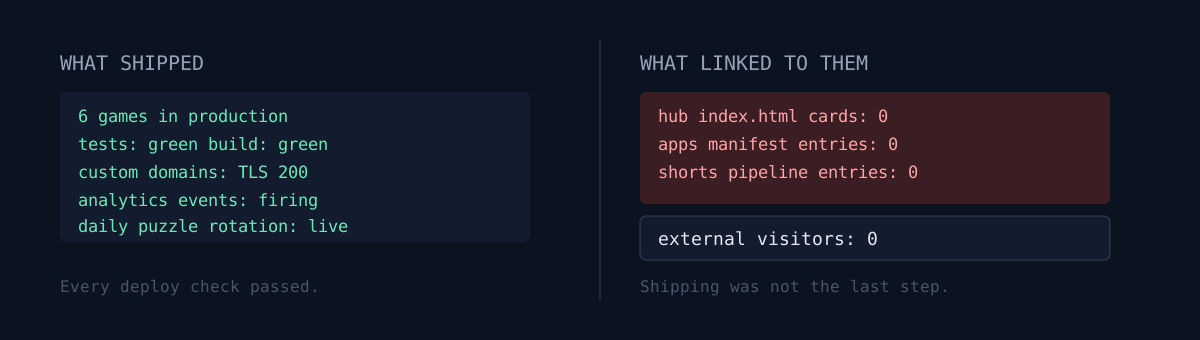
I run a portfolio of small web apps. Over two days I took six browser games from scratch to production: two daily puzzles, two arcade games, one rhythm game, one quiz.
Every launch check was green. Typecheck passed, unit tests passed, build passed, custom domains served SSL with a 200, no horizontal scroll at 390px, no console errors, and I watched all four analytics events land in the database from the live URL.
The next day I counted external visitors. Zero.
One question before the rest of this post: how many pages currently link to the last thing you shipped? I had never counted that number.
Scratch to production, the steps I actually ran
Here is what I did, per game.
- Copy an existing game repo as a template (config, analytics, event API, storage helpers).
- Write the content generator and the judging logic.
- Write a pure function plus tests that enforce the rules.
- Build the UI, mobile portrait first.
- Local build, then actually play one full round in a browser.
- Create the cloud project, set env vars, deploy to production.
- Attach the custom domain, add the DNS A record, wait for SSL.
- Confirm all four analytics events land from the live URL.
That is what I had been calling "launched." All eight steps passed, for all six games.
Three real gotchas
These are the things that actually cost me time. All reproducible, and none of them caught by a green build.
1. You have to deploy again after attaching the domain
I added the domain to the project and set the DNS. dig resolved correctly, domain verification returned ok. But curl https://... kept returning 000, and the certificate command only returned Response Error.
The cause was simple. Adding a domain to a project does not alias your existing deployment. You have to run one more production deploy after attaching the domain. That is when Aliased shows up, and that is when certificate issuance actually starts.
The symptom looked like an SSL problem, so I kept digging into certificates. It was a deployment alias problem.
2. In SVG, only your vertical and horizontal lines disappear
One of the games is drawn in pure SVG. It is a board of dots and lines, and traced lines are highlighted with a gradient and a glow filter.
When I played it, some highlighted lines were simply not on screen. Diagonals were fine. I opened the DOM: the elements existed, the class was right, the computed stroke was correct. They just did not render.
The cause is the SVG default coordinate system.
<linearGradient>  default gradientUnits = "objectBoundingBox"
<filter>          default filterUnits   = "objectBoundingBox"
An axis-aligned line has zero width or zero height in its bounding box. A vertical line has zero width, a horizontal line has zero height. That makes the gradient and the filter region collapse to nothing, and the stroke does not render at all. Diagonals have a healthy bounding box, so they look perfect.
The fix is to switch both to userSpaceOnUse and give the region in viewBox coordinates.
<linearGradient gradientUnits="userSpaceOnUse" x1="0" y1="0" x2="100" y2="124">
<filter filterUnits="userSpaceOnUse" x="-10" y="-10" width="120" height="144">
This one is dangerous because you cannot catch it by reviewing diagonals. A quick glance at a screenshot reads as "hm, fewer lines than I expected." If you draw grid-based boards, add an explicit QA item: are highlighted vertical and horizontal lines visible?
3. Procedurally generated puzzles should not ship on "it'll probably be solvable"
One of the games is a one-stroke puzzle: trace every line exactly once.
Generating a random board and checking solvability afterwards is risky. Sooner or later a player gets a board that cannot be finished.
So I inverted the order. Draw the solution first, then publish its trace as the puzzle. Walk a grid without ever reusing an edge, and that walk is by definition a valid path. The board is not "solvable because I designed it well." It is solvable structurally.
Then the code verifies the claim again. A test runs 120 days x 5 stages = 600 boards through a real solver. The deploy script runs that test first, so an unsolvable board cannot reach production.
What would you do here? Trust the generator and hand-solve a few samples, or make exhaustive verification a deploy gate? I picked the first option once before, and what I described did not match what the code did.
And the visitor count was zero
With five games past all eight steps (the sixth went up the next day), I queried the events table the following day.
185 events total. But when I counted sources, every one was either a QA session of mine (qa-live, qa-smoke, qa-mobile) or a direct hit with no source. Distinct device tokens per app: 8 to 16. That matches the number of my own devices and QA browser sessions exactly.
Not one outside person.
The usual next thoughts are: is the game boring? is my SEO weak? should I wait more than a day?
All wrong. Two greps answered it.
$ grep -c 'class="card"' ~/hub/index.html
34
$ grep -cE 'neko|meme|choseong|relicrun|starswarm' ~/hub/index.html
0
The portal hub had 34 cards, and zero of them were games.
I checked further:
- App manifest: zero game entries.
- Short-form auto-posting pipeline: its source was a single mobile-app directory file. Web games were never in scope.
So the five games were alive in production, and no page on the internet linked to them. The only person who knew the domains was me. Zero traffic was not a mystery. It was arithmetic.
Deploying was not the last step
What makes this failure mode nasty is that it passes every automated check.
The build passes. The tests pass. The domain returns 200. Analytics land. The deploy log is green. Not one command failed. And the product is unreachable.
The eight steps I called "launch" were really "build complete." The real launch checklist needed more:
- Add cards to the hub/portal index, per locale.
- Regenerate the app manifest.
- Register in the admin metrics dashboard and redeploy it.
- Add to the source list of every distribution pipeline (newsletter, social automation, and so on).
- Confirm the link actually renders on the live page.
Step 13 is separate for a reason. I added the cards, deployed, opened the live page, and still saw the old card count. CDN edge cache. Grep the file on the server and the new card is there; open the bare URL and it is not. A cache-buster query returns the new page. There is one more gap between "I deployed it" and "a user sees it."
One more thing about locales
While adding cards I made one deliberate call: games with Korean-only UI went into the Korean hub only.
Putting Korean-only games on the English and Japanese hubs would raise the card count. It would also send anyone who clicks to a screen they cannot read. I have advertised a Japanese path before while having no Japanese content, and I generated a pile of dead links doing it. Card count is a vanity metric. Count reachable links instead.
So exactly one game with English UI went into all four locales, and the rest went into the Korean hub only.
The seven games in question
Writing a whole post about games without linking to them would repeat the exact mistake, so here they are. All free, no install, no login.
- Daily One Stroke — trace every line exactly once. This is the game with the SVG gotcha and the solution-first generator described above.
- Daily Gori — find the four words out of sixteen that share a category.
- Choseong Dungeon — guess words from Korean initial consonants across five floors.
- Meme Detective — identify the meme from daily clues.
- Relic Run — a daily arcade runner.
- Star Swarm — a 75-second formation shooter.
- ROPE SYNC — rhythm jump rope. The only one with English UI, which is why it is the only one I put in all four locale hubs.
The first four need Korean words and trivia. The last three barely need language at all.
Three self-checks
Things you can verify in your own project right now.
- Run the grep. Search your homepage, portal, or index file for the name or domain of the last thing you shipped. If it returns zero, that product is not launched yet.
- Open the input file of your distribution pipeline. If an auto-poster or newsletter reads a list, is your new product actually in that list? Check the source path yourself. "It surely picks it up" is exactly where I was wrong.
- Subtract yourself from your analytics. My first filter nearly counted 46 of my own QA sessions as external users. Launch-day traffic is entirely your own. Move the baseline to the day after launch, and exclude any device token that ever appeared with a QA source. Otherwise the gate deceives itself.
The honest part
Even with the wiring finished, external visitors are still zero. Adding links does not summon people. The hub itself gets very little search traffic, so this fix did not create traffic. It made traffic possible, which is a smaller claim.
So I set a decision date. In two weeks I count external daily visitors across all seven games, and if the total is under the threshold, I stop building new games. The report runs weekly on its own, and when collection fails it records collection failed instead of writing a zero. I have already been burned by a pipeline where every job was green.
The lesson is not "don't build games." It is that building a product and building a path to the product are different skills, and I believed I was doing the second one. Green deploy logs kept that belief alive for a long time.
Run that grep on your own project. If anything returns zero, that is the cheapest thing you will fix today. I would like to hear what it returned.