I set out to fix the discovery settings on ten channels in one pass. Six of them had the exact same title — competing with each other in search, carrying zero topical words.
I wrote a script that pushed titles, descriptions and keywords in one go. Every call passed. Ten success lines in the console.
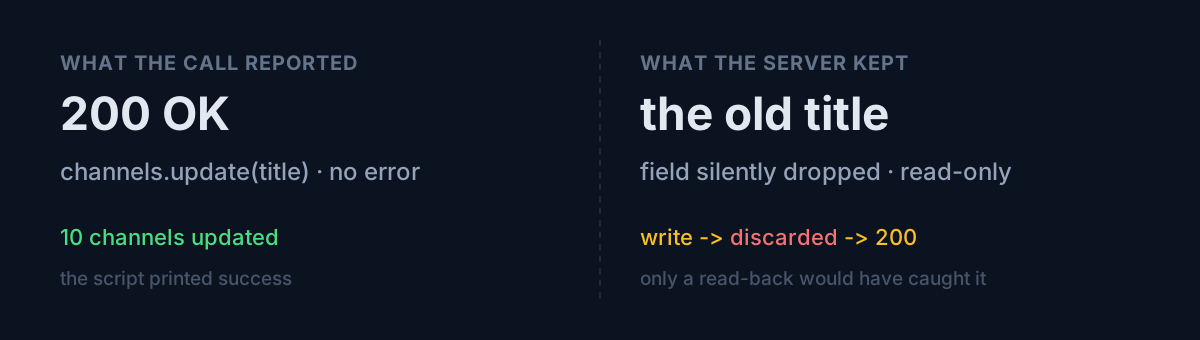
Then I read the values back. Not one title had changed.
A question for you: does your automation read back after it writes, or does it move on because nothing threw? I was the second kind. That habit cost me five stumbles in a single day — and, luckily, all five were caught the same way.
1. Writes get silently discarded
The platform's channel-update API has a title field. Send a value and you get no 400, no 403, no warning. You get 200. The server treats that field as read-only and quietly drops it. Title changes have to be made by a human in the web studio.
The absence of an error is the worst part. From the script's point of view this is indistinguishable from success. Only one thing caught it:
write → read back → compare against the expected string → print a human to-do on mismatchThe script no longer tries to set titles. It prints the string to paste and a human types it into the console. Automation that admits what it can't do beats automation that pretends.
A bonus finding: after the human pass I ran the read-back again, and only nine of ten matched. One title had a leading space. A paste accident. Your manual steps need read-back too.
2. Some fields must travel alone
Titles, descriptions and keywords live in the branding-settings block; per-locale translations live in the localizations block. Send both in one request and you get:
400 'branding_settings cannot be used with other parts'Two fields on the same resource that cannot ride in the same request. Splitting the call fixes it, but skimming the docs would never have predicted it.
3. The translation beats the original
This was the real trap. If a channel has a localized title registered for a language, viewers in that language see the translation. Fix only the original and leave the localized value alone, and your primary audience never sees the new title — ever.
You can't catch this by eyeballing the admin UI, because the UI shows you the original. It only surfaced once I extended the read-back check to the localization fields.
4. Your renderer doesn't know all of CSS
The same day I touched the share-image (OG) generator. Cards get rotated 180 degrees when reversed:
transform: reversed ? 'rotate(180deg)' : 'none'An ordinary ternary. I deployed, checked, and found reversed cards fine and every upright card returning 500:
Unexpected token type: word
in CSS rule `transform: none`. Only absolute lengths such as `10px` are supported.
The image renderer can't parse transform: none. In a browser it's the do-nothing default; here it throws. The fix isn't a different value — it's omitting the property entirely:
...(reversed ? { transform: 'rotate(180deg)' } : {})The scary part is elsewhere. I missed this initially because I only tested the reversed card. Test one side of a branch and your users test the other. In this case "the other side" was the majority of all share images.
5. I assumed a metric that doesn't exist
Pulling channel performance, I asked for impressions and click-through rate:
Unknown identifier (impressions) given in field parameters.metrics.The analytics API has no impressions metric at all. It exists only in the web dashboard. Which means automation cannot distinguish "shown but not clicked" from "never shown." That's not a bug, it's a boundary — and knowing it changes how you design the diagnosis.
What would you do?
Here's the question I'd put to you. When you write automation that calls a write API, adding read-back verification usually costs three lines and one request. Do you add the three lines, or do you take "no exception" as proof?
Until this day I didn't add them. And in one day I hit five silent failures, four of which threw nothing at all. Only the second one (the part restriction) announced itself. The rest were all of the "succeeded, changed nothing" variety.
Three things to check
- Do you read back and compare after writing? Third-party APIs will not tell you when a field has been demoted to read-only.
- Have you executed both sides of your branches? Check one and your users check the other.
- Are your manual steps inside the verification loop? One paste is all it takes to add a leading space.
The honest part
Nothing I changed that day is likely to move the numbers much. Channel keywords and descriptions nudge click-through, and I confirmed with data in another post that my bottleneck sits further down the funnel.
What the day did leave me is this: most of my automation was treating "the request was sent" as "the value changed." Without that one read-back line, believing your settings applied is just belief.
In a similar vein, the time a search command died silently and I read it as "no results" is in 63% of My App Traffic Came From the Channel I Wasn't Pushing.
You almost certainly have one running job that writes without reading back. Care to check just that one today?