Naming the tool: this is observed with Claude Code (as of 2026-08) and the skillset auto-loaded on top of it (the brainstorming/planning family). It's a structural observation, not a knock, and it's only useful if the tool is named. Behavior may differ in later versions.
I autonomously delegated several mechanical tasks to a CLI agent. All steps were predetermined and required no judgment, so I wrote the to-dos in order in the prompt and handed them over.
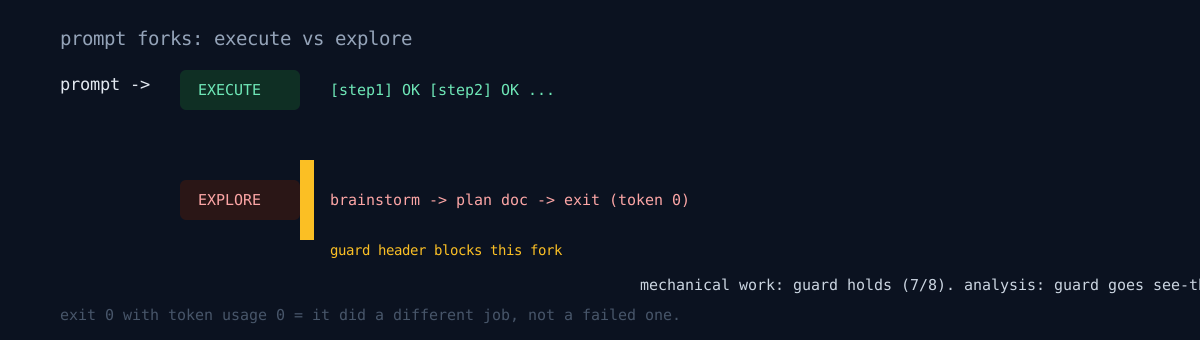
Instead of working, the agent tried to open a web browser mockup. On another attempt it wrote a plan document and exited. Not one line of the instructed work ran.
It hadn't failed — it was doing a different job
A skillset was auto-loading in the agent environment. The moment the prompt reads like "build something," a brainstorm → write-a-plan chain triggers, and the agent faithfully follows it. Writing a plan instead of doing the work is the correct behavior at that point.
So the agent hadn't failed — it was doing a different job. This kind of failure doesn't error. The exit code is 0. You only learn "this isn't what I asked for" by opening the output.
The fix was a guard header at the top of the prompt that states the execution mode:
# Execution mode — strict mechanical, no skill detours

You are running as a non-interactive autonomous agent.

Do NOT:
- Load brainstorming / planning / skill-discovery skills
- Offer a "visual companion" or web browser preview
- Ask the user clarifying questions
- Switch to plan mode or write a separate plan document — the plan is below

Do:
- Execute the steps below in order
- Print one line per completed step: `[step N] OK <evidence>`
- On unrecoverable failure: `[step N] HALT <reason>` and stop
With this, I batched 8 tasks and 7 completed autonomously in 14 steps immediately. The remaining 1 HALTed on a separate image-processing bug — a normal failure unrelated to the guard.
Avoiding trigger words in the prompt mattered too. Phrases like "explore alternatives" or "propose approaches" are themselves brainstorming entry points. You have to state in words that the task is mechanical and the steps are pre-prescribed.
But there's a domain the guard doesn't reach
The guard works for mechanical execution. It was useless for analysis or review work.
On a read-only task to find logical holes in a plan document — even with the guard header, lowered reasoning effort, and redirected input — the agent just echoed the skill-document body to stdout and never reached the reasoning step. Three attempts, three times the same pattern: exit code 0 but token usage 0.
The reason is clear. Mechanical tasks have explicit steps, so there's no room for brainstorming to enter. But analysis work is inherently "exploration," so the skillset recognizes it as its own domain. To block that via the prompt you'd have to deny the very nature of the task, and then you don't get the result you wanted either.
| task nature | guard effect | why |
|---|---|---|
| mechanical execution, steps pre-prescribed | works | no exploration entry point |
| analysis / review / hole-finding | useless | the task itself is exploration |
Honestly
- The analysis-work guard failed, and the alternatives are just workarounds. Forcing the output format to an extreme (N one-line findings, max), limiting the files and lines to read, and assuming the guard fails so you prepare cross-verification on another path — none of the three is a root fix.
- There's no setting to turn off the skill loader in a config file. It needs a tool-side change, and there's nothing to do but wait.
- "Added a guard, got 7/8" is not a controlled comparison. There's no control group running the same 8 without the guard. All I have is the observation that the first attempt was hijacked and it ran normally after adding the guard.
- I don't know why exit code 0 comes with token usage 0. Something seems to cut off at the step that prints the skill document, but I couldn't confirm it.
An auto-loaded skillset is mostly helpful in interactive sessions — other posts on this devlog benefited from that discipline. The problem is that in non-interactive delegation the default works in reverse. If you run autonomous delegation and the result is "a plan," before blaming the agent, ask: does that prompt read as "build it," or "run it?"