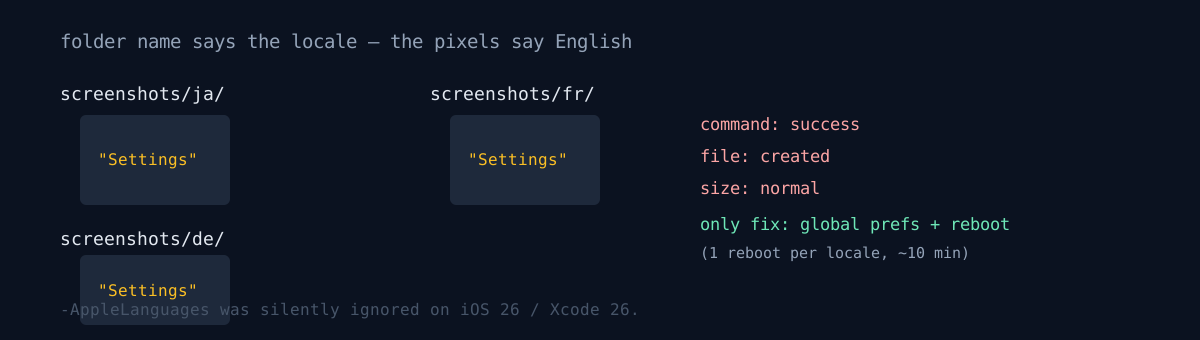
I auto-capture App Store screenshots in 16 locales. The standard way is to pass the language as a launch argument:
xcrun simctl launch "$UDID" "$BID" -AppleLanguages "(ja)" -AppleLocale "ja_JP"This broke on the iOS 26 simulator. The app doesn't come up in that language.
The failure is silent
The command succeeds, the app launches, the screenshot is taken. It just renders in the simulator's current language, or a lagging previous one.
The result comes out in the worst possible shape — the folder is named ja but the image inside is English or the previous locale's language. Structurally it's perfectly normal, so you only know it's wrong by opening it. Run 16 locales and most come out in the wrong language.
This worked through the iOS 1.0/1.1 era. It regressed on iOS 26 / Xcode 26. So a pipeline that ran fine for years quietly started producing wrong results one day.
The only reliable method was to write global prefs and reboot.
xcrun simctl spawn "$UDID" defaults write -g AppleLanguages -array "$lang"
xcrun simctl spawn "$UDID" defaults write -g AppleLocale -string "$region"
xcrun simctl shutdown "$UDID"; sleep 2; xcrun simctl boot "$UDID"; sleep 6
xcrun simctl launch "$UDID" "$BID" -SCREENSHOT_MODE   # no language argument
One reboot per locale, ~10 minutes for 16. Slow, but this gives correct results.
The size gate can't catch this
Switching to reboots created a new failure mode. It races the first launch right after reboot, so capturing before the app foregrounds gets a black screen (~70KB) or the home springboard (~3,700KB, large because of the wallpaper). I worked around it with a file-size gate and retry — a normal app screen is roughly 120KB–1,500KB.
black screen   ≈   70KB
normal screen  ≈  120KB – 1,500KB
home springboard ≈ 3,700KB
→ out of range: relaunch + recapture, growing sleep on retry
But the size gate isn't a root fix. It only catches things whose size is clearly out of range, like a black screen or springboard. "An app screen in the wrong language" has a normal size, so it can't catch it. Meaning the pipeline's original problem is undetectable by the size gate. You end up needing a human-eyes step — the exact same conclusion as the sister post a paywall got captured in the screenshots. An auto-capture's output can't be auto-verified; full visual QA is the only safety net.
App in this story: Resolv.
Honestly
nohup ... &background runs died early right after builds, so I run in foreground and chunk locales in eights to dodge timeouts. Didn't dig the cause; worked around it with chunking.- I don't know why the launch argument is ignored. It looks like an Apple-side regression but I had no way to confirm, and it might work again in the next Xcode. In that case this method stays needlessly slow.
- The size gate catches the reboot's side effect (black/springboard), not the original problem (wrong language). It's easy to fool yourself into thinking one tool handles both.
If a pipeline that ran fine for years keeps reporting "command success + file created + normal size" while the results are wrong, the platform may have quietly regressed. Your automated output — when did you last open it with your eyes?