I was designing a feature that turns a territory you walked into an eight-second video you can share. It has to work on iOS, Android and the web.
The textbook answer is obvious: use each platform's native encoder.
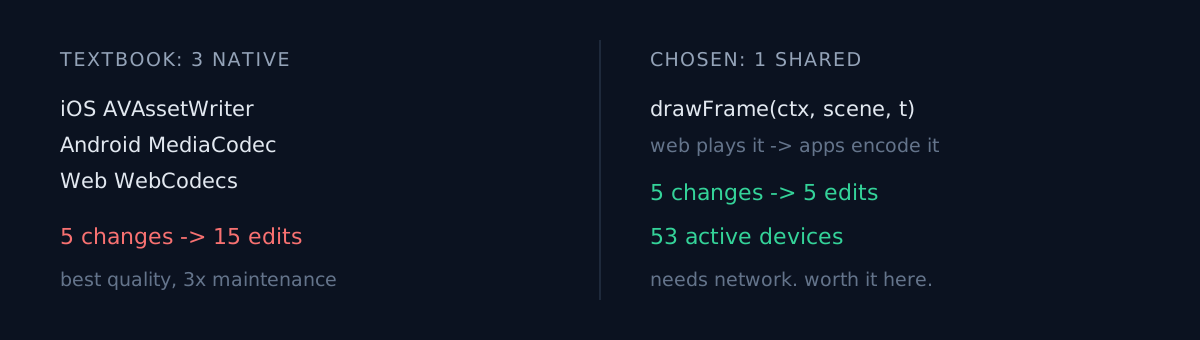
iOS       AVAssetWriter
Android   MediaCodec
Web       WebCodecs
Best quality, works offline, fastest. Ask any reviewer and they'll tell you this is correct.
I didn't do it. The reason wasn't technical.
One number
This app has 53 active Android devices.
Hold that number up and three native renderers means this: every one-line change to the choreography is fixed three times and verified three times. Three sets of encoder gotchas. Want the camera easing 0.2s earlier? Open Swift, Kotlin and TypeScript.
At 53 devices that maintenance is never repaid. Not by slightly better quality.
When did you last put user count into an architecture decision as an actual variable?
What I chose instead
One implementation of the choreography, on the web only. The apps load that page in an offscreen WebView and collect the mp4 it produces.
lib/reel/draw.ts     drawFrame(ctx, scene, t)  ← pure function
  ├─ landing page     requestAnimationFrame feeds it live t
  └─ /render shell    feeds it t in fixed 1/30s steps → deterministic encode
The same function plays on the web and encodes in the apps. Fixing the choreography lands on all three platforms at once, with a single web deploy.
There was a second effect I hadn't planned for. The landing page and the shared video come out of the same code, so they cannot disagree. A link preview showing something different from the video is now structurally impossible.
The assumption that could have killed it
Everything hung on one thing: does WebCodecs actually work inside an embedded WebView?
Safari 17+ and Chrome 94+ support it. But WKWebView is not Safari and Android WebView is not Chrome. Documentation doesn't settle it.
So before writing any code I spent half a day on a spike: actually encode ten canvas frames as H.264.
| Target | VideoEncoder | isConfigSupported | Result |
|---|---|---|---|
| iOS WKWebView | true | true | 10 chunks / 39,594 B |
| Android WebView 145 | true | true | 10 chunks / 55,433 B |
Android passed on an emulator with no hardware encoder, falling back to software. That's the worst case clearing the bar.
A single false there and the whole structure was dead. Which is why this came before the design doc, not after.
It cost something
Not free. Honestly:
- It needs the network. The apps load a remote page, so there's no video offline (it falls back to a still card).
- A web deploy can break older app builds. The payload carries a version and the renderer fails fast on one it doesn't know.
- Debugging is one step further away. A web page running inside an app scatters logs across two processes.
And it bit me. The bridge called postMessage detached from its receiver and WKWebView refused it silently. A WebView outside the view hierarchy never got a content process, producing an error that looks nothing like a page error. Neither would exist with three native renderers.
I'd still choose it
The numbers answer it. I changed the choreography five times during this work — colour contrast, the opening hook, map brightness, watermark position, a duplicated counter. Three native renderers makes that fifteen. And two of those five were only found by looking at rendered frames, so three copies would each have needed their own discovery.
Three things to check
- Would you pick that architecture for 100 users? The textbook answer assumes a scale. Check whether that assumption is true for you.
- How many places does one fix touch? That number is your future velocity. Maintenance cost is not feature count — it's changes × duplicated implementations.
- Is there an unverified assumption the whole structure rests on? Spend half a day measuring it before the design doc. Once the doc is written it gets expensive to walk back.
The honest part
Native quality is better. Native encoding would be faster. I knew that and chose otherwise.
Following the textbook without checking your own scale is the same mistake outside the product too — the bottleneck was never the product is the same illusion in another shape.
And this isn't "we're small so we cut corners." It's that 53 is information the design needs. Had I followed the textbook without looking at it, I'd be making every choreography change three times and quietly wondering why everything felt slow.
Put your user count into the next architecture decision. Does the answer change?