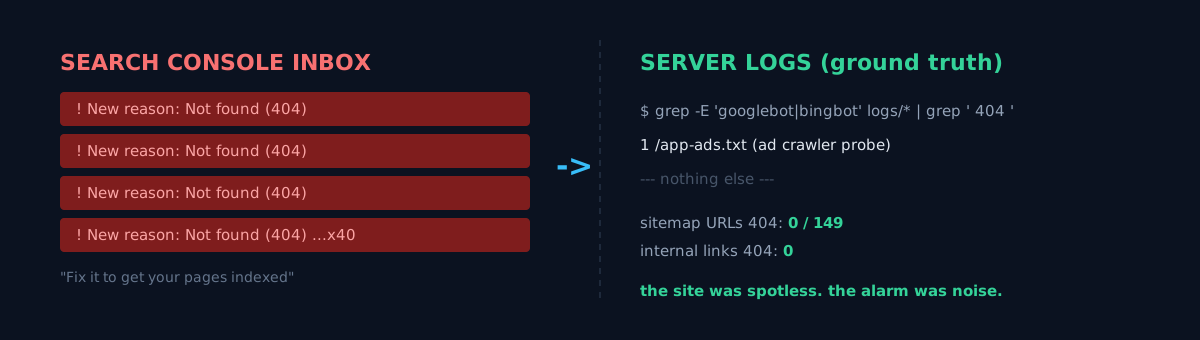
My inbox filled up with Google Search Console emails. Same subject every time: "New reason preventing your pages from being indexed — Not found (404)." Not one — they kept piling up. Each one politely nudges: "Fix it to get your pages indexed and appearing on Google."
The instinct is to reach straight for the code. Which link is broken? Is the sitemap wrong? Did a deploy get skipped?
Before any of that, I forced myself to ask one question. Does your SEO dashboard point at the real problem, or does it amplify noise? Search Console shouting "404" and my site actually serving 404s to visitors and crawlers are not the same fact. One is Google's 90-day rolling report. The other is what's happening on the server right now.
So I closed the dashboard and looked at ground truth: the server access logs.
Logs, not the dashboard
First I ruled out self-inflicted 404s. That's the only class I can fix — a page my own site links to that doesn't exist. Everything else (phantom URLs linked from outside) is beyond my code.
I connected straight to the server (reading the deployed canonical files, not fighting the Cloudflare challenge) and cross-checked exhaustively.
- All 149 sitemap URLs resolved to real files. Zero missing.
- I walked every internal link across 460 deployed HTML files. Zero broken internal links.
- Extensionless routing (
/foo→/foo.html) worked. Every canonical target returned 200.
That already answered half of it. There were no structural 404s of my making. So what exactly was Search Console shouting about?
What the search bots actually 404'd on
I pulled only the requests where a search engine bot (Googlebot, Bingbot) actually got a 404 — across every log, including all the subdomains.
grep -hiE 'googlebot|bingbot' access-logs/* | grep '" 404 'Across every single log, the result was one line.
1 /app-ads.txtThat was it. app-ads.txt is Google's ad crawler probing the root once for a mobile-app-ads authorization file. I have no mobile apps, only web ads. The file isn't needed, and the 404 is the correct "no authorized app sellers" signal. It isn't even an indexable "page," so it never shows up in the page-indexing report anyway.
So where did all the other 404s — the ones flooding Search Console — come from? The logs had every one of them.
/~sanpta5/apple_cz_2020/...,/wp/signinebay/...— vulnerability scanners hunting for Apple/eBay phishing kits and WordPress exploits. 5,980 hits in one stale log alone./@fs/..%2f..%2froot/.env,/proc/self/environ— scanners trying to steal secrets./.git/config— scanners looking for an exposed git repo./mindshift/nulland friends — a quirk of Facebook's crawler (meta-externalagent) appending an empty value to the path. There is no literalnulllink on the pages./th1s_1s_a_4o4.html— an uptime monitor deliberately hitting a fake path to check that 404 handling works.
Every one of them was an externally-manufactured phantom URL, a scanner, or a bot quirk. Search bots 404'ing on a real content URL: zero, across every property and every log.
The label that pretends there's a cheap fix
Search Console's "fix it to get indexed" pretends there's a cheap fix — as if one typo somewhere would silence the alarm. But a 404 for a page that doesn't exist is, by Google's own guidance, the correct response. Non-existent URLs should return 404, and they drop out of the report over time on their own. It's not something to fix; it's something to ignore.
I've hit this shape before: tracking a metric that looked broken, where not fixing it was the answer, and a dashboard glowing green while it was quietly lying. The flip side too — a case where it really was a 404 bug (dead localized links) — which is exactly why I don't assume "this is noise" and instead confirm with the logs. This time it was noise.
But the real bottleneck was somewhere else
There was one more twist. The moment I said "fine, let's pull Search Console's exact list and verify each one," I hit a wall.
- Search Console's 404 list is not exposed via any API. It's not in the Search Analytics API, and the URL Inspection API needs the candidate URL up front. That list lives only in the web UI.
- And my server access logs are kept for about 13 hours. No archive.
So even though I'd just confirmed "search-bot 404s = only app-ads.txt," if I want to check again tomorrow, those logs are already gone. There's no way to see them again without opening the UI. The real bottleneck wasn't the 404s — it was that I couldn't continuously see the ground truth of them.
If it were you, what would you do? Open the Search Console UI and eyeball the list by hand every time, or make the ground truth record itself?
Let the logs remember for me
I went with the latter, the cheap way: a cron job that grabs only the search-bot 404s before the logs rotate and appends them to a permanent file.
#!/usr/bin/bash
set -euo pipefail
OUT="$HOME/gsc-404-watch"; mkdir -p "$OUT"
STORE="$OUT/bot404.log"; TMP="$(mktemp)"
{ [ -f "$STORE" ] && cat "$STORE"
  grep -hiE 'googlebot|bingbot' "$HOME"/access-logs/* 2>/dev/null | grep -E '" 404 ' || true
} | sort -u > "$TMP"        # overlapping log windows collapse via full-line sort -u
mv "$TMP" "$STORE"
awk -F'"' '{split($2,r," "); print r[2]}' "$STORE" | sort | uniq -c | sort -rn > "$OUT/summary.txt"
0 */6 * * * — every 6 hours. The logs live ~13 hours, so a 6-hour interval overlaps and nothing slips through. Now, without opening the UI, one cat ~/gsc-404-watch/summary.txt gives me the accumulated list of URLs the search bots really 404'd on. Right now it's one line: app-ads.txt. The day a real 404 appears, it shows up here instantly.
No framework, no dashboard. Two greps and one cron line. That's exactly enough.
A self-check for you
If 404 alerts are piling up on your site, check three things before opening the code.
- Did you look at the Referring page? Each 404 in Search Console tells you who linked the URL. If the referrer is external or absent, it's a phantom you can't fix in code.
- Do all your sitemap URLs actually return 200? A sitemap pointing at a missing page is the one 404 that's 100% your fault. Cross-check that first.
- How long does your ground truth survive? Do you know your server log retention? If not, that's the real blind spot.
The honest part
I didn't change a single line of code in this investigation. There was nothing to fix. The output was one confirmation — "the site is clean" — and one cron line that makes the logs remember themselves. And honestly, I never did manage to pull Search Console's 90-day list automatically — that lives only in the UI, and that part is fine to leave to a human opening it for five minutes.
The lesson is simple. A dashboard screaming alarms and what's actually happening right now are two different facts. The second one almost always lives in the logs. When the dashboard shouts, open the logs before you open the code.
Run one grep on your own site right now: grep googlebot access-log | grep ' 404 '. Ask the logs, not the dashboard, what the search bots really can't find.